
Play Recent Songs Directly from iTunes Dock Icon in Mac OS X
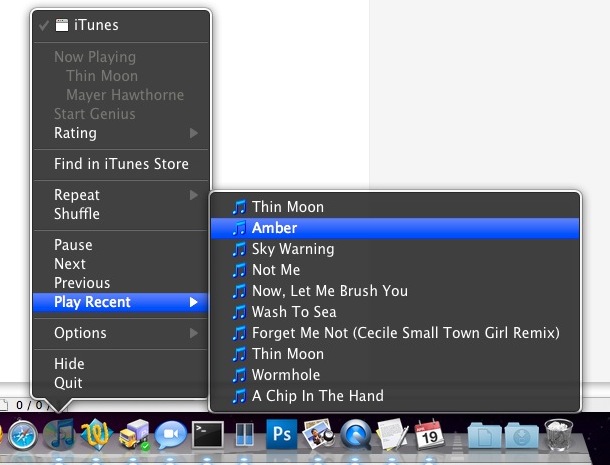
 You may have known that you can navigate around music, skip songs, go backward to prior songs, pause, and mute music, all from the iTunes Dock icon, but did you know that the iTunes dock item in OS X also includes a list of the ten most recently played songs?
To access the recent songs playlist, just right-click on the iTunes icon as it sits in the Dock, and you’ll see a “Play Recent” list with the song names that you can then select from. Choose one to start playing it immediately.
The Dock icons of OS X reveal a lot of tricks if you use the control/right click on them, so it’s worth trying it out with other apps too and you’ll likely discover some other tricks and interactions. iTunes alone is full of actions from the Dock Icon, you can even rate songs from the same menu, set shuffling, and more.






This is really useful. I’m new in the Macuniverse, so thanks for this tip.
[…] [Fonte del Tip] […]
The Mayer Hawthorne cover of Thin Moon is a great song. Back on topic, great tip I did not know this was possible.
This does not seem to work when playing music from an ipod connected to the computer.