
Compress Photos with iPhone
One of the subtle features to iOS that I find myself using really often is the ability to compress photos sent from the iPhone, typically by email. If you’ve ever emailed a picture from an iPhone you’ve probably seen the compression screen, it looks something like this:
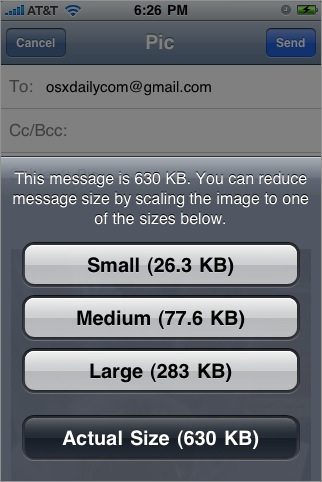
Basically iOS gives you four compression size options: Small, Medium, Large, and Actual Size. This can greatly shrink the overall size of the photo, and not only is this feature nice to make quicker work of sending pictures due to the smaller file size, but it’s also a great way to reduce iPhone data usage, which matters a lot more on those users who have tiered cellular data plans.
To access this compression feature, all you need to do is take a picture as usual with an iPhone or another iOS device (or access an existing image through the Photos app), and then go to mail the picture to someone using the sharing options. You’ll then get a pop up screen that lets you choose the appropriate compression options. This actually reduces the resolution of the image as well, so keep that in mind as it may be an undesirable side effect for some use cases. The rule of thumb is that a bigger less compressed image is going to be higher quality, thus if you want to preserve the best photo quality send it at the “Actual” size and don’t select to compress it at all.
This compression feature first debuted on the iPhone with OS 4, and then later arrived on the iPad and iPod touch. Now it’s part of iOS for every device, though it looks slightly different in iOS 7 and newer versions of the mobile operating system.





