
Get Emoji Icons on Older iPhone & iPad with Emoji Free App
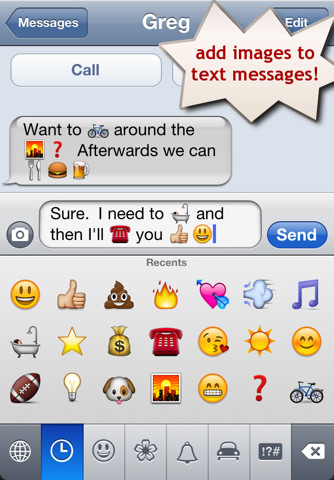 While new iPhone and iPads have the Emoji keyboard built in to iOS and ready to be enabled, older devices may not. But if your iPhone, iPad, or iPod touch does not have the Emoji keyboard available because it’s running an older version of iOS (like iOS 5 or older), you can still use Emojicons by downloading an app that offers the same Emoji keyboard.
Yes, older iPhones need to download an app to get emoji, but this app works for older models that do not support that native emoticon character set.
Old-model iPhone and ipad owners, do not worry, you can still use the popular emoji icons on older iPhone models without a jailbreak thanks to a free app available at the app store. We’ll show you what to do, it’s easy.
Get Emoji Characters on Older iPhone & iPad with Emoji Free
Aptly named Emoji Free, this is very simple to setup, all you need to do is download the app and then enable the new emoji keyboard:
- Download the Emoji Free app on your older model device
- Tap on Settings
- Select ‘General’
- Tap on ‘Keyboard’
- Select “International Keyboard”
- Select “Add New Keyboard”
- Tap on “Emoji”
- Reboot your iPhone by turning it on and off
Because the keyboard is unicode, the characters will come through on new devices, they don’t need the same app. Cool huh?
You can then use the emoji icons within text messages, emails, and Notes. The recipient of your emoji styled messages does not need to have the app installed, but to see the emoji they do have to use another iPhone, iPod touch, or iPad.
Emoji emoticons are extremely popular in Japan and are part of their keyboard sets by default. The popularity of emoji has been spreading around the world so it’s not unlikely that future versions of iOS will feature an optional emoji icon keyboard. In the meantime, Emoji Free works with iOS 3 and later.






Anyone here in 2021
[…] This is a change from past iOS releases where you would either need to jailbreak or install a 3rd party application in order to use Emoji from the iPhone, iPod touch, or iOS in […]
This App didn’t work for me.
I searched in the web and found this App ===> SMS Smileys
This works fine and I have now the emoji keyboard on my iPhone 4
[…] can write whatever you want, change the colors, and using emoji you can project graphics too. The only real requirement (other than the app) is a digital camera […]
No Emoji kb shown on my UK (bought SIM free from Apple store) iPhone 4 with software 4.0.1