
How to Quit Multitask Apps on the iPhone in iOS 6
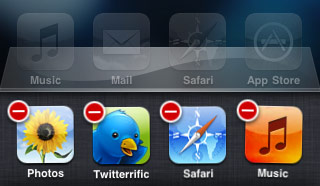 With the release of iOS 4 continuing on through iOS 6, a new multitasking ability was brought to iOS and the iPhone, iPad, and iPod touch.
Basically, multitasking means you can run multiple applications at the same time, which is a standard feature of modern desktop operating systems, and that feature is now ubiquitous in the mobile world as well.
On the other side, running multiple applications at the same time on any device means you may want to quit those applications that are now running in the background, say if you aren’t using them any longer, or if you want to free up some system resources for something else (technically, iOS is supposed to be smart enough to do that on it’s own, but nothing is perfect)…
Quitting Multitasking Apps on iOS 4, iOS 5, iOS 6 with the iPhone
- Double-click the Home button to bring up the multitask manager
- Tap and hold on any application to make them start to jiggle and for a red (-) icon to appear on their corner
- Tap the red button to quit that application
If you are skilled with multitouch, you can actually quit multiple apps at the same time by simultaneously pressing on every one of the red close buttons.
The multitask bar serves as an iOS app task manager of sorts, though it’s much more limited than what you’d expect on the desktop side of things.
This ability to quit the apps from the background is kind of inappropriately hidden to the average user for no clear reason. I’ve had to show people how to use this feature a few times so hopefully it’s use is clarified a bit in future versions of iOS, even if iOS is smart enough to pull resources back from apps on it’s own. [multitasking picture borrowed from The Graphic Mac]
Do note that modern versions of iOS can still quit multitasking apps, you can learn how to exit out of running apps in iOS 7 and 8 here with the assistance of a swipe up gesture from the multitask panel.






[…] shown before and after are so different that users will have to get used to completely different interaction, […]
[…] is obviously just like the standard method of quitting an app in iOS but multitouch makes closing groups of apps faster than […]
But should you quit all apps that are running in the background? I thought that the list you see are all RECENT apps, not just all RUNNING apps.
When I cleared the entire list, I had to setup my visual voicemail again, for example. Makes me think that some apps are meant to be running in the background all the time.
How about, say, Facebook? When you close that, will you still get push notifications?
Facebook has had push since before iOS4 was even released, so yes. Push is independent of the multitasking process.
Anyway, what most people don’t seem to realize is that closing apps in the background simply isn’t necessary, they’re stored in the RAM so they don’t use any CPU, nor do they waste battery life. If the iPhone/iPod runs low on RAM it’ll automatically close the last app in the menu.
[…] Fuente. Tambien te puede interesar(Rumor) Posiblemente el iPad de Apple tendra camaraNuevo teclado que cambia el modo de uso del iPhoneSaber rapidamente que version de Windows tienes o estas usandoComo evitar una sorpresa no deseada en TwitterBy Blogsdna […]
It’s hidden because Steve Jobs said so: “In multitasking, if you see a task manager… they blew it. Users shouldn’t ever have to think about it.” Who are you to question his wisdom? :)
http://www.engadget.com/2010/04/08/jobs-if-you-see-a-stylus-or-a-task-manager-they-blew-it/