
Mute the Volume Adjustment Quack Sound on a Mac
 You can mute the quack sound that your Mac makes when adjusting audio levels by adjusting a system preference setting. Yes, that means you can completely turn it off and stop the little quack / pop sound from happening anytime the volume changes. Here is what you will want to do in OS X:
- Open “System Preferences” from the Apple menu
- Click on the “Sound” preference panel
- Uncheck the box next to “Play feedback when volume is changed”
- Exit out of System Preferences
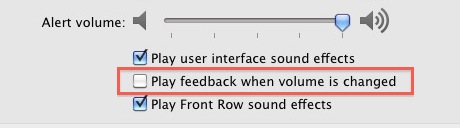
The change is instant, and now your Mac will be silent when adjusting the volume level with the keyboard controls. Go ahead and try it out by hitting the F10, F11, or F12 volume adjustment keys to see, or rather hear, the difference.
This is a good feature to disable if you’re often in quiet places like a library. If you spend a lot of time in quiet areas, you can also mute your Mac startup sound.
If you want to regain the popping / quacking sound indicator when volume level changes, just go back into the Sound preference panel and re-enable the checkbox alongside “Play feedback when volume is changed”. Note this setting is turned on by default in Mac OS X.






Thank you.
You Rock Thanks, that sound speaks to wake my kids when I try to lower the volume of a really loud video.
[…] [via OS X Daily] […]
You can also hold shift & alt whilst pressing the volume keys for finer control over the volume level.
You can also hold shift while you use the volume keys, to mute the quack temporarily
You can also hold shift while changing the volume to temporarily disable the quack sound.