
Hide and Show the Dock in Mac OS X
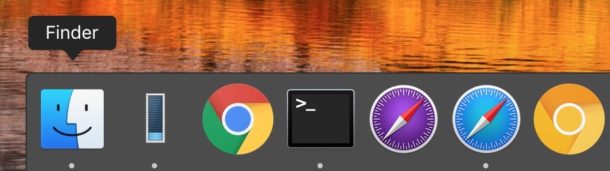
The Dock is one of those staple features of Mac OS X, containing all running apps and also serving as a quick launch bar for opening applications and managing multitasking. The Dock is popular and intuitive enough for it to be a core user interface element beyond the Mac, included as a major component in iOS and other OS’s too.
A simple trick to improve Dock functionality is hide it when the Dock is not actively in use. When the automatically hide feature is on, the Dock only shows itself when a cursor is placed over the region of the Mac screen where the Dock is displayed. This is easy to configure, either with a keyboard shortcut or by visiting the Mac OS X system preference settings, let’s get to it cover both.
How to Hide and Show the Dock with a Keyboard Shortcut
If you hit Command+Option+D it will automatically hide or show the Dock in Mac OS X. If you choose to hide it this way, it will reappear back if you hover over the region that you have your Dock placed with the mouse cursor.

The keyboard shortcut effectively toggles the auto-hide feature on or off without going into the System Preferences, which we’ll cover next:
How to Automatically Hide the Dock When Not in Use on Mac
You can set the Dock to automatically hide itself when it’s not being used by either hitting the key shortcut as mentioned above, or by enabling the option in the Dock Preference panel. For most Mac users, the System Preferences method is preferred:
- Open System Preferences from the Apple menu and choose “Dock”
- Check the box for “Automatically hide and show the Dock” by clicking the checkbox next to it
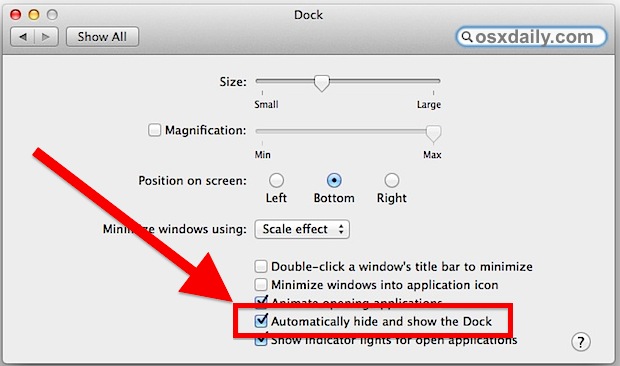
If the setting is checked, the Dock will hide and show itself automatically when the cursor is near the bottom of the screen.
If the setting is unchecked, the Dock will always be visible at the bottom of the Mac screen.
The setting exists in all versions of Mac OS X whether they are new or old, but you may find the toggle in System Preferences looks very slightly different in past versions of Mac OS X, mostly because there are less options available to customize the Dock experience in general:

Showing the Dock When It’s Hidden, and Hiding The Dock When It’s Visible
When this box is checked, the dock will automatically hide itself when it’s not in use.
To make the Dock appear, simply hover the mouse cursor over the bottom of the screen.
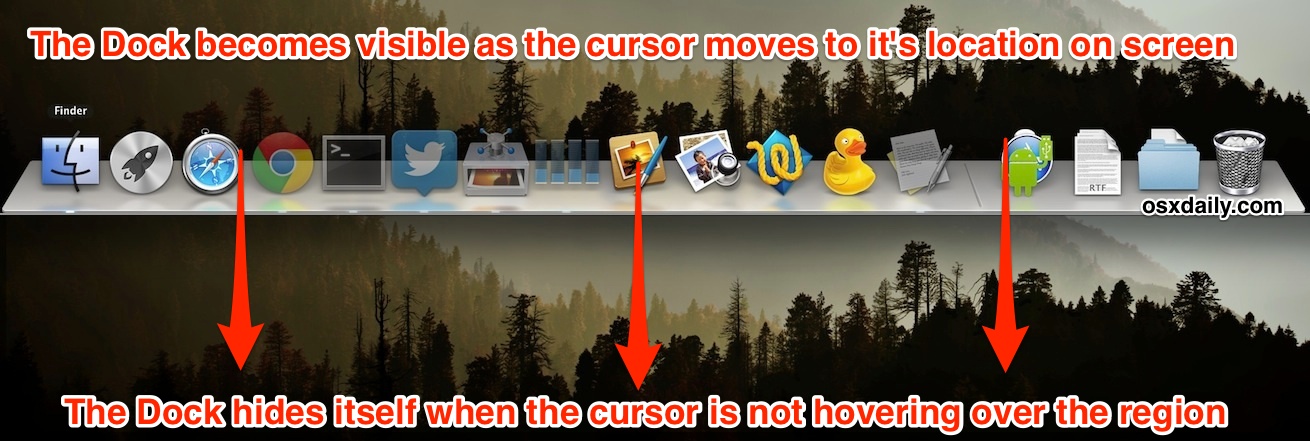
To make the Dock disappear again, simply move the cursor away from the bottom of the Mac screen. Easy!
This is an underused but great feature that preserves screen real estate, making it particularly valuable for Mac users with smaller displays, like the MacBook Air and MacBook Pro.
Why Auto-Hide the Dock?
Whether you auto-hide the Dock or not is a matter of personal preference, but if you like to maximize your screen space you may like the feature.

I use the Dock constantly, combined with Spotlight it’s how I launch applications on my Mac. However, I find that having the Dock automatically hide itself when not in use saves me a fair amount of screen real estate on my MacBook Pro 13″ and this is particularly valuable with maximized applications and web browsing.
Modern versions of Mac OS X will see the Dock automatically hide itself by default when entering into the full screen app mode.
New to the Mac and not sure about the Dock yet? Think of it similar to the task bar for Windows, though modern versions have used variations of the Dock theme and incorporated into Vista, Win 7, and Windows 8. Similarly, Dock-like functionality is included Android and Ubuntu too for that matter, it’s just one of the most convenient ways to quickly launch apps, whatever you’re using.






How can I make the dock to stay permanently? I hate that hide/show feature.
I have been visited by demons on occasion on my 3 year old 21.5 inch iMac where the Dock disappears. I know the pros and cons of a disappearing dock but prefer it to remain in place. Despite following all suggestions it refuses to remain fixed. Further, my top bar also disappears, which I find equally as annoying. I wish one of your suggestions offered some new info but perhaps you have heard this from others. I am up to date on OS (Catalina 10.15.2). Thanks for any help…
These are both settings you can enable or disable on Mac: Hide and show menu bar, Hide and show Dock
What you want to do is to show the Dock and to show the Menu Bar. The instructions on this article show you how to toggle the Dock setting, which is in System Preferences > Dock > disable ‘automatically hide and show Dock’
For the menu bar, go to System Preferences > General > disable “Automatically hide and show the menu bar”
You can read about the menu bar setting here:
https://osxdaily.com/2015/11/28/hide-show-menu-bar-mac-os-x-automatically/
I had some issues on my sister’s mac with tje dock meny. Thanks for your help!! :)
Is there a way to keep the dock most of the time, but hide it only when you want to ?
yes yes!! I’m new to mac and agree, the doc is good, but needs to go away sometimes ;)
[…] on older Macs) to summon the Dock with keyboard navigation enabled, works even if the Dock is hidden by […]
[…] hiding the Dock is one of the more useful features you can enable if you work on a Mac with limited screen […]
[…] you use a hidden Dock in Mac OS X, you can speed up the time it takes to show the Dock with a defaults write command. […]
[…] of Dock auto-hide settings this will activate. stLight.options({ […]
[…] free utility called MenuEclipse, the end result is pretty similar to the way you can automatically hide and show the Dock. In the screenshot above, I have the menubar completely hidden, but it will activate if I move the […]
you absolutely have to do this with a 13″ or smaller screen, the 11″ MBA and hackintosh netbooks too