
Broken MacBook Pro screen? Turn it into a desktop Mac!
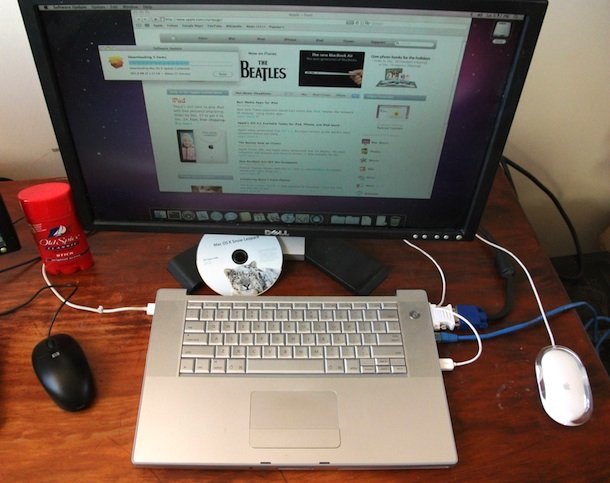
Have you broken your MacBook Pro screen? The cost to replace a cracked or dead screen of a MacBook or MacBook Pro can be very expensive, but instead of considering the broken MacBook Pro useless, just turn it into a desktop Mac!
Equipment necessary to use a broke screen MacBook Pro as a desktop Mac:
- External LCD Display – Any external LCD display will do, I like the HP W2338H 23
 because it looks similar to the Apple Cinema Displays, and it’s a fraction of the price. Other great brands are LG, ViewSonic, and Samsung. Just be sure to get something with a resolution that your MacBook/MacBook pro supports.
 - External Video Adapter to hook your MacBook / MacBook Pro to the external display – This is going to depend on your MacBook or MacBook Pro, so you’ll need to find out what the video out port is. It could be a DisplayPort to DVI adapter, a mini-DisplayPort to DVI adapter, or others.
- External Keyboard and Mouse – Of course you can still use the built-in keyboard and trackpad, but if you want to the headless MacBook Pro to perform like a real desktop Mac, just grab an external keyboard and mouse. I’m partial to the Apple Wireless Keyboard and wireless Apple Magic Mouse to get the full desktop experience.
 because it looks similar to the Apple Cinema Displays, and it’s a fraction of the price. Other great brands are LG, ViewSonic, and Samsung. Just be sure to get something with a resolution that your MacBook/MacBook pro supports.
 and
and  to get the full desktop experience.
Once you have all the necessary hardware, do the following:
- Hook the LCD display to the Mac with the appropriate adapter
- Hook up the external keyboard and mouse (optional but recommended)
- Boot the MacBook with the broken screen, then close the screen during boot
This will automatically boot your Mac to use the attached external screen. Your next step is to set as the primary display to the external display, so that the menubar will appear on the external display and not on the dead internal display. This is very important otherwise the broken screen will still hold your menubar and will be the default location of new windows if the lid is left open.
The picture above shows a MacBook Pro with the broken screen completely removed, but this isn’t necessary because you can use the MacBook Pro with the lid closed whether the screen works or not. Just be sure an external monitor is hooked to it.
Thanks to Andy for sending in this picture and the idea!






iMac Broken screen?
If I have two computers (a macbook pro and a windows desktop) and now have two monitors (both support displayport and HDMI) would it work to have this HUB connect to the mac via thunderbolt/usb-c and connect the monitors w DP and then use a KVI switch w USB 3.0 connected to keyboard and mouse and then connect the switch also to the windows PC and then use HDMI on the monitors for the PC?
So I have a mid 2018 MBP with broken display. Removed lid and connectors for display. Touchbar works fine. Keyboard backlight not working. Labtick says “it appears that you don’t have a backlit keyboard”. Did SMC reset. Haven’t tried PRAM reset yet, as resetting to factory standards may not be the solution. Question for the owner of the MBP shown in the pic above… Assuming you have a backlit keyboard, were you able to get it to light up? Thanks for the great post, and any suggestions in advance. BTW, I wonder how many broken MBP’s are out there mothballed as their owners may have decided against the exorbitant repair cost!
How can I remove my screen like the photo? Will the computer still boot up if I just disconnect it?
Hi,
I tried this and it worked but chicken and egg mistery !
I have two Macbook pros 2008 same as in this article, tried this on the first machine after booting I shot in the dark to log and then hit CMD + F1 to access the display setting and chose copy display, clamshell mode used the machine a few time then removed the internal LCD as in the picture,
now the computer boots directly to the external monitor without the internal monitor, But it won’t boot with any other screen except the one I used the first time. if I unplugg this specific screen the Mac won’t boot up.
Now the second machine, with the same problem, I cannot boot directly to any external screen except when the internal monitor cables are plugged, the external monitor won’t work until the loggin screen. if I remove the internal screen then the Mac won’t boot up.
Huh?
This is a great use for macbook whise screen has broken.
I’ve done the same with mine and works well except that I have lost airport connectivity.
This may be because the airport antenna is wired to the clutch / hinges that hold the screen or to the screen lid itself.
Greatly appreciate if anyone has an idea on how to fix this matter.
Thank you!
My screen broke off from the base but is still connected by a blue wire and silver wire. I need to know if I can cut these wires without causing the base to tv to fail. Currently I can use the base with my tv but I want to cut away the screen.
YOU SAVED MY LIFE! I have the same problem and I thought I there was no hope! Thanks a lot :)
@Marv74br Can you reach your machine from another Mac ? Than you can try to change the settings using remote desktop or screen sharing.
If you haven’t enabled screen sharing you can boot another Mac with the drive from the MacBook, than enable screen sharing, and then reboot the MacBook Pro again, it should stay enabled.
Another trick is to use it while open, but put a magnet on the bottom of the right speaker, near the USB port. The machine will go to sleep because it thinks you closed the lid. Then plug in the AC power, and an USB device, and it should wake up with only the external screen because the magnet makes it ignore the internal screen.
Good luck !
What if the image does not show on the external monitor, and I can’t see anything on the original screen because it got broken so bad it looks like a car-crash windshield? The Mac turns on ok, the capslock key lits, the keyboard lits, even the funcion keys I tried are working, like bright (it dim the light on the broken monitor, trully bizarre), volume… but NO image on the external monitor… are any ‘keyboard shortcuts’ to it? The computer, if nothin else is wrong, must be stalled on the user login screen… Mac OS 10.7.2, MBP 17″ of the late 2007 model… please help!
is there a tutorial on how to remove the screen? i want to use this set up for a media server… also, does the mac detect the native monitor if it has been removed?
thanks
Chris
Where did you buy magic mouse case?
It’s beautiful. Sorry about my english.
It’s not a Magic Mouse case…
It’s an old white Apple Pro Mouse, it only got 1 button (well the entire mouse is the button)
I don’t see anything except the Old Spice
HAHA!
hahahaha…. with ol’ spice anything could happend….
Love the ol’ spice .. :)