
Set Twitter for Mac to Livestream New Tweets & Automatically Scroll to Top
 If you use Twitter to keep an eye on things or to livestream news and events, this feature in the Twitter for Mac desktop app is a must use. It allows the Twitter app to automatically update and scroll to the most recent tweets, giving you a live and constantly updated feed of what’s going on from who you follow on Twitter. This applies to your main feed as well as search streams and other feeds, so this trick makes for an excellent way to watch the social world of twitter, serving whatever purpose it is that you use the app for (and we all seem to use it differently).
Here’s how to enable the excellent live streaming feature in Twitter for OS X, this works in all versions of Twitter on the Mac:
- From the Twitter menu, open Preferences
- Click the checkbox next to “When new tweets arrive: Automatically scroll to top”
- Close Preferences for changes to take effect in your twitter feed
(You may need to hit Command+R to force refresh the feed upon first enabling this)
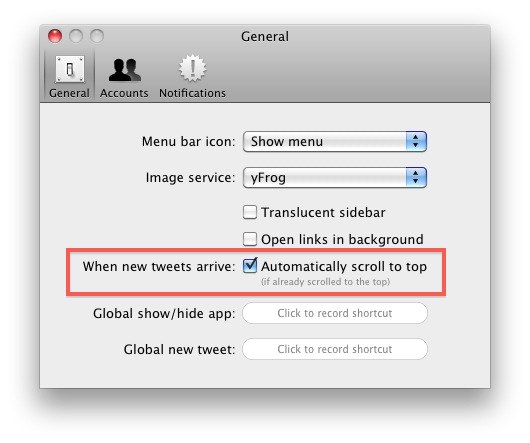
Now if you’re at the top of the twitter feed, updates will automatically appear in the feed and stream in live. It’s smart enough so that if you’re scrolling down in the feed to read older items, the feed will stay put, so you won’t be thrown to the top and lose your space.
This is one of those features that I think should be enabled by default, it’s too useful not to be. Combine this with enabling Growl notifications for the Mac Twitter client and you’ll find it easier than ever to stay on top of Tweets, news, and events. Oh, and while we’re talking about Twitter, don’t forget to follow @osxdaily on Twitter too!






This worked for me – thanks Chris.
Nevermind, I just fixed it. Hope this helps others with the same problem. If you’re on 10.7.4, you can’t view your top-level Library. Use a program like App Zapper to search for “Twitter” and delete the .plist, and com. files along with the application itself. Finally, re-install from the Mac App Store and the Livestream feature should be working again. You’ll know you’ve succeeded if the Twitter app asks you for your login info on startup.
The livestream feature for the Mac’s Twitter app just stopped working for me too, and I can’t seem to find any other articles with people complaining of the same — seems maybe the percentage of us with this problem is too low to warrant a bug fix.
my live stream feature just now quit working. i have been using for over a year with no problems and today it stopped working
I’m having some troubles these days with live stream in my twitter app for Mac. It’s not working. When i scroll down mannualy, the time show the tweets in my timeline with 6, 7 minutes before. When i go to preferences, my option it’s just “scroll to top” instead “automaticaly scroll to top”. In File>Live Stream>accounts i can’t check the account to get live stream in timeline =[ Anybody know about it?
chris is right, if you follow too many people this is a hassle unless the app is always visible
I think the best use for the Mac app is to sit alongside whatever you are working on, just don’t get too distracted… heh
enabled by default? Noo!!!
I follow way too many people. I want to be able to read down until I hit tweets I’ve already seen, THEN update the feed. I have a hard time imagining the last few days if I had been constantly battling a damned app that keeps scrolling me up to the top in the midst of reading.
This is essential. Funny thing is I use the app more than the website now, I think that is the opposite effect of what they wanted.