
Mac Setups: Ultraportable Workstation with iPad & MacBook Air
Apr 23, 2011 - 6 Comments
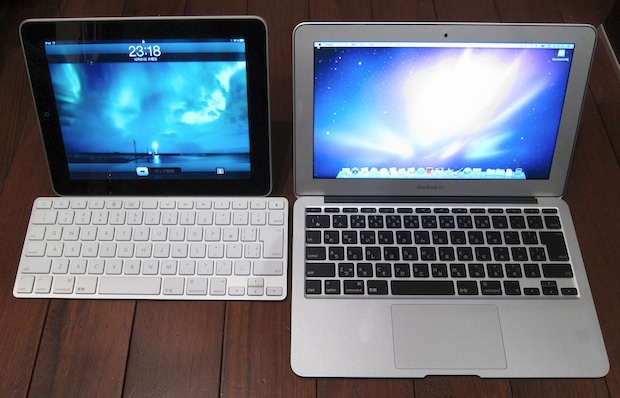
Everyone loves the iPad and everyone loves the MacBook Air 11.6″, making this a perfect Mac setup for the ultraportable road warrior. Another impressive fact; these two devices have a combined weight that is still less than the MacBook Pro 13″ model, if that’s not impressive I don’t know what is.
You could take this setup a step further and get DisplayPad for the iPad (App Store link), for $3 the app lets you turn an iPad into an external display for any Mac, as long as there’s WiFi around.






I have both of these ( Macbook Air 11.6 and iPad 2 ) and both of these are currently sitting with me on my Sofa. I am curious what is difference between Display Pad and Air Display. I have also use iTeliport which hooks nicely with VNC stations.
I just bought display pad – thank you
Ipad removable docking station for a jeep jk, thought you guys might think its pretty cool, thanks
http://www.facebook.com/pages/COP4X4/181467227197#!/media/set/fbx/?set=a.10150164215422198.295560.181467227197¬if_t=photo_album_comment
Oops I forgot to reference the source image, here is the image on Flickr:
http://www.flickr.com/photos/minami/5101831243/
A wifi router is also not needed. The macbook air can make an ad-hoc wifi network. Just enable internet sharing in system preferences.
You would still need wifi router to connect the MacBook Air too though, or a tethered iPhone at least.