
MemTest for Mac OS X Tests your RAM
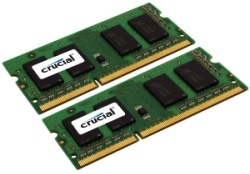 If you have recently upgraded your Mac RAM, or if you are experiencing strange system crashes, it’s a good idea to test your memory modules integrity using a free tool called memtest.
Essentially, memtest is a utility designed to stress test RAM for errors. Without getting overly technical in the explanation, memtest works by writing random data to the RAM, then verifying that the data written to the RAM is readable and without conflict. If errors are detected using this method, it typically means there is a faulty memory module, and that’s why memtest is such a valuable tool. Though it’s technical in nature, it’s quite easy to use, so let’s begin.
Download MemTest for Mac for Free
Memtest is from the broader UNIX world and it that has been ported to Mac OS X. For whatever reason, there are some websites who are charging for the free utility, but you should not need to pay for it because it is free, open source, and there are Mac versions available from developers as free downloads:
- Download MemTest now (direct download link)
The above link downloads a zipped package installer that simply places the memtest port in /usr/bin and does nothing else.
Test your Macs RAM
Once you have installed memtest for Mac, launch the Terminal and type the following command:
memtest all 2
This will immediately launch memtest, testing all modules twice (thus why the 2 is attached to the command). You can specify another number of tests to perform by replacing that, but two is fairly standard if you aren’t experiencing anything unusual.
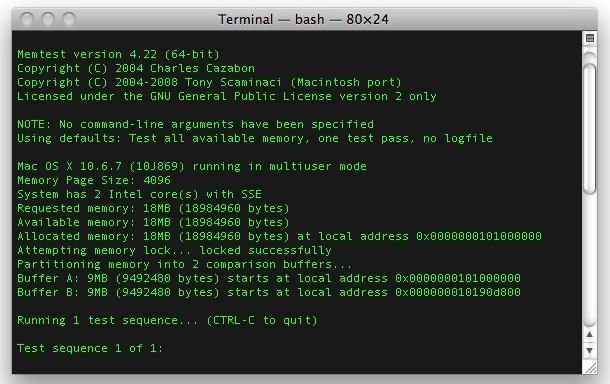
Memtest will take a little while (15+ minutes is not unusual) and you’ll see an actively updated screen like the screenshot above showing progress of the app. Again, the aforementioned command will test your RAM twice, which is generally enough to detect errors, but for unusual system freezes and crashes it can be a good idea to test your memory longer by removing the ‘2’, and then letting memtest run repeatedly until it has been ended, this is done by running memtest without any numerical specification like so:
memtest all
Without specifying a number of passes at the end, the app run a long time but can be stopped any time by hitting Control+C in the terminal window. Letting memtest run a while will consume a lot of CPU cycles so if you’re going to run the utility on a Mac laptop be sure to plug it in first.
Error Reports and Bad RAM
If any errors are reported, memtest will let you know. Likewise, if you run memtest and the utility freezes or crashes, that’s a pretty good indicator that your RAM is bad. If you’re running the test and you encounter any errors or freezes, you should return the memory modules to the place of purchase and get a replacement.
I’ve used this utility for a while now and never run into any problems with Mac RAM, but it does happen from time to time. If you have recently bought an upgrade it’s always a good idea to use this app to verify that what you bought is trouble-free.
You can read a bit more about this memtest for Mac port at Command-Tab.com.
General System Testing Routine
Testing RAM with memtest should be considered part of a multi-step process of performing general system tests. This should also include running Disk Utility to check hard disk health which is done by verifying hard drive functionality and repairing any problems that are found, and also performing a general stress test on the processor and fans by placing a Mac under heavy load. These are all decent methods to perform general system testing, and are particularly worthwhile to do after upgrading elements like RAM or a hard disk, or replacing hardware, whether for troubleshooting purposes or as part of an upgrade path.






Does this work for Big Sur?
Mem Test doesn’t appear to be compatible with Mac OS Mojave. Does anyone know an alternative? Thanks
Does it still work with OS X? I ran the memtest twice, and twice it froze my computer, I had to force shut down.
Hello, this does not work in El Capitain 10.11.5. Will try Apple Diagnostics.
link from the article is broken,
this one worked for me, today:
http://www.optilabs.eu/download/memtest_422.zip
Here is a working link to download Memtest 422 zip via Command-Tab:
http://command-tab.com.s3.amazonaws.com/memtest_422.zip
The link has been updated as well, the download for memtest for Mac should work fine now. Runs great in MacOS Sierra by the way!
I tried to install it on OS X El Capitan 10.11.5 and says it´s not compatible with this OS, how you could even installed in MacOS Sierra????
It should work in El Capitan. Memtest works in Mac Sierra for me but all Macs are soldered with RAM now so it is less useful today. You could use Apple Diagnostics test instead to test memory.
Thanks! I will do that. Nevertheless my machine is a MacBook Pro 15″ mid 2010, I upgrade the RAM to 8 GB, so when I try to install Memtest it pops a window that says the software is not compatible, it appears I need v. 4.23. Don’t understand why I can’t use v 4.22.
Carlos, another great option that works in El Capitan and Sierra is “Rember” which is a GUI front end to memtest:
https://osxdaily.com/2011/07/13/test-defective-ram-rember-mac-os-x/
I just confirmed this, works great in Mac OS El Cap and 10.12.
Thanks for the article. Alas, I don’t see any instructions on other applications allowed to run during the test. Does it make any difference? Also, do I have to remove all external drives form my Macbook while running it? And should a decent memory test not be run from a boot menu, with few as possible services loaded?
Finally, is it possible to get a list of most common errors and possible fixes? Such instructions would really complete the article.
Testing this on my late 2012 imac (i7 @ 3.4ghz) with just upgrading the RAM to 32GB.. Everything seem’s good – also, first time I’ve heard the fans kick in (due to the memtest) so don’t worry of yours does. Even though I put it under considerable load throughout the day and rarely switch it off (I know..) fan’s never usually have to kick in
Is this still useable on a mid 2011 iMac, OS X version 10.9.5? Having problems with it being really slow, and has been in to Apple store due to consistent sleep wake failure restarts that are still occurring after they have replaced everything except the memory and hard disk. They replace power supply, logic board and graphics card. But computer still intermittently restarts itself, always being sleep wake failure problem. Have checked activity monitor and have red and yellow in the memory graph area. Am a total computer dummy so don’t know what to do. HELP!
Yeah.. just ran in out a mid 10 MBP & mid 12 iMac and works well.. But, I if your under apple care and they have swapped bits of hardware out and still no fix they may replace new for old (lucky you!)
i have upgraded to 16gb macbook pro late 2011 15″. it take more than one hour to finish 2 run. but when it finish, everything was ok. Is it a problem?
thanks in advance!
Problem is with my 2.16GHz Intel Core 2 Duo iMac 5,1 when 2GB RAM is fitted, a line often appears across the main window and in the browser window, plus there can be a Kernel Panic freeze, crash and re-start after audio problems in iPlayer.
These problems never happen when a 512KB RAM is in place on its own, but do when both RAMs in place. There is apparently an underlying hardware problem 4SNS/1/40000001:VDOR but this is there whichever RAM is in place and doesn’t seem to be the cause of what is going on. I can’t find anything on the internet yet that says what this problem leads to.
I bought the iMac second hand August 2013 knowing there were intermittent problems and the price was OK.
I’ve just completed Memtest with the 2GB RAM in place on its own, and it passed two runs. Both times it said it was ‘full 1089MB’ region. Does this mean only half the RAM is being tested each time? If so, how can I get it fully tested? What happens if fit the 512KB and alongside and run the test?
Here’s a working link:
http://static.command-tab.com/2008/memtest_422.zip
The one in the article no longer works.
Thanks for the heads up, fixed the MemTest link!
I’m not sure what that installed (somewhat concerning) but it doesn’t appear to be memtest as that is not in usr/bin
It’s an executable binary, it doesn’t install anywhere you just run it where you download and decompress the archive with ./memtest
I have 4GB on my 2009 Mac Book Pro but the allocated memory shown in memtest is 2096mb. Does this mean that 2GB of my memory isn’t working?
After some Internet research I have found out that you have to start up your Mac in Single Mode to get a reliable MemTest. After doing so my iMac 16 GB RAM was reported 100% functional.
With such an amount of RAM be prepared for some waiting… (Almost two hours in my case.)
By the way, by mistake I put 4×4 GB PC3 10600 RAM modules in my Mac and it works, however in the speed of 1333 MHz. That is much better than the previous 1066 MHz.
What does this mean?
FAILURE! Data mismatch at local BUFA address 0x00000001b7c78f98, BUFB address 0x0000000337466798
BUFA Data: 0x4343434343474343, BUFB Data: 0x4343434343434343
Serious?
I’ve got the same error:
FAILURE! Data mismatch at local BUFA address 0x0000000225261ca8, BUFB address 0x000000038eee0ca8
BUFA Data: 0x0000000000400000, BUFB Data: 0x0000000000000000
Help me somebody!!!!
:-/
[…] that support 16GB. It’s always a good idea to double-check compatibility before buying and to run a RAM test after installing to make sure everything is […]
VEDY VEDY COOL THX
> is it possible that problems exist
> on the parts of memory that isn’t being tested?
Same question. I’ve gotten crashes and panics throughout the year since I bought a mid-2011 Mini; Genius always blames software; software authors say errors are “all over the place” and blame hardware.
Memtest: no problems with 2x2GB (Apple original)
No problems with 2x4GB (OWC RAM)
No problems with one 4GB alone
No problems with the other 4GB alone
Errors with one 4GB and one 8GB
intermittently — about 2 out of 7 passes
Errors with the other 4GB and the one 8GB
intermittently — about the same
No problems with just the single 8GB
Everyone so far says there should be no problem specific to 4+8 = 12 GB.
So either both 4GBs have a problem, or
the one 8GB has the problem
But running them individually doesn’t get the problem.
My best guess is — that using 4+8 lets Memtest test a little more of the 8GB card, and that happens to hit the intermittently failing area.
But this is logic, aka guessing.
Anybody know?
And, is there a bootable CD tester out there I can use that would work on a mid-2011 Mini (using a 3rd party external USB CD drive)?
I tried the Memtest-86 CD, but that doesn’t work on the Mac (esc doesn’t exit, and using esc suddenly reports multiple errors).
I ran it on my mid 2011 iMac which I recently increased from 4GB to 8GB and got the following result.
Requested memory: 6278MB (6583214080 bytes)
Available memory: 6278MB (6583214080 bytes)
NOTE: Memory request is too large, reducing to acceptable value…
Allocated memory: 6102MB
If it only checks 6102MB of the 6278MB it found is it possible that problems exist on the parts of memory that isn’t being tested?
You should run in single user mode before using on a Mac so it can test more of the memory. Hold command+s when booting your Mac.
I just updated my 2009 MBP (2.6GHz Core Duo) to 8GB from 2GB. Apple and Crucial both say the limit is 4GB, but the system recognizes the two 4GB modules just fine in About This Mac and System Profiler.
However, the computer has been VERY slow lately whenever I’m using more than one app at a time. I’m running memtest right now, and it’s been more than three hours so far, still on this first pass. Is this unusual? It’s not crashing or hanging, just going REALLY slow. It just says “15+ minutes” above, so I’m not sure what a reasonable upper bound would be.
Any advice would be much appreciated.
Correction, that’s a Core *2* Duo. :)
Update: approaching the 12 hour mark; test sequence 1 is still underway. Anyone out there?
I know its been a while since you posted, but I figured I would answer you. My father has the same 2.6 core 2 duo MBP as well. In the system profiler it shows Macbook Pro 4.1 I believe. In any case, OWC reports this model only takes 6gb of ram, not 8. It will address 8 however it will slow down as you are experiencing… so… sorry you’ll have to downgrade to 6, or 4gb.
I bought and installed 16GB upgrade to my MB Pro. The memtest has so far passed 9 out of 10 times. The only one error I received (at the second iteration) was in the Checkerboard, failure at 60, all other times it’s gone through flawlessly. Not sure if I should be concerned.
Correct me if I’m wrong, but isn’t the maximum memory capacity of MBP 8 gigs?
Perhaps thats why you fell into the problem
The “official” word from Apple is that the MBP line only accepts 8GB. However, according to numerous sources – and confirmed installations – it can actually handle up to 16GB. If it’s any indication, both Crucial and Macsales (OWC) confirm this when you use their system specific memory selectors.
Have MBP, installed 16gig, in single user mode 10 time out of 10 no errors. However, when in Multi-user mode – several sub-tests failed few times, could it be that I have a full system up and running? Doing more tests…
MBP 8,2
How reliable is memtest? I just upgrade to 16GB for my 2011 Oct Mac Mini and memtest failed 1 out of 3 loops due to “FAILURE! Data mismatch at local BUFA address”. I’m wondering if I should RMA the 16GB memory sticks?
Thanks
Try to reboot with the Apple Hardware Test to confirm as well, but if you continue to get memory errors you should probably get them swapped out. Sometimes memory works, but you will run into random crashes and problems with the computer, personally if my memory and hardware tests kept failing, I would swap them out.
If I recive a tok as result in Bit Flip during a memtest, what it’s mind
Thank you for this. My memory from Newegg runs really well. =]
Thanks! My memory passed, but it only took 22 seconds, not 15min…so I wonder if I did something wrong…
Feb ’11 Macbook Pro, 500gig, 8gb, Lion
[…] Zapuść softa do testowania RAM-u: Kelley Computing – Rember i/lub MemTest for Mac OS X Tests your RAM Cytuj + Odpowiedz na ten temat « Poprzedni temat | […]
[…] soft do RAM-u: Download Rember for Mac – GUI wrapper for Memtest. MacUpdate.com i/lub MemTest for Mac OS X Tests your RAM Cytuj + Odpowiedz na ten temat « Poprzedni temat | […]
[…] Witamy! Przetestuj RAM za pomocą: MemTest for Mac OS X Tests your RAM Cytuj + Odpowiedz na ten temat « Poprzedni temat | […]
Hi,
I have 8GB ram but memtestosx shows “Memory Page Size: 4096”. Any suggestion? Thanks,
I’m testing a 16GB machine and also have the same “memory page size”. This is just the size of the memory chunks that get paged in and out, in bytes.
A couple of lines down you should see “Requested memory:”/”Available memory:”/”Allocated memory:”. This is the amount of memory not in use already that is going to get tested. Mine is 12934MB.
[…] Zapuść softa do testu RAM: MemTest for Mac OS X Tests your RAM i/lub Kelley Computing – Rember i może coś się wyjaśni. Cytuj […]
Good article, thanks, and helped me solve my Macbook crashes OSX 10.6.8. However, I downloaded Memtest from SourceForge AppleJack project. Nice thing is the Readme file gave more info, a better user interface for dummies like me AND you get the other Applejack utilities – all for free.
They are already working on a Lion version.
http://sourceforge.net/projects/applejack/
[…] is a free and easy to use graphical front-end to the command line MemTest tool, it runs memory tests to help determine if you have defective RAM modules installed in a Mac, […]
Thanks.
nice tool, work nice
Please make a comment here on how to remove it again
Control+C quits memtest
or to remove it:
cd /usr/bin/
sudo rm memtest
There’s not much reason to delete it though, it’s about 160k
memtest is a windows utility too, always use it