
Disable the Character Accent Menu and Enable Key Repeat in Mac OS X
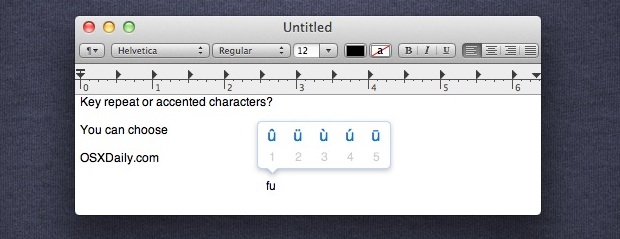
If you hold down many keys in Mac OS X, particularly vowels but also letters like j and n, a little popup menu appears showing an accented character selection window. This is a fairly new change to OS X behavior, replacing the long existing default of a repeating key press instead, where if you hold down a key the letter will repeat endlessly until you let goooooooooooo with repeating letters of that which is held down.
If you want to turn off the character accent selector and re-enable key repetition with extended keypresses, you can easily do so through a defaults write command.
To get started, launch the Terminal app and enter the following command onto a single command line (it’s often easiest to just copy and paste the defaults string) and then hit the Return key:
defaults write -g ApplePressAndHoldEnabled -bool false
You shouldn’t need to do anything for the change to take effect, but relaunching apps may be beneficial if you don’t immediately notice a difference.
Try it out, and you can can now repeat keys as usual rather than have the iOS-style accented popup appear.
If you want to bring the accented character selector menu back with a long keypress, you’ll use the same defaults command string in the Terminal, but use true instead, like so:
defaults write -g ApplePressAndHoldEnabled -bool true
Most apps need to be relaunched for the change to take place again.
This works in all versions of OS X where the Press And Hold feature exists, including Macs with Mavericks, Mountain Lion, and Lion.






Thank you! I was about to go nuts!
There is no ‘Terminal app’ in the App store!
The Terminal application is on the Mac by default always, preinstalled in the /Applications/Utilities/ folder.
The Terminal is intended for advanced Mac users only, if you are not sure where it is I would say that means it is above your particular technical level and you should probably avoid using the Terminal. The command line is totally unforgiving and there is a lot of room for error, avoid it if you do not have the know-how to properly use it. Much like you wouldn’t try to perform some other complex task without training and knowledge, this is the same situation.
Hey genius, if we are asking for help is because we are not genius like. Learn to speak for the audience. Thanks for nothing.
Thanks Pauls. I have the same problem: the ability to get diacritical marks disappeared for no apparent reason – came here – looked for Terminal app – WTF? Now I find out it’s too complicated for me to use. I want a simple procedure that USED to be one of the hallmarks of Apple. No longer it seems. “Launch the Terminal app” is unintelligible to most of us: I suspect that if we knew how to do that, we wouldn’t come here for help with this seemingly trivial problem.
very clever: ‘launch the Terminal app’, but there is no information on what this means; what is the terminal app, and how can you access it?
I did this last week and after I rebooted, it worked. Yay!
However, today when I tried to get the accents, I was back to key repeat behavior. Ran the command in Terminal rebooted again and it works again. Sheesh! Does this mean I’ll have to rerun the command and reboot every day???
Works great, thanks. Sometimes I’m really shocked that basic options aren’t available to change.
Thanks for the tip
Fantastic…it worked. :)
Awesome tip! Thank you very much :)
My accent pop-up suddenly disappeared, and now I only get repetitive letters when I hold them down. But I didn’t “do” anything! I’ve never launched Terminal, so how did it change on it’s own? Eeek! ;-/
Hi, I had the same thing happen to me. My accent popo-up ust disappeared from one day to the other, and I can’t get it back. Going to try a restart to see if that fixes this.
I tried the above procedure with Terminal, using:
defaults write -g ApplePressAndHoldEnabled -bool true
but that didn’t seem to do anything either.
This should most certainly be a system preference to be turned on and off at will.
Restart took care of it. I guess the above procedure and/or the restart did it. I have my accent pop-up back.
Thanks for the tips
I tried everything recommended above, including restarting. No luck. I want the pop-up menu with accents. I tried the command with “true” (no quotes, of course) and I tried with “yes” (ditto). I tried not restarting and also restarting. I work a lot with eight or nine foreign languages and these pop-up menus are super important to my sanity. Does it matter that I also have a Romanian keyboard installed, though not active? I have had that keyboard on here for six months, the problem is of recent vintage and seems to relate to an update from six weeks or so ago. Please help. Thanks.
THANK YOU THANK YOU THANK YOUUUUUU!!!!!!!!!
Meanwhile, THIS is AN OPTION IN SYSTEM PREFERENCES what are you doing apple ……
Hi! Is this supposed to work for MacBook Air too? I tried doing it in the Terminal, like you said, but it still doesn’t work :'( Is there any other way to fix this? The accent pop-up thing is okay, but what’s more important for me is the repetitive letters so please help :)
It didn’t work for me in Maveriks from the first try. I changed false to NO and it seems to stick now. Also, don’t forget to restart any app after setting this in terminal.
[…] 2: You may also want to turn off the character accent menu when you press and hold a […]
where do i type this in at? :(
You type the commands into Terminal, as is stated in the article.
You can install OnyX, too.
It has a simple option where you can activate/deactivate the key repeat/vowel accents
Thanks very much, you have been a great help.
Works perfectly – thanks much for the tip. I agree this should be an option in System Preferences somewhere.
THIS SHOULD BE AN OPTION IN SYSTEM PREFERENCES ANOTHER COUNTDOWN APPLE.
Cool!!!!! It works perfectly!!!!!! Great job William… Thanks!
[…] osxdailly] __spr_config = { pid: '4e398ab8c2b219497d000043', title: 'How To: Disable Accent Character Menu […]
How do I relaunch it?
Just quit an app and then open it again, for it to be system wide you might want to just reboot
That’s cool, but then is there a corresponding keyboard shortcut for bringing up the Character Accent Menu when one needs it…?
Unfortunately no, not unless you bind it yourself in Keyboards Services. That is why this tip is not the best, but you can always use the Option key press for åççéñts