
Enable Tab Key Navigation in Safari
Aug 14, 2011 - 4 Comments
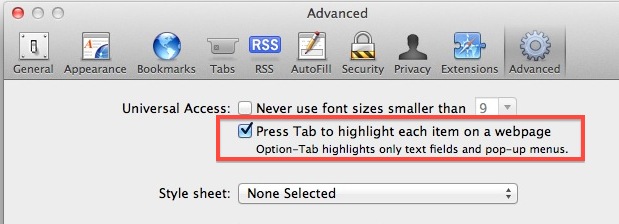
Navigating elements on web pages with the Tab key is a useful feature in most web browsers, but since the release of Mac OS X Lion the new default behavior in Safari seems to limit what the tab key selects on a page. Here’s how to enable tab key navigation across all actionable elements on a webpage:
- From the Safari menu pull down and select “Preferences”
- Click on the “Advanced” icon and check the box next to “Press tab to highlight each item on a webpage”
Note the sub-text points out that if you press Option+Tab then you will select only the text input boxes and menu items, which is the default behavior of Safari and Chromes tab key navigation.






Thanks for the help. What a poor decision for a company that claims to want to put accessibility first. Safari doesn’t show CSS outlines for me either, works in all other browsers. Confirmed–going to keep using chrome.
Is there a way to return this back to Itunes?
[…] how to enable tab key navigation across all actionable elements on […]View full post on OS X DailyGet more Daily Mac Tips View full post on MacFanboys – Mac Tips & […]
I prefer the text input only tabbing, that is generally what I want to tab between and not much else. I could see this being useful with the Element Inspector, that plus the increased accessibility is probably why this is in advanced settings and not enabled to begin with.