
Set iPhone Camera LED to Flash on Incoming Calls and Alerts
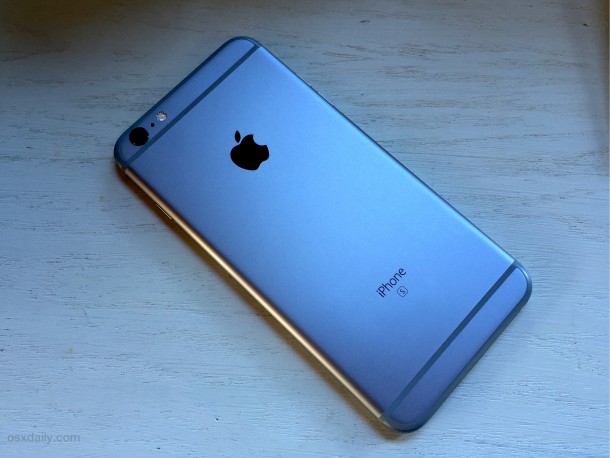
The iPhone camera LED flash can be used to alert you to incoming calls, messages, and other alerts to your device. With this feature enabled, anytime a call or messages comes in the devices LED will flash repeatedly, even when the iPhone is on silent mode.
This great feature offers an obvious visual cue with a bright flashing light for when any alert or notification comes in to the iPhone. LED alerts on iPhone are an excellent feature that is not well known, but we’ll show you how to enable this on your iPhone.
How to Enable LED Flash Alert for iPhone with iOS
Using LED flash for alerts is possible in most versions of iOS and with most iPhone devices, here is how you can set this feature for your iPhone:
- Tap on the “Settings” app and then on “General”
- Select “Accessibility” in settings
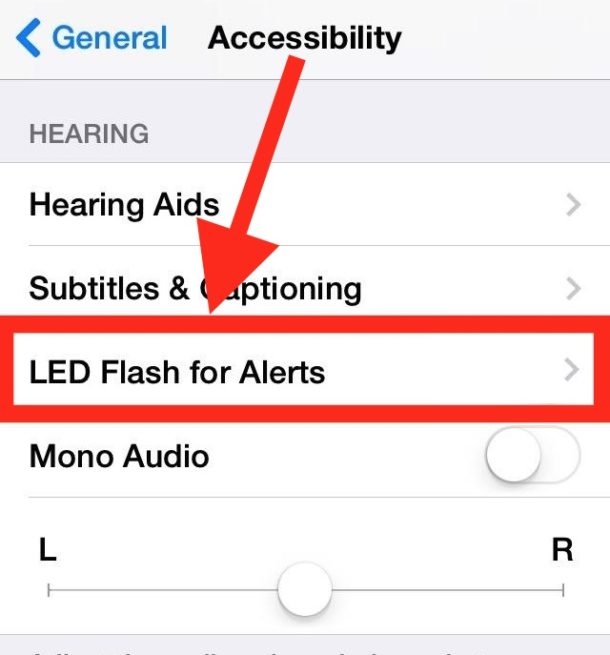
- Locate “Tap LED Flash for Alerts” and tap on that
- Now toggle the ON switch next to “LED Flash for Alerts”
Once you get an incoming message, phone call, or alert, the LED flash on the iPhone camera will blink and flash, offering a visual indicator that a notification or alert is coming through to the device.
Undeniably useful for those with hearing difficulties, but flashing the LED alert when an iPhone gets a call or message is also genuinely useful for those of us who regularly keep their phones on mute, lower volume, or who just want the iPhone to be a bit more obvious when an alert comes through.
This setting is supported by all modern iPhone and most versions of iOS, though it has been around for quite some time and the setting may look a little different on newer versus older iPhone models.
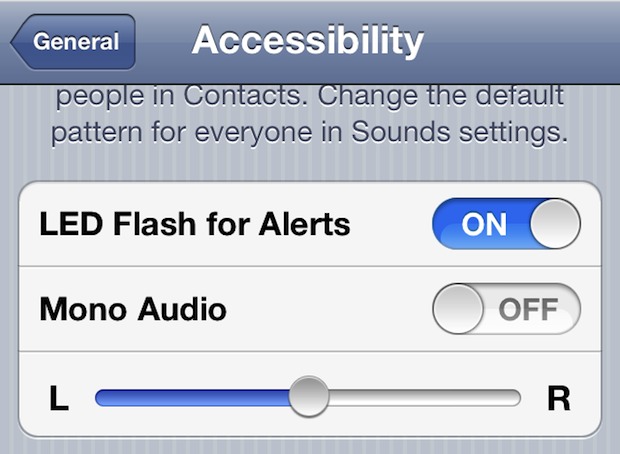
For some background, this idea actually started as an old jailbreaking tweak, but Apple adopted it as an accessibility feature for iOS 5 and it persists in all modern versions and added a secondary “flash on silent” option in later versions like iOS 10. The flash LED alerts ability is agreat feature for just about everyone with an iPhone, try it out if it sounds like something you may appreciate.
By the way, desktop users can enable a screen flash on the Mac for alerts which is sort of similar offering a visual clue for alerts and notifications.






its not working to my device 6s.pls help
Does not seem to work on 6s. Tried all possible info from comments pertaining to 6s b or 6 plus!
This does not work for me at all I need help with it
Is not working on my iPhone 6splus any help?
Thank you 🥰🥰🥰🥰🥰🥰🥰
It doesn’t work on my iPhone 6s too,pls any help on how to get it work on my iPhone 6s
How do I get the screen to light up like the galaxy does when someone calls.
I am using iPhone 7plus. But the flash light not working the settings.
It won’t work on my iPhone 6s Plus.
It won’t work on my iPhone 5c
Filash on call iPhone 4 s
I finally got it to work. But it has to be asleep. Thanks for you guys help! 😘
Work on my iPhone 4s iOS 8.3 blink only when ur iPhone is lock only……. Ringer on silence it works fine……
My iPhone is flash on call
My phone won’t flash when I get a incoming call or text message 😢😡
This does not work on my iPhone 5! 😡
Thanks! I followed the steps and it works.
I had this feature on my iphone 5 an when I upgraded the iOS now I can’t turn it off. the option is completely gone.
I’ve tried everything and it doesn’t work on my iPhone 5s with io7, worked perfectly with my 4s io6
Doesn’t work on my iPhone 5 :/
[…] some ways this is similar to the iPhone’s LED light alert feature that flashes with incoming phone calls and texts, except that it flashes for all alerts on the Mac, […]
thanks dude…really gr8 help
Phone has to be locked or in sleep mode to work :) that’s exactly what it is brains over here
Incoming call flash light option is only available for 4s ?? Or we can set on iPhone 4 as well.
I couldn’t get it to work on my phone. After reading the posts on here, I switched the camera flash to auto and it worked!
Me too I can’t get it to work :( Mine is an iPhone 5 with iOS 6…
Mine works any which way with all apps or no apps running. locked screen and unlocked. silent mode or regular. Only thing I need to do was have my camera flash on auto.
The trick is that you can’t have any background apps running (like the ones that sends notifications etc.) You will have to double click home button and then long press one of the app icon on the task bar and then cross all these background apps out! Then it will WORK. TESTED for BOTH ringer mode AND vibrate mode and ON ALL CALLS or Notifications! And you must lock the keyboard or iPhone is asleep. IT’s workable :D
Go to General->Accesibility and turn of Flash Indication for incoming calls.
the flashlight in the camera app must not be turned off.
it hast be set to auto or on
here’s the lowdown:
LED works with 4s
phone MUST be locked
Face up / Face down does not matter
running background apps does not matter
works for rings and texts (at least, thats all i care about)
It only works for a short time…Is there anyway for it to KEEP flashing so I will know that a call came in when I was away? I use my iPhone as my home phone, and is always plugged into electric, so don’t worry about battery life.
Finally works thank so much
Ur phones gotta b locked after uve done the settings then it will flash:)
thnks tried all the other stuff but your hint did the trick:-)
Thnks Marky had tried all the other things your comment did the trick :-)
Just noticed today that mine is working after applying recent update via iTunes. Tried calling my cell from a land line and it did NOT flash. Got a call from out of state and it did flash. The switch is on…the apps are all closed and phone on vibrate. STRANGE
My LED lifht is not turning off even if I have changed the accessibility settingd…pls HELP!!
I have the 4S and the flash works fine, with or without apps running and it works with both silent and ring on/off for texts, calls, alerts, etc.
Go to camera and set flash to auto or on. Then it works.
Most probably you have turned it off.
Don’t work on 4s bit of a silly one really
Finally!!! thank you so much for helping me switch off this feature. It became so tiresome when my phone flashed at everything… calls, texts, alarm etc and I couldn’t remember how to switch it off.
It flashes only once when the text, call comes in but not repeatidly.
What is it with Mono audio, i think the iphone 4 is Mono, the speaker is on the right on bottom
It works on my iPhone 4, on silent mode, and in ring mode, for incoming calls, sms, mail, and i have background apps running
I go through these steps and there’s NO LED Flash Alert listed there. And yes, I’m on iOS5. Any idea where else it might be?
you need to scroll to the bottom of the page to find it.
Tried many ways to get it work: restarting, switch the feature on/off, it DID finally WORKED. The trick is that you can’t have any background apps running (like the ones that sends notifications etc.) You will have to double click home button and then long press one of the app icon on the task bar and then cross all these background apps out! Then it will WORK. TESTED for BOTH ringer mode AND vibrate mode and ON ALL CALLS or Notifications! And you must lock the keyboard or iPhone is asleep.
Hey you are dead on girl, did everything u wrote and it worked, this works on iphone 4 and 4s thanks !!!!!!
Whoever you are You should be a representative at apple care thankyou 🙏
Actually only works on TEXTS not calls…
Turned in on, called on both silent or ringer, it DIDN’T work for my iPhone 4S!
ive found on SOME iphone 4s only works when locked
Yep.. I was having problems with the phone ringing – it wouldn’t blink. But the phone has to be locked in order for it to blink.
Exactly When its locked its blinking otherwise no blink :(
did you get your 4s phone to work? im hard of hearing and cant get my to work
what does this do to battery life?
You say “EVEN when the iPhone is on silent mode.” Actually, it works “ONLY when the iPhone is on silent mode.”
I have to say, this works on my iPhone 4 in silent mode and when ringer is on. Plus for my mobile it worked on calls and texts. Drove me nuts in the middle of the night.
Same here.