
Increase the Contrast of a PDF to Sharpen & Darken Text
With Preview you can adjust the contrast of a PDF, this makes the text sharper and darker, and for scanned files or dubious quality PDF’s this makes them significantly easier to read.
The process of increasing contrast and sharpening text in a PDF is made quite simple with Preview app on the Mac, we’ll walk through how to accomplish this.
How to Increase Contrast & Sharpen Text in PDF Files on Mac
This works with all versions of Preview in all versions of Mac OS:
- Open the PDF file with Preview
- From the ‘File’ menu, choose “Export”
- Click on the “Quartz Filter” drop-down menu and choose “Lightness Decrease”
- Choose “Save”
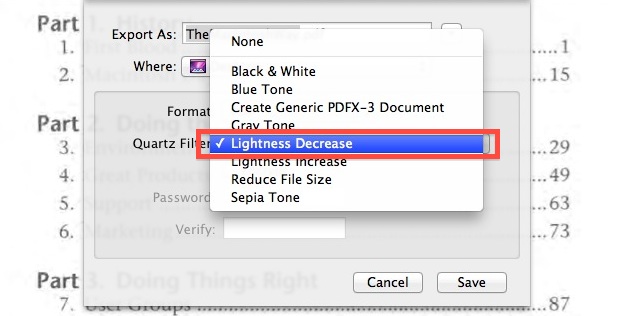
Essentially what you’re doing is re-saving the PDF file with the contrast filter applied, which has the effect of making the text darker and sharper. The exported PDF file will be a new document, leaving the original file untouched. The image below gives a
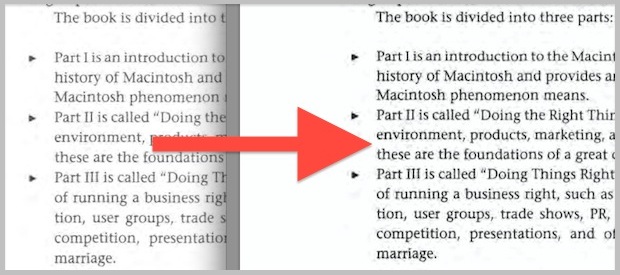
You may notice re-saving and exporting the file takes a while, this is because Preview is quite literally applying a filter to each individual page of the PDF you are saving. For small PDF files this is quick, for longer PDF files it can take a bit. Just wait before reviewing the changed document.
For a very practical example, I noticed this was needed after downloading the excellent Guy Kawasaki freely available “The Macintosh Way” book, which is a great look at early Apple history. Unfortunately the PDF file text is very light making it difficult to read on some screens, but the Quartz Filter mentioned above greatly helps this.
One potential downside you may notice with some files is an increase in noise. That noise is most noticeable on older PDF’s of scanned books or documents, and at times the trade-off may not be worth it. For the most part it works great though and it improves the readability, contrast, and text sharpness of a document.






Big THANKS!!!
Like! Where is the “like” button? I want to break it! :D Thanks man really helped me! :)
Thank you. I’m finding more and more pdfs difficult to read as publishers go to muted tones in them.
Great to have something like this that works, but I find I usually have to export/save multiple times to get the contrast I desire. There ought to be a simpler way. Still, if I need it, this will do the trick. Thanks!
My version of Preview does not have and “Export” feature. I am using 5.0.3 for Mac OS X10.6.8. See my screenshot here: http://imgur.com/a/XOiDy
Look in the File menu for “Export”, not the Edit menu
Thanks for noting that.
This time, I did look under File but “Export” is still not there.
See this screenshot: http://imgur.com/a/pLRao
A year later … and someone comments on your comment. I think your version of OS X is too old. The “File” menu in the “Preview” in MacOS 10.13.3 has an “Export…” option.
what about if you don’t have preview anymore
Everyone has Preview, Preview is bundled as part of Mac OS X
THANK YOU!!! Very helpful! If you can think it, you can do it on a Mac!
Thanks for taking the time to write this up. This is exactly what I needed!
This doesn’t work on my mac. There is no export in the file menu.
George, did you open the PDF with “Preview”? Find the file in Finder, CTRL + Click and choose Preview. Should be able to Export from Preview.
I just downloaded the Preview for Windows application. It does not show Export from the File menu tab. Now what? I opened the PDF using Preview, but now I can’t do this operation.
Faint pdf scans were driving me crazy – thank you so much for the extremely useful tip!
Brilliant. Really pleased this was so simple. No softwares, no rubbish.
Fantastic tip, thank you!
great!
[…] Increase the Contrast of a PDF to Sharpen & Darken Text Increase the Contrast of a PDF to Sharpen & Darken Text… Source: osxdaily.com […]
Coincidentally resaving it like this finally allowed iBooks to read that book