
How to Invert the iPad or iPhone Screen to Make Reading at Night Easier on the Eyes
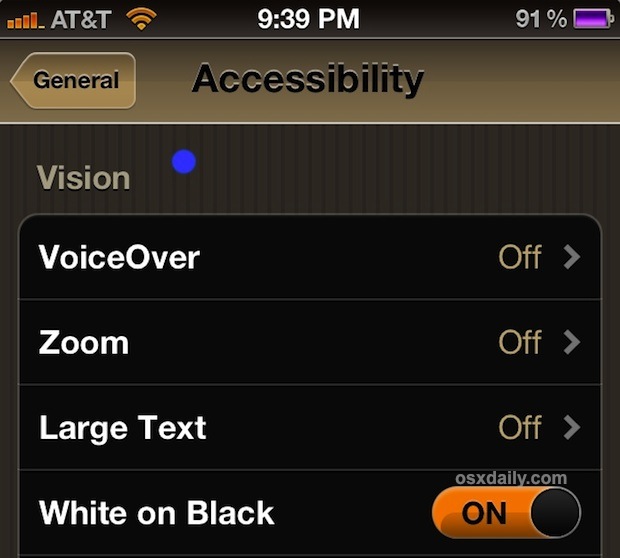
If you’re like me you end up reading a fair amount while laying in bed using an iOS device. If you read in the dark, you can give your eyes a rest by turning on a little known Accessibility feature that inverts the display of the iPhone, iPad, or iPod touch to show white text against a black background rather than the default setting.
Inverting the screen colors basically reverses every screen color on the display to be it’s opposite. White becomes black, black becomes white, blue becomes orange, and so on. The net effect is sort of like a dark-mode or night-mode, since much of the iOS screen colors are bright, and by inverting them everything gets darker.
How to Enable Screen Inversion on iPhone or iPad with iOS 12, iOS 11, iOS 10, iOS 9, iOS 8
- Open the “Settings” app
- Tap “General”
- Choose “Accessibility”
- Tap on “Display Accommodations”
- Tap on “Invert Colors” and set that to ON
- Exit Settings when finished
The screen colors will immediately invert, changes are immediate.
How to Enable Screen Inversion on iPhone or iPad with iOS 7, iOS 6, iOS 5, and iOS 4
- Tap on “Settings” app to open your iOS settings
- Tap “General”
- Choose “Accessibility”
- Look for “White on Black” and drag the slider to “ON”
- Exit Settings when finished
You will immediately see the change, which looks just like the screen shot above.
You can turn off Screen Invert at any time as well by going back to the Accessibility settings and reversing the setting change.
Screen Inversion has been around since at least iOS 4, and while it’s intended for those with vision issues it can also just be a great relief to those of us who read in the dark. It’s also kind of fun to try and play games with the screen inverted, or just to turn this on a friends iPhone as a prank.
I find this much easier to read with than just reducing the brightness, although it’s not quite as good as something like Flux for the desktop. Yes there’s an iOS version of Flux available, but it requires a jailbreak so that’s not a viable option for everyone.






[…] inverting the screen colors is a genuinely helpful tip for those with vision difficulties and also for […]
[…] on environmental lighting conditions. But it’s not always perfect especially if you use it at night, and if you’re in frequently changing lighting conditions that behavior can reduce battery […]
[…] is a fairly common accessibility feature, and it’s also pretty handy for when you’re reading at night because it puts most screen text into a white on black mode like […]
[…] If you haven’t used White on Black before it essentially inverts the screen, which makes reading at night or in low light conditions less harsh on the […]
[…] someone in the same room is trying to sleep. You can also take the Night theme concept system-wide by inverting the iOS screen, making it easier to read web pages and use other apps in the […]
Great!….BUT, it also inverts colors in your pix! Why?? It makes no sense to me why I would want to look at my pix turned ‘infrared’.
One of the funniest pranks to play with a mac owner (or at a retailer..) is to press ctrl-alt-cmd-8 to invert the display. Not many people know how to reset this (repeat key-combination).
Many reasons made the invert color good,
for better batterie (if more black)
better read,
some who want steel your iPhone think it’s broken.
Ive been using Flu.x since i read about it here, and let me tell you, it is amazing!! It does exactly what it says it does: reduces stress on the eyes. The bright white light of my laptop was really bad on my eyes, now not only do i have it on my macbook, i have it on my jailbroken iPhone and PCs with Windows and Linux.
On a Mac you can also apply this by pressing
Control-Option-Command-8
You can also program this to come on with a triple-press of the home button. Quick and easy to turn on and off.
That is brilliant. Makes the tip actually worthwhile. Thanks dude!!
My friend has it setup for his MBP to happen in low light so the triple click is close enough for bed use
I set my brightness to almost zero so I can still have accurate colors
Yeah but unfortunately there’s still no quick way to adjust brightness. Using the three-click option to do this inversion you can turn it on and off almost instantly.
actually there is a pretty quick way to adjust brightness…
when you use the double click to see what apps are open, if you swipe the bottom row of apps to the right there is a bar that lets you adjust the volume and the brightness…pretty easy and quick