
Share iPhone, iPad, and Mac Calendars with Anyone Else from iCloud
Nov 8, 2011 - 13 Comments
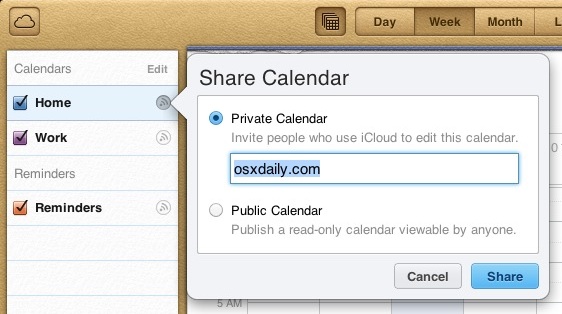
Using iCloud, sharing a Calendar from your iPhone, iPad, or Mac OS X iCal with anyone else is now easier than ever.
This is a straight forward process that requires iCloud, set it up if you haven’t already and you can get sharing, here’s how:
How to Share Calendars from iCloud.com
- Go to http://icloud.com and login with your Apple ID that’s configured with iCloud
- Click on the “Calendar” icon
- From the left side Calendar menu, click the little radiowave icon next to the Calendar you want to share with others
- Enter the iCloud email address of users who you want to share the calendar with, then click “Share”
The recipient can then find the shared calendar in their own iCloud Calendars list, but all parties must be using iOS 5+ and Mac OS X 10.7.2+. You can also choose “Public Calendar” to share the calendar with the world.
Great tip discovered by TheGraphicMac.






[…] Meeting Times” which provides a timeline based on when the recipient is available. If they share a calendar with you everything will be visible, otherwise just suggested meeting times will be […]
I was wondering how to do just that! Thanks for posting this.
Once you have created the new calendar you must change each appointment and select the new calendar in the appointment.
Am sharing calendar with ex for sake of kids, is there any way to keep some appointments blocked from his view?
Set up different “calendars” and make one for the kids stuff only and then only share that one calendar.
I’m doing the same thing for ex. How do I move items already in my calendar into my “new” kid calendar?
[…] Share iPhone, iPad, and Mac Calendars with Anyone Else from iCloud Share iPhone, iPad, and Mac Calendars with Anyone Else from iCloud… Source: osxdaily.com […]
[…] |VIA| […]
[…] |VIA| […]
[…] Via | OSXDaily […]
Can’t do it from the iPad or iPhone/iPod touch though. Crazy.
Neat :).
You can do this directly from the Calendar and iCal app too with a right click