
Go To the Parent Directory in Mac OS X by Keyboard Shortcut Quickly
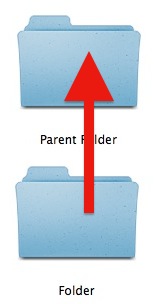
Need to jump to the parent directory of a folder on the Mac? Buried in a nest of folders in the Finder of Mac OS X? Mac OS includes a handy keystroke to immediately jump to the parent directory of a Finder window. For some quick reference, the parent directory is the enclosing folder in a hierarchy, in other words it’s whatever is above the current folder in the file system hierarchy. If the path is /Users/Paul/Documents/Notes/ than “Documents” would be the enclosing folder of “Notes”, and “Paul” would be the parent directory of “Documents” and so on.
You can quickly access the parent directory of any item or directory by hitting Command+↑ (that’s Command + Up Arrow to be perfectly clear) anytime in a Mac OS X Finder window.
This keystroke will immediately jump Finder to go one level up to the directory containing the current file or folder, commonly called the Parent Directory, but which which Mac OS X refers to as the “Enclosing Folder”. Whatever you want to call it, it’s always the folder above the current directory though, and it’s always accessible through the keystroke:
Command+Up Arrow Jumps to the Parent Directory on Mac
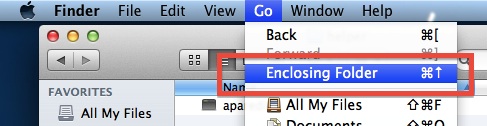
It’s also possible to access the parent directory (or enclosing directory) through the “Go” menu of the Finder, that is demonstrated in the screenshot. The accompanying keyboard shortcut is the same that is shown within the Go pulldown menu:
Terminal users can think of this as basically the Mac GUI equivalent to typing “cd ..” at the command line, something that should be familiar to those of us who spend a lot of time in the command line or come from the unix world.
This is an extremely useful keyboard shortcut for Mac users who like to navigate around with the keyboard, which can be much faster than using the mouse for some. Combine this keystroke with some other Finder navigation shortcuts and, one of the most powerful, the Go To Folder keystroke, and you’ll be jumping around in the file system of Mac OS X quicker than ever before.

If you have any other tips or tricks about navigating in the Finder, or going to the parent directory or enclosing folder on the Mac, share with us in the comments below!






Thanks
It seems to me they need to add “left arrow” as an alternate shortcut. After all, in multicolumn list view, “right arrow” descends into a subdirectory and “left arrow” returns to the parent. So if you’re already in the leftmost column, why shouldn’t “left arrow” take you to the parent of that directory?
Your tips made my life easier, thanks! :)
[…] is not to be confused with the separate keyboard shortcut to jump to the parent directory of the current file or folder, which is also labeled as “Enclosing Folder”. That […]
[…] the Finder, the Back button will show nothing. In this case, hitting Command + Up Arrow will always go to the parent directory of the currently active folder though. stLight.options({ […]
[…] command is what the Go To Parent folder shortcut turns into when you hold down the Shift key, which is appropriate given the startup disk is the […]
Or you can show the “Path Bar” to see the whole path and just double click on the parent directory icon.
You can also just hold Command and click the window’s title to see the entire path!
Great site – love the tips, thanks.
That doesn’t work with Smart Folders though like with “All My Files” it won’t show the parent, but this command takes you to the parent.