
How to Always Send Mail as Plain Text in Mac OS X
Need to adjust Mac Mail app so that it sends new email compositions as plain text? This can be a popular change for some email situations, and it’s easy to make the adjustment to plain text emails in Mail for Mac.
Email defaults to wanting to send as rich text, meaning bold text, highlighting, fonts, italics, and the usual formatting options that correspond with page layout and fancier looking mail messages. But when you’re sending a lot of emails across platforms, say from Mac OS Mail app to Windows Outlook, for example, it can be a good idea to use the ‘Plain Text’ format for all email correspondence. This can help to avoid any font or formatting irregularities and size oddities when sending emails between platforms that may interpret the mail text formats differently, a situation that can be particularly obvious when sending from modern operating systems to more outdated versions (like Mac OS to Windows XP). Fortunately, you can adjust the Mail app in Mac OS to default to send emails as plain text, eliminating any potential issues.
How to Set Mail as Plain Text on Mac
Setting Mail composition to default as Plain Text is easy enough and done directly from the Mail.app application within Mac OS, here’s what you’ll want to do:
- Go to the Mail menu and choose “Preferences…”
- Click on the “Composing” tab
- Under “Composing:” click the pulldown menu next to “Message Format:” so that “Plain Text” is selected
- Close out of Mail Preferences
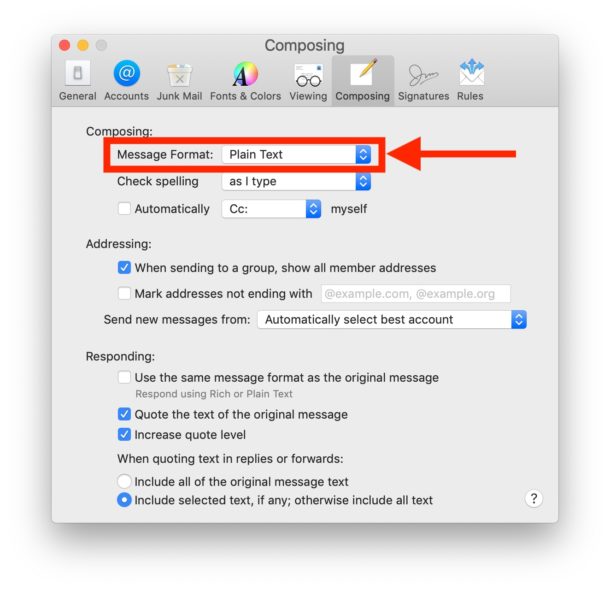
All new emails will be composed and sent as plain text.
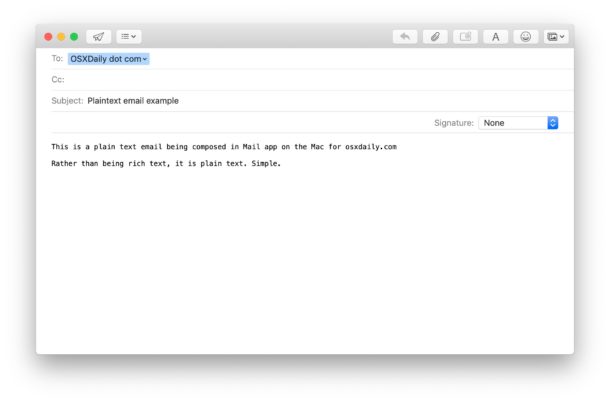
Note that making rich text modifications can still override the plain text default. To avoid that behavior when composing an email with a picture or rich media, try attaching the images (as in, literally including them as attachments) rather than embedding them into mail messages from copy/paste.
Speaking of copy and pasting, if you plan on pasting in some rich or styled text to the email message body, you can always convert it to plain text first through the TextEditor app. This can give you a preview of what the text will look like as well.
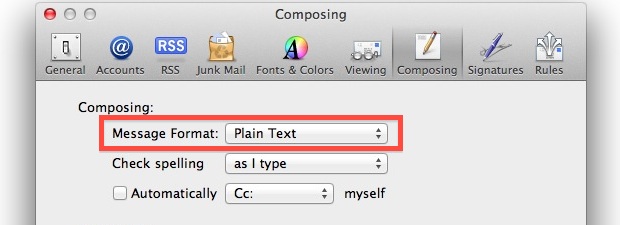
This applies to basically all versions of Mail app for Mac. In earlier Mac Mail versions, the setting looks slightly different like the following but is otherwise the same:
Thanks for the tip idea, Gary!






[…] you’re constantly stripping formatting funkiness out of emails and you use the OS X Mail app, consider toggling the preference switch to always send emails as plain text rather than rich formatted text. This will force all outbound emails to be normal looking, even if […]
Everyone should do this, or else emails look ridiculous with Comic Sans size 42