
Change the Shell in Mac OS X Terminal
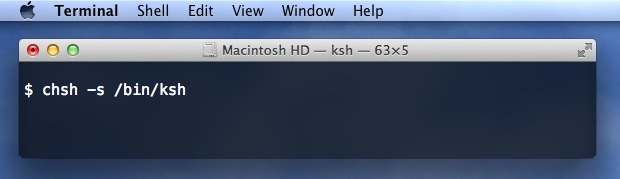
Tired of bash? Prefer zsh, ksh, tcsh, fish, or sh? You can quickly change the default shell in Terminal app, in addition to changing a users default login shell for when logging in remotely with SSH or otherwise. Here’s how to do both.
How to Change Terminal Apps Default Shell in Mac OS
This adjusts the new shell that is used upon Terminal app launch, new terminal windows, and new terminal tabs, becoming the new default Mac shell.
- Open the Terminal app if you haven’t done so yet
- Open Preferences from the ‘Terminal’ menu, then click the “General” tab (or “Startup” tab on older Mac OS versions)
- Under “Shells open with” choose “Command (complete path)” and set the new shell
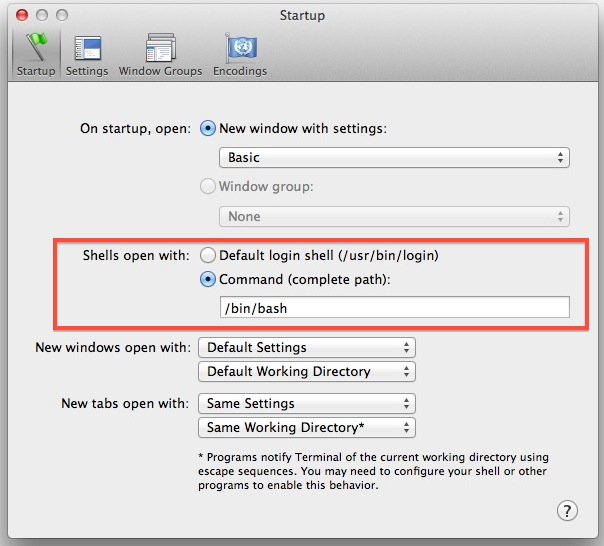
Default shell options that can be switched to that are bundled with Mac OS X include the following paths:
/bin/zsh

/bin/ksh

/bin/tcsh

/bin/bash

/bin/sh
Placing any of those in the ‘Command (complete path)’ box will set the new shell as the terminal window default.
Note this changes the default shell used by Terminal app, which is different from the default login shell, that is changed through the following step instead…
Change a User Default Login Shell in Mac OS X
You can also change the default shell through the command line itself using the chsh command, which is shorthand for ‘change shell’. This will be necessary if you want the default shell to be different when logging in with SSH or telnet. You’ll need to authenticate each change as well, the command will ask directly or you can prefix it with sudo. Here’s how to set the default user shell to zsh, bash, tcsh, ksh, sh, or any other shell for that matter.
Change the user login default shell to zsh:
chsh -s /bin/zsh
ksh:
chsh -s /bin/ksh
tcsh:
chsh -s /bin/tcsh
bash (default):
chsh -s /bin/bash
sh:
chsh -s /bin/sh
other shells:
Simply adjust the path for chsh to set, like so:
chsh -s /path/to/alternate/shell/like/fish
We covered the first part of this years ago and it hasn’t changed since, though it’s worth noting that in modern versions of macOS use zsh as the default, including Monterey and Big Sur, whereas older versions of MacOS and Mac OS X used bash as the default shell, like Mavericks, Lion, Sierra, Snow Leopard, etc.






whats the command line for terminal shell with a dollar sign
You may also need to edit /etc/shells to allow changing to an unusual shell (such as /usr/local/bin/bash).
this was exactly what I needed to do after getting a
chsh: /usr/local/bin/zsh: non-standard shell
Thanks!
[…] executed command while replacing the erroneous syntax. You’ll need to be using the default bash shell for this to […]
[…] enter the new shell on a session basis to start testing it out, if you like what you’re using change the default shell to fish with the following command (/bin/bash is the OS X default shell, if you want to go […]
Point for chiggsy for mentioning zsh.
FWIW, /bin/zsh exists on my stock Lion install (I suspect it’s there on any stock Lion install).
Use directory services. For example:
sudo dscl . -change /Users/chiggsy UserShell /bin/bash /opt/local/bin/zsh
Or right mouse Click in System preferences > accounts > yourLoginName and change it system wide :)
What is the difference between the following:
ksh
tcsh
bash
sh
When you want to create Scripts, to automate something on your system (e.g. renaming a lot of files, or what ever) the different shells provide different commands…
It’s really a difference in scripting and some shells offer different binaries than others. Bash is the most common, there is little reason not to use it.
With MacPorts installed you also able to install newer versions of the Bash (e.g. 4.2.20) and start it by default.