
How to Forward a Text Message on iPhone
Apr 16, 2012 - 24 Comments
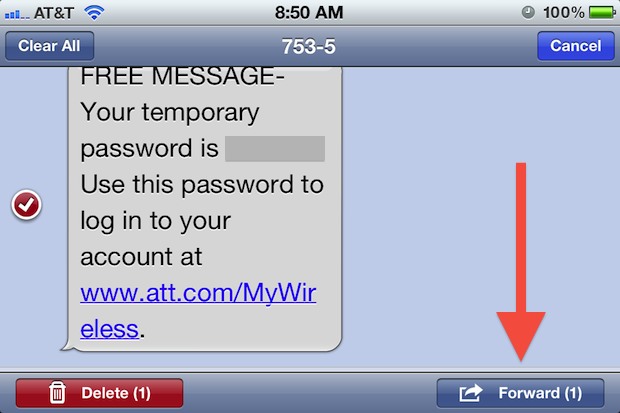
Forwarding text messages from one sender to another is made very simple on the iPhone. The process is the same whether it’s a text, SMS, MMS, or even an iMessage:
- From the Messages app, open the text message you want to forward
- Tap the “Edit” button in the upper right corner
- Tap the message you want to forward so that it shows a red checkbox next to it
- Tap on the “Forward” button in the lower right corner
- Enter the recipient in the new message screen and send as usual
The forwarded message sends to the recipient as any other message would, and an SMS or MMS can be forwarded as a mass text message as well. Group texting is useful for reducing text message fees with some providers and it’s also a great way to annoy your entire iPhone address book.
And yes, text messages can be forwarded from an iPhone to iPad, iPod touch, or Mac running Messages, and vice versa, though sending to a device other than an iPhone obviously won’t register as an SMS.






My iPhone 5s does not have the forward arrow on bottom of screen to forward any text messages… How do I get the arrow to appear ?
To forward a text message to an email address not to a phone how do I do that thank you so much
I am trying to foreward back a text message and add to the message , but the phone number is not in my contacts anymore so when i went back into the message he sent me to retrieve the number of in my whole entire text that I was trying to forward back to him disappears and now I can’t find it
Thanks everyone I have been pulling my hair out because the forward option disappeared!! Tried everything – except turning my phone off!! Got more & more frustrated, read this blog, turned the phone off, turned it back on & problem solved!! Too easy!!! Thanks again!!! xxx
I m using an iphone 5s. I m unable to forward a text message because the arrow does not appear at the bottom right cornner. Please help.
I got the forward bent arrow on the right bottom back by turning off the power for a few minutes and turn it back on
I have the same problem as Diane. the forward arrow just disappeared as an option
Thanks this really worked so easy
iOS 7.1.1 Method
===========
1) View SMS message.
2) Hold finger on message text until Copy | More… appears.
3) Select More…
4) Press bent arrow in bottom right corner.
5) Et voila!
This works! Many thanks!
MY PHONE IS BROKEN AN I NEEDTO EXPEDITE MY MESSAGE O MY HUSBANDS PHONE FOR THE DAY HOW? CANOT GETINTO MY PHONE
Well Christine, I would start by reading the article about how to forward text messages, but also, I imagine that typing ALL CAPS with many typographical errors in an incoherent question or statement is going to help you send that text message. Call your cellular provider if the phone is toast, good luck!
Does not work for me. hold finger on msg until ‘copy/more’ appears, select ‘more’ and then given no other options except for ‘delete all’ or ‘cancel’ on top. No forward anywhere, no bent arrow at bottom. Just blank where you can type a msg – and ‘send’ to the right of it, but send does not do anything when you press it. I have a 6 plus – and several problems I had not encountered before.
iOS 7. is different
1) Open the message you want to foreword
2) Hold you finger on one of the message responses
3) You will see circles next to all the message responses which you can select
4) In the bottom right hand corner your will select the arrow (foreword)
5) you will be taken to a new screen where you can enter or select your forewords information
Thanks for the correct answer.
My arrow (forward) is not showing up now. This is how I’ve always send forwards but for two days now it’s gone. The only option is copy or delete.
in my iphone 6 i used to have no. 4, the forward arrow but i lost it. what happened ? did i messed up with my settings? pls help
thanks Jeffery,
Still doesn’t work
I have an Iphone 4. I click on the message I want to send. You say then click on the edit button in the right hand corner. I do not have an edit button. The button on the top right hand on my phone says contact.
I followed the instructions but when I tap the mssage I want to forward, I do not get the “forward” button in lower right corner. On my phone when I tap edit, all of my messages have a red circle with a white horizontal line going through it. When I tap the message I wan to forward, the circle turns so that the white line is now verticle…almost like a key.and then the word “delete” appears in upper right corner…but that is it. What in the heck could possibly be wrong with this thing? :)
I would appreciate any help with this as it is very frustrating. Thank you kindly!
Turn off iMessage (Settings>Messages>iMessage>Off)
When I try the above to sned a text message to my email address it gets sent as a text message to my phone. In other words, I forward a txt message fromsomeone else to my email address and it comes as a text message on my phone.
Did you find a solution to this? I am frustrated with the same issue