
Use Apple ID to Share Files in Mac OS X Without Creating New User Accounts for Networking
Modern versions of OS X allow you to share files securely with another individual without creating a new user account for them. Instead, authentication gets handled by the individuals Apple ID, and a separate password is set to allow that Apple ID to share files and folders on your Mac.
This can be preferable to creating a new user account if you only wish to share some files and you don’t want to provide a user with complete login access to the Mac. Additionally, it can be an easy way to allow a user with an already existing Apple ID and iCloud login to get quick network access to the Mac.
How to Share Files On Mac OS X Without Creating A New User Account By Using Apple ID’s as Network Logins
Using Apple ID’s as network sharing logins is a two step process in OS X, first it must be enabled, and then an Apple ID must be used during a network login event. We’ll show you how to do both.
How to Set an Apple ID as a Valid Network Sharing Login
This taps into the systems Address Book to approve file sharing access:
- Open System Preferences from the Apple menu
- Click on “Sharing” and be sure that “File Sharing” is enabled, as shown by the checkbox next to it
- Under “Shared Folders”, select an existing folder or add a new folder that you wish to share
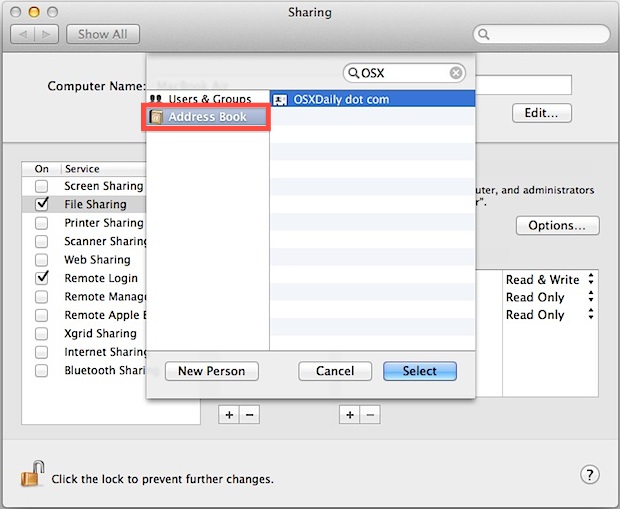
- Under “Users” click the + plus button
- Select “Address Book” and find the person whose Apple ID you wish to use as a valid share login, then click “Select”
- Set a password and close out of Sharing
With that set up the user can now connect to the specified shared directory using only their Apple ID, they do not have an actual user account on the Mac and they could not log into it for purposes other than file sharing.
The login procedure using an approved Address Book entry is the same as connecting to any other shared Mac, just remind the connecting user their password will be different.
Connecting to a Shared Network Mac with Apple ID as the Login
Now that the Mac is ready to accept a valid Apple ID as a network login from the allowed user, it’s as simple as connecting to the network share as if it were a standard server connection event on Mac OS X:
- From the OS X Finder, pull down the “Go” menu and select “Connect to Server”
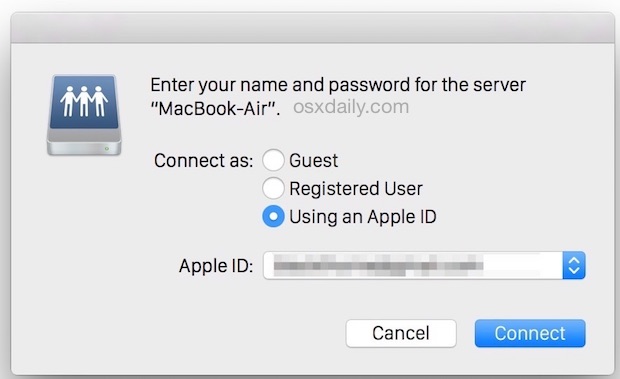
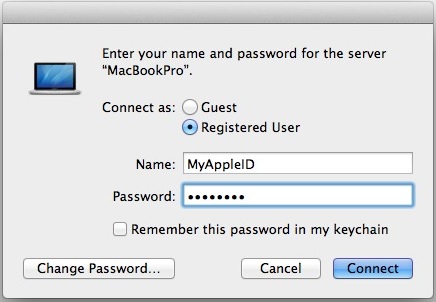
- Select “Registered Guest” and enter the Apple ID as the name – or, in new versions of OS X, check the ‘Use Apple ID” option and enter the approved Apple ID from the list to login to the network Mac
- Use the password that was set by the user in Sharing rather than the Apple ID password, then connect as usual
You can assign as many Apple ID’s as necessary to a shared directory, and you could also assign different Apple ID’s to different folders.
This will even work for someone connecting to a shared Mac from a PC, the only requirement is a valid Apple ID, either from iTunes, the App Store, or from elsewhere in the Apple ecosystem. It does not work with Remote Login and SSH, however.
This requires OS X Yosemite, Lion, Mountain Lion, Mavericks, or any modern version of OS X on the Mac, and obviously the Mac must have iCloud, and the user to login must have a valid Apple ID / iCloud login too.

Remember, the Apple ID is the same login as that which gains access to the App Store, iTunes Store, iCloud, and much more, serving as the general gateway login to your Apple experience. If you forget that Apple ID, you’ll need to recover it.






How do you reverse this procedure? I am using an OS X server and I accidentally connected to a share on the OS X server using my apple ID. Now whenever I connect to the server with AFP or SMB is always connects with my apple ID not my username and I have had nothing but major permissions problems with this optional way to logon to a network share. I called Apple and they have no idea how to disassociate and apple ID with a network share. Please help!!!
Did you ever get that figured out? Since upgrading to High Sierra, we can only connect to a server using the Apple ID, even if we try to connect as a registered user. Thanks for any solutions you’ve found. —Stefem
Did you figure something out? same problem here… no solutions found.
If only somebody had mentioned that since Yosemite, Apple automatically delegates trust to file shares for the entire system to your iCloud account when it is set up, so that any device logged into the same iCloud account with admin privileges has admin access to all other Macs logged into that same account! A neat trick, to be sure, unless you intend that file sharing should not involve or trust Apple, but exclusively your user credentials.
Thankfully, you can fix it. Here’s how: System Preferences, Users & Groups, unlock as necessary. Right-click your user account, and choose Advanced Options. Delete all of the aliases (do not delete the iCloud account, only the aliases, unless you want to log out of iCloud).
Great to know, but fortunately nearly everyone I share with has Lion so we can just use AirDrop :)
You left out an important aspect – this works for *anyone* in Address Book! This provides one-time access to literally anyone for quick file sharing. It doesn’t matter if they are on Windows, Mac OS X Tiger, Snow Leopard, Linux, anything works. Create an entry in Address Book for them, set a password, limit their access to a single directory, that’s all they get! Secure, easy, simple.