
Extract & Uncompress Any Archive File with Unarchiver for Mac OS X
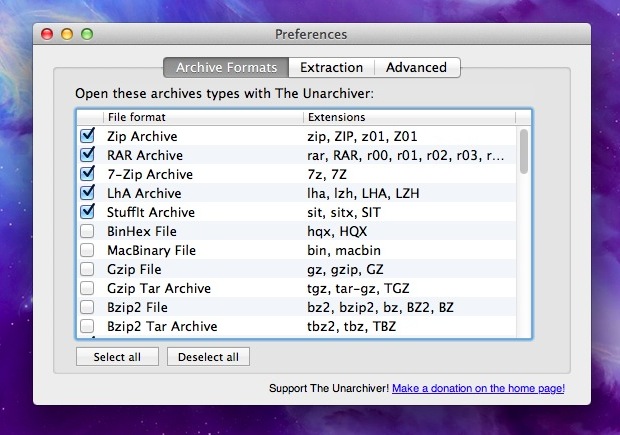
The Unarchiver is a one stop shop for extracting and uncompressing virtually any archive file that you’ll come across on a Mac. Easily managing the usual archive formats of zip, sit, gzip, bin, tar, hqx, it’ll also easily tear through less common archive types including rar files, 7z, bzip2, cab, sea, exe, rpm, cpgz, and many other obscure compression formats that OS X’s built-in Archive Utility can’t handle.
Once Unarchiver has been affiliated with the archive formats of your choice it will automatically launch and extract the files if you come across them, the integration is completely seamless much like the Macs default utilities for decompressing files. There are a variety of options for managing the archives as well, you can set Unarchiver to always extract to a specified folder, trash the original archive after extraction, open the extracted folder immediately, adjust the modification time of the created folder, and a few other handy adjustments.
Unarchiver is a free download and should be considered a must-have utility for all Mac users. While most archives these days are made as zips, you never know when you’ll encounter one of the more unusual file formats, so instead of getting stuck with a useless uncompressable archive, extract it all with Unarchiver.
The Unarchiver works with just about every possible version of Mac OS X, so you don’t need to worry about system compatibility. Beyond that, The Unarchiver will read, decompress, and extract archive file formats that are not even related to the Mac platform, so the obscure file archive formats from other worlds will open easily, which is part of why it makes the utility so powerful.
For best results, you should probably associate Unarchiver with as many archive file formats as it can detect and associate with, since The Unarchiver tends to be able to decompress some files and extract some archives that the built in extraction utility of OS X is unable to. Of course you can also just associate the app with file types you wouldn’t normally come across too, whatever works for you.






Leider habe ich keinen 💻, only iPad Pro and Windows Desktop, but if I try to upload several files it going very
Slowly because of connection, so I decided to upload
Every file separated ans so it’s going.
Thanks for your useful tips, have a great weekend 🙏🌹
Why is it that I can’t select or deselect archive formats while in preferences? The only format I need is one of the few unselected.
Unarchiver is fantastic but if we only want to handle something like bzip can’t we just use bzip2 decompression from the terminal?
Unarchiver is a must, they should consider charging something, they deserve it.
Been using it for years. Great app.
The Unarchiver is broken since the addition of sandboxing. Extracted apps won’t open and some files are unreadable, even with v3.2.
BetterZip does the job for me, even though it’s ugly as hell.
I hope Apple adjusts their policy then, some of these apps are too useful to not allow simply because of the sandboxing requirement.
I experienced the same Sandbox problems; apps not opening etc. I reverted to my trusty Archiver app.
+1 for The Unarchiver, it is one of the first things I add when configuring a Mac