
Stop YouTube Links Opening the YouTube App in iOS
With how prevalent HTML5 is these days it seems unnecessary for the YouTube app to launch every time you tap a YouTube video link on an iPhone, iPad, or iPod touch.
If you’d rather watch the movie directly in Safari, here is how to stop the YouTube app from launching in iOS.
Stop YouTube Links Opening YouTube App in iOS with Restrictions
This works the same in all versions of iOS:
- Open “Settings” and tap on “General”
- Tap “Restrictions” – enable them if they aren’t enabled yet, setting a passcode in the process
- Flip “YouTube” to OFF and close out of settings
Essentially this is disabling access to the YouTube app in iOS.
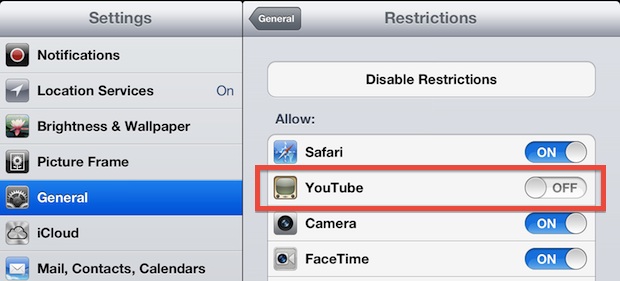
Now you are free to click YouTube links from Mail, Safari, or where ever else, and the YouTube app won’t open. A side effect to this tip is that it also hides the YouTube icon from the home screen, which may or may not be desirable.
This feels like it should be a separate preference choice for iOS, but it isn’t one yet. Regardless, it’s a great tip from Macgasm.
If you know of another solution, share it with us in the comments below.






In iOS 12 there is nothing called “restrictions” under “general”.
This is great and so helpful, I love Youtube, I can’t believe how great this is, I just wanted to let you know with this great friendly comment.
This is no longer useful now that the YouTube option is no longer there thanks apple for tying it all yet again😒…
Very useful now as the YouTube app no longer works on the original iPad.
Heya i am for the primary time here. I came across this board
and I in finding It really helpful & it helped me out much.
I’m hoping to present something again and help others such as you aided me.