
Stop iPad Screen from Dimming or Locking Automatically
The iPad screen defaults to automatically dim itself and then turn itself off to black after a fairly short amount of time of inactivity. That’s great for preserving battery life of iOS devices, but if you’re like me you keep an iPad or iPhone alongside you full time while working as a control panel for Pandora, podcasts, and email, and having the screen lock after a few minutes of inactivity is annoying.
Fortunately you can adjust the amount of time it takes for the display of iPad to dim and lock itself.
How to Stop iPad Screen Dimming and Locking Itself Automatically
Here’s how to prevent the iPad (or iPhone or iPod) screen from dimming and auto-locking:
- Open “Settings” app
- Choose “Display & Brightness”
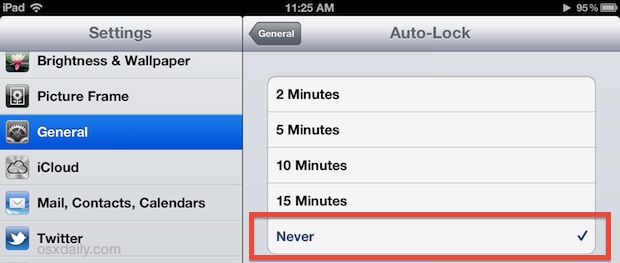
- Tap “Auto-Lock” and choose “Never” as the option for auto-locking the screen
Close out of Settings, and now when you leave the iPad, iPhone, or iPod touch screen alone it won’t automatically lock itself or even dim.
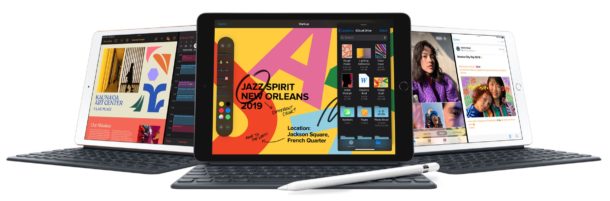
This feature exists on all iPad devices, regardless of how new or old they are.
On older versions of iOS you can also make the adjustment in Settings > General > Auto-Lock > Never
A caveat to remember is this will always be in effect, meaning you will have to lock the screen yourself using the top power button when you do want the screen to go dark. That’s especially important for when you’re on the go, if not to prevent battery drain than to help protect your personal data in case you happened to lose the device (don’t forget to use a strong passcode too).
Perhaps in an ideal world, there would be different power management settings for auto-locking for if a device was plugged in and if a device was on battery, but iOS does not have that feature yet.






Need help with ipad settings. I wanted to turn of the auto shut down when the battery reaches 45%. Im on ios 9.3.6
I don’t know about y’all, but even when set to “never” my screen still dims. Frustrating. I do not want to manually change this setting every time I get into and out of the car. I would like an option to keep the screen lit and unlocked while playing music, watching movies, using gps, and reading. Are there any third party apps?
I know, have you a solution for the problem?
This unfortunately doesn’t work with the new IOS upgrade – I have 3 iPads running Staff/Guest sign in and have the units dimming and going off – I’ve changed the setting to disable as advised above and this doesn’t do anything – units still dimming and turning off.
Is there an application that can be downloaded and prevent this occurring. (Apple aren’t helping).
I love my iPhone and have for years but this auto dimming pisses me off. I have an 8 now and everyone on our plan has iPhones and this is going to be the last
I have Iphone7plus, it gets lock automatically while i m using it.
when i use any app it closes the app automatically and its locked.
What should i do?
Thanks. I like my iphone, but holy smokes am i tired of entering the passcode every 10 seconds when i sm reading books or websites.
Iphone6 plus go to settings the display and brightness after that go to auto lock scroll down to never
I have the iPAD mini and my only two visible options are 2 minutes and 5 minutes…there are no other options present, including any grayed out options (there are none).
Is there a way around this? I really need my screen to stay on when I’m at work.
Mine auto-locks after 30 seconds anyway, regardless of how many minutes I’ve chosen…
Only the “Never” setting works, but then, I don’t want the screen to remain lit forever…
Same here!
My iPhone 6 auto-locks at 30 seconds and it’s greyed-out so I can’t change it! Really annoying!
For all those, who can’t find the “never” option. You’re most likely using a company iPad. The company can apply security profiles to your iPad. They can (and mostly do) hide the longer auto-lock settings and also enforce you to use a stronger password than the 4 number code.
Will keeping an iPad screen on for 4-5 hrs continuously, without using the device, in any way deteriorate the screen or the touch capability?
Even after I’d ticked ‘Never’, my iPadAir continued to lock automatically after a few minutes.
The “never” option appears to be missing. I think John may spot on with his comment. Seems silly to not allow the screen to remain on. Apple has little faith in their customers.
Nope apple won’t let you choose to keep your iPad from auto locking anymore. Someone complained and ruined it for everyone. Welcome to the new government where everyone is just like you.
THANK YOU! it’s worded just enough that you look past it when used to android os
They got rid off it. Now the max limit is 15 min
Any other way to keep it frm dimming?
The max is Never.
Why doesn’t iOS have power management settings to auto lock when on battery and stay on while plugged in? Windows has had that option for decades. I love apple devices but there some basic things they just drop the ball in. Thanks, Tim
I agree with this
For security reasons I always have a 5 minute auto lock turned on. If I lose or forget my phone, or someone steals it, hopefully it has locked down and a passcode is required again.
Oh wow such important. the only way this is useful is it doesn’t waste the battery by turning off the screen. when you spend years typing in a password that never gets used in any practical sense then you eventually will want to turn it off. when did you hop on the apple technophile band wagon?