
Open Notification Center with a Keyboard Shortcut in Mac OS X
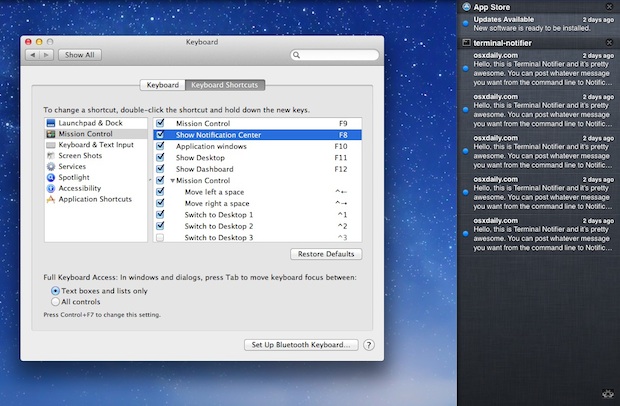
Want to open Notification Center with a keystroke on the Mac? It can be done by setting up a custom keyboard shortcut.
Typically Notification Center of Mac OS X can be summoned either with a click of the menu bar item in the upper right corner, or a two-fingered swipe left on a trackpad, but you can also set a custom keyboard shortcut to see your notifications or alerts on the Mac.
This article will show you how to setup a custom keyboard shortcut for accessing Notification Center in Mac OS:
How to Open Notification Center by Keystroke in Mac OS
To use a keystroke for accessing Notification Center you need to create a keyboard shortcut, here’s how that process works in Mac:
- Open System Preferences from the Apple menu and choose “Keyboard”
- Click the “Keyboard Shortcuts” tab and select “Mission Control”
- Locate “Show Notification Center” and click to the right of the text to enter an input box, then hit the keyboard shortcut you want to assign to open Notification Center (like fn+control+F8)
- Test it out to confirm the shortcut works for accessing Notification Center, then quit out of System Preferences
You can set any keystroke you want for accessing Notification Center, just be sure it does not conflict with another command or process on the Mac.
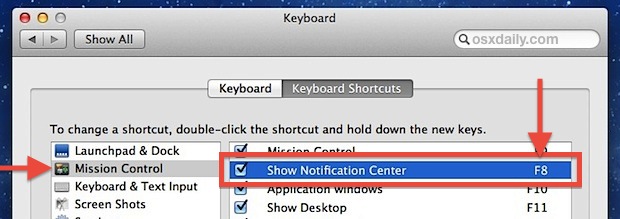
F8 is a good key shortcut to assign for Notification Center since it doesn’t serve a use otherwise outside of iTunes, but you can set it to whatever you want, just be sure it doesn’t conflict with another keyboard shortcut that you use often. You can also assign multiple keystrokes to see the notifications if you want, but it’s probably better to reserve other keystrokes for other custom keyboard shortcuts you may want to setup on the same Mac later.
As a Mac user who tends to spend a lot of time in Terminal and typing in general, I find keyboard shortcuts to be much faster than using touchpad gestures or the mouse to click the icon. But everyone is different, so try out the keystroke method versus clicking the Notification Center icon, vs the four-finger side swipe, each of which accesses notifications center in Mac OS.
Now that Notification Center is part of both Mac OS X and iOS it’s more useful than ever, check out some more tips on the topic if you’re interested.






My favorite tool to control and manage all my shortcuts is BetterTouchTool: http://www.boastr.de/ A fantastic OSX tool that lets me assign actions by application or globally.
This is a great tip. For some time now I have had Dashboard fully disabled making my F4 key utterly useless, but with this tip, along with FunctionFlip I was able to remap the key to open Notification Center. Works like a charm!
Paul, I think the best you can do for now is drag *everything* below the ‘do not show’ line. I shall have a rummage around and see if I can find a quick solution to completely disabling it.
Paul & Will,
Great questions, here is how to completely disable Notification Center in OS X and also remove the icon from the menu bar:
https://osxdaily.com/2012/08/06/disable-notification-center-remove-menu-bar-icon-os-x/
Any terminal hacks for completely disabling it?? I just don’t want it running on my system at all.
Is there a way to turn on/off “Show Alert Banner” with keyboard shortcut?