
How to Edit the Hosts File in Mac OS X with Terminal
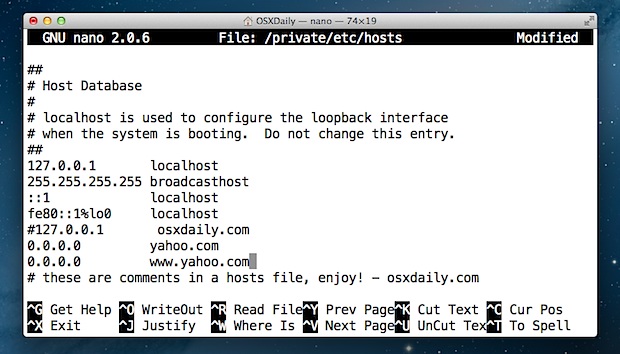
Need to edit or modify the hosts file on a Mac? This guide will show you exactly how to edit the hosts file in Mac OS. You’ll find hosts in Mac OS X is stored at /private/etc/hosts but it can also be accessed at the more traditional location of /etc/hosts. That said, if you’re looking to edit hosts, you’ll want to target the file located in /private/etc/ though.
We’ll walk through how to manually edit the hosts file in macOS Big Sur, MacOS Mojave, MacOS Catalina, MacOS High Sierra, MacOS Sierra, OS X El Capitan, Yosemite, OS X Lion, OS X Mountain Lion, and OS X Mavericks, this will be done with the command line using the simple text editor called nano. Don’t let the command line or Terminal sound intimidating though because it’s not, we’ll make the entire process of editing a Mac hosts file super easy.
How to Edit Hosts File on Mac OS
Let’s get started making some edits to /etc/hosts in macOS and Mac OS X!
- Launch Terminal, found in /Applications/Utilities/ or launched through Spotlight
- Type the following command at the prompt:
- Enter the administrator password when requested, you will not see it typed on screen as usual with the command line
- Once the hosts file is loaded within nano, use the arrow keys to navigate to the bottom of the hosts file to make your modifications
- When finished, hit Control+O followed by ENTER/RETURN to save changes to /private/etc/hosts, then hit Control+X to exit out of nano
- Quit out of Terminal when finished
sudo nano /private/etc/hosts
You can verify your hosts modifications immediately with ping, Safari, or any other network app.
Changes take effect immediately though some adjustments may need to be accompanied by a DNS flush which can be done with the following command in macOS 10.12+ through OS X 10.9:
dscacheutil -flushcache;sudo killall -HUP mDNSResponder
When flushing DNS cache with that command you will need to enter the admin password.
If you’d like to see how this entire process is accomplished before doing it yourself, watch the video below to see a demonstration of the hosts file being modified on Mac OS X to block the website ‘yahoo.com’ from loading:
Note: the procedure is the same with older versions of Mac OS X, though the path to hosts could be /etc/hosts if the version of Mac OS X is dated significantly.
Tips to Consider When Editing Hosts Files
The following tips go beyond Mac OS X and apply to any hosts file, be it on a Mac, Windows, or Linux.
- The preceding IP address is where the following domain will resolve to
- Always add new hosts to their own unique line
- The # symbol functions as a comment, it can be used to add comments to hosts entries or to comment out hosts modifications
- You can block websites through hosts by adding them to the file and sending them nowhere, preventing access
- You can redirect websites locally using the same logic, perfect for setting up test domains
- With some modifications, it can be necessary to flush DNS cache with dscacheutil before the changes take effect
- For juggling multiple hosts files consider using a manager app like GasMask
- If the hosts file claims to be locked, it’s because you did not prefix the edit with the “sudo” command
- Consider making a backup of hosts if you plan on making significant modifications, or it’s your first time editing the file (process described below)
Making a backup of the hosts file can be a good idea if you plan on making significant changes or just want to play around with modifications and see what happens, a simple way to do that would be to use this command, which would store a backup in your home ~/Documents/ folder:
sudo cp /private/etc/hosts ~/Documents/hosts-backup
Then, if you wanted to restore the modified hosts to the backup of the original file, you just have to swap the paths like so and rename the file again:
sudo cp ~/Documents/hosts-backup /private/etc/hosts
That’s it, though again you may need to flush the DNS for changes to take effect.
Finally, it’s worth mentioning that if you’d prefer to avoid the Terminal and the command line completely, you could try the easier method of using a preference pane to modify the contents of hosts that way through System Preferences instead. Generally speaking though, we recommend just using the tools that are built directly into the Mac.
Let us know in the comments if you have any questions or tips.






“If you’d like to see how this entire process is accomplished before doing it yourself, watch the video below to see a demonstration of the hosts file being modified on OS X to block the website ‘yahoo.com’ from loading:”
Well, video is no longer available. There is nothing but a blank space at the place where video must be.
Hey Mike, you may have a content blocker installed that is preventing the YouTube video embed from showing? The video works for me.
Thanks a lot! It really helped me :)
Tone of thanks, I am new in Programming. thanks a lot.
My mac’s host file is missing that last line that is supposed to say:
fe80::1%lo0 localhost
why would this be? should i worry about it?
please explain in very easy to grasp terms?
thanks in advance!
Does anybody know how to get rid of Website Blocker? I have a .dmg file of website blocker and the application, but the application is not available for my 10.6.8 Snow Leopard. I have never even installed the application, yet it is spawning launches in my console center every 10 seconds. I have moved all the contents of website blocker to the trash, but the trash will not let me delete due to the item “WB” being in use. Please help
Hey, can we also add an alias for uri example: 127.0.0.1/public test.dev || so when i fire test.dev it will auto go to the /public folder … big thanks
so if you use windows you’re not doing this pretty much?
Correct, this is for Mac OS X, but you can edit a hosts file in Windows too.
hi all, just picked up a new MBA 13″ and when i tried to enter the sudo command into terminal, it asks for a password which i enter and after i get a message – “command not found”
i have done this a few times on other machines with no problems, but it seems that the new OS is not liking the Sudo command.
Anyone know a fix ??
You know – it’s 1 am and I was butting my head against my desk after try to make changes to the ‘hosts’ file until I saw this: “followed by ENTER/RETURN to save changes”.
Sometimes I need things REALLY spelled out!
Thanks! You rock as the kids say…
I do not feel confident trying to do this myself. Would disk utility automatically fix this or not? I am locked out of facebook on this Mac, and want to get back in cause my tablet is not user friendly. Once before i tried to fix a problem on my PC and 3 laughing clowns were all that was left of my hard drive. :( Thank you.
I can’t thank you enough!
The trick with the hosts file helped me restore iPhone 5s on OS X 10.6.8.
Thank you very much once again.
thumbs up! it works perfectly. easy tutorial
Is it possible to block websites with just the ip address if the blocked site instead of the name also?
And can I block communication of a program from accessing the internet this way?
If not please tell me how.
Yes, placing an IP in the hosts file with another domain associated with it will prevent that IP from being accessed, or use the loopback address (127.0.0.1)
Very Helpful! thanks!
thank you so much!!!:)
Mountain lion pretty much ignores /etc/hosts
it uses directory services now, and you need to learn to use dscl in terminal in order to tame it.
My mac shows “access denied” even though I am the administrator. It suggests that I find the file and unblock it but I dont know how…
You need root access to edit the hosts file, this is NOT administrator access.
Use the sudo command in the terminal.
the commands have to be :
1. sudo nano /private/etc/hosts
1.1. put your changes
1.2. CTRL+O (press ENTER in order to save)
1.3. CTRL+X (to exit nano)
2. sudo killall -HUP mDNSResponder
3. dscacheutil -flushcache
enjoy
can someone help me. whenever i save it, it looks for the host file…
why whenever i save my or hit command+o it looks for the hosts file…
I messed around with terminal to unblock facebook in Vietnam and now I can’t re-access it in the States. What do I need to do? Can someone help?
Funciono perfecto, Gracias!!
Hi I got a question, I just got my MacBook and I’m running mountain lion. I’ve tried editing my host file but when I open the window, there is nothing in there. I’m seeing everyone with default settings that you’re not supposed to mess with but I don’t have them in there. I have nothing! Is that normal?
It’s “Hosts” with an “s”, from the terminal if you open a file that doesn’t exist, it will create that file (but it’s empty, of course).
Actually with a small “h” too.
hosts
HUGE MISTAKE in these instructions.
The changes will not save with:
When finished, hit Control+O to save changes to /private/etc/hosts, then hit Control+X to exit out of nano
DO THIS:
When finished, hit Control+O, THEN CLICK ENTER to save changes to /private/etc/hosts, then hit Control+X to exit out of nano
Thanks! I was wary of doing anything wrong and messing things up beyond my own (very) limited abilities, and I would have spent a while googling more and trying to figure it out.
Is there anyway to use the hosts file to block facebook in Mountain Lion? I’ve added the entry to the hosts file, and trying to ping http://www.facebook.com shows that it won’t connect, however if I type http://www.facebook.com into Safari, it will still manage to go to facebook’s website. Does this have something to do with the facebook integration in Mountain Lion?
facebook redirects to https:// these days
you’ll need to add facebook.com and http://www.facebook.com to block it effectively
Something is causing my hosts file to be reset on each reboot mt. lion on macbook pro 7,1
this is not happening on imac running same software…
anyone experiencing this?
ok, did some more looking and found this http://superuser.com/questions/354902/etc-hosts-getting-reset-in-lion
idk if you guys have ever done a post on this but it would be worthwhile. I run cisco vpn for work, go figure…
Heres my set up
hosts file blocking
http://someonewhocares.org/hosts/
You can also use the hosts file to rickroll people, just add the youtube iframe code to the index.html in /Library/WebServer/Documents
then add an entry to the /etc/hosts file
127.0.0.1 somedomain.com
I used the rickroll hosts trick when setting up a laptop for my mate who didnt want his kids accessing things they shouldnt, by adding a list of unsuitable domains to the hosts file.
So whenever they try to look at naughty sites they get rickrolled.
Then install icefloor the gui frontend for the pf firewall in mountain lion
icefloor is made by Hany El Imam who also made the excellent noobproof and waterroof for previous versions of osx
http://www.hanynet.com/icefloor/
Then set up the emerging threats list with the pf firewall
http://ikawnoclast.com/2012/04/using-the-lion-pf-firewall-with-the-emerging-threats-list.html
I have been talking to Hany the developer of icefloor and he should be adding the emerging threats list to the next version.
What I need is a list of known attack sites to add to my hosts file. I’ve seen a ton of them in my logs but I’ve never bothered to collect their domains.
What is a difference between /etc/hosts and /private/etc/hosts?
/private/etc/hosts is the source, /etc/hosts is hard linked to it. If you change one, both change. The proper one to edit is /private/ though.
It’s even simpler than that. There is only one host’s file and that’s in /private/etc/, /etc is a symlink (not iirc, a hard link) to /private/etc/. A symlink is, to all intents and purposes, the same as a Finder alias.
Therefore if you go to /etc/hosts (via the symlink) you’ll end up at the exact same file as if you got there via /private/etc/hosts (the ‘real’ path). It’s the same as if you make a Finder alias on your Desktop of your Documents folder and double click on it. That’ll take you to the same place in your file system as going directly to the Documents folder.
~W
I did NOT put that spurious apostrophe in the word host…
DAMN YOU AUTOCORRECT!
You can use Gas Mask too
http://code.google.com/p/gmask/
You should never ever use Text Edit to edit unix based files.
If you want a free editor use TextWrangler, if you download TextWrangler from the Mac App Store you need to install the command line tools separately.
http://www.barebones.com/support/textwrangler/
There are 2 ways to edit system files with TextWrangler.
Open the file from the Finder with TextWrangler and then enter you admin password, or use the sudo command with the TextWrangler command line tool to open the file.
TextWrangler is a fantastic free text editor, highly recommended!
Ive never had any problems using Text Edit as long as you ignore all the problems of permittion issues.
I have tried this in the past using but using large hosts files like from http://winhelp2002.mvps.org/hosts.htm caused my processor to run hot constantly when the internet is connected. Is it still like that?
sudo vi /private/etc/hosts
I can’t remember how to do anything in vi and I’m probably not alone, I think unless you’re a frequent user vi/vim are too easy to forget.
But, to make it super easy, you can do this:
sudo open /private/etc/hosts
That takes it into Text Edit
Agreed that vi/vim are probably not something for the feint hearted. As mention in another comment, using Text Edit is not a good option for unix files. Best to stick to nano instead :D
Once you learn vi, you will be glad you did.
You can do things like search and replace based on regular expressions, sort lines, convert case, indent etc.
Correct, you can edit Hosts file in OS X with TextEdit by entering:
sudo open -a TextEdit /etc/hosts
Type your admin password, hit return, then TextEdit launches as root with the hosts file on the Mac. You can save and edit the file as usual from TextEdit this way in OS X. Easy for novices, but nano, vim, emacs, etc are better.