
Change the Default Font of Notes App in Mac OS X
Aug 8, 2012 - 14 Comments
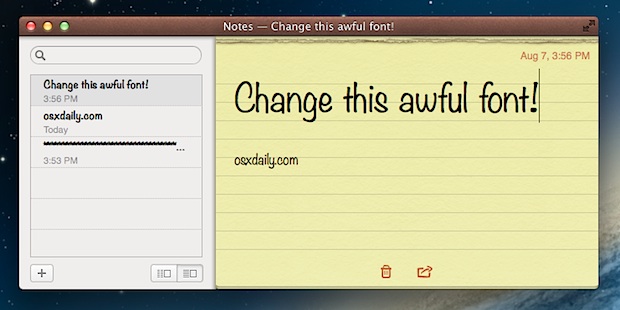
The new Notes app in OS X features a default font that is kind of hard to read and looks a bit goofy, nearly like Comic Sans. If you want a more professional looking font that’s easier on the eyes, you can easily switch the default font from “Noteworthy” to the always classic Helvetica, or another font of your choice.
Here’s how to switch the Notes app font in Mac OS X:
- Launch Notes if you aren’t there yet on the Mac
- From the Notes app, pull down the “Format” menu
- Open the “Font” submenu followed by “Default Font” and select “Helvetica” for the cleanest looking font, or choose “Marker Felt” to match the default Notes font in iOS

Changes take effect immediately.
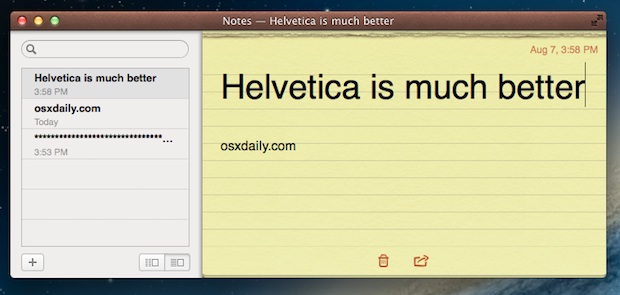
Helvetica is shown below:
Formatting can be lost as you’ll see in this video:
You can change it in the iOS Notes app too.
This works in all versions of OS X that have the new fancy Notes app, whether you’re using OS X Yosemite, Mavericks, Mountain Lion, you can switch that font in Notes app.






This is a waste of time as it only applies to much earlier versions. At this time (2021; Catalina; OSX 10.15.7) there still appears to be NO way to change the default font of an app.
Who would have guessed? Do you think anyone listens or reads these comments?
I’ve been reading around and found nothing on how to set a certain font as default so I guess we just accept it as is.
The only thing I really have problem with is before when I right clicked on note & select Fonts – Show fonts, I got a whole list of fonts available to me. Now, when I do that, I only get a small window of favorite fonts that I previously put in there.
does NOT apply to the Notes app used on an iMac with the OS Sierra. You can select text and change the font but you cannot change the DEFAULT font. It would be great if that can be done. I have a visual problem and the “system font” in Notes app is too gray and not contrasty enough for me to easily read.
Thanks! That was driving me nuts.
I know this is a bit off topic, but how can we now sync Notes with i.e. iPod Touch?… Before Mountain Lion, I was able to sync via iTunes, now this cannot be done! I know it can be used via iCloud, but I just want to sync the way it was before. I hope Apple gives us the option without iCloud sync!
The fonts fine…. Quit whining like a bunch of 6-yr olds””
Hello! today i found an hidden trick in notification center, in right corner theres notification center icon. click it when holding option (ALT), it will turn off!
Off-topic, but useful nevertheless so thanks!
Agree! Nice find, though!
You can use other fonts or font sizes (or add fonts to the menu) by editing /Applications/Notes.app/Contents/Resources/en.lproj/DefaultFonts.plist, or the corresponding files for other languages.
It doesn’t break the code signature, because the lproj folders are omitted in the CodeResources file.
You can change font from the “Show Font” menu (cmd + T)
I don’t understand where is the difficulty to do this?
It doesn’t change the default font, which is used by new notes and notes without formatting.
Why awful?
It is only a question of (bad) taste :P
Also: remove Markerfelt and Noteworthy from your system fonts folders and you’re done.