
Disable the iTunes Store to Prevent Unwanted Purchases
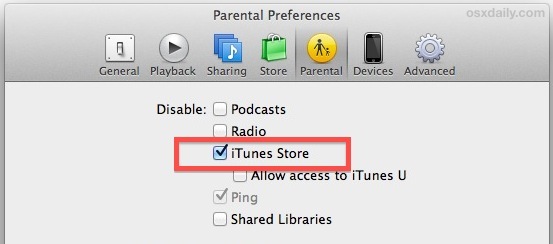
One of the best ways to kid-proof (and generally fool proof) an iPhone or iPad is to turn off in-app purchases. That’s great for the iOS world, but for the desktop you can do something similar by disabling access to the iTunes Store completely, this will prevent unintended purchases of apps, music, movies, books, or anything else, by blocking access to the entire store.
- From iTunes in OS X or Windows, open Preferences via the iTunes menu
- Choose the “Parental” tab and under the “Disable” section check “iTunes Store”
- Optionally for student usage, leave “Allow access to iTunes U” unchecked
All access to the iTunes media stores is now blocked, either through iTunes, the iTunes sidebar, clicked App Store links, or any other method you’d usually use to get there.
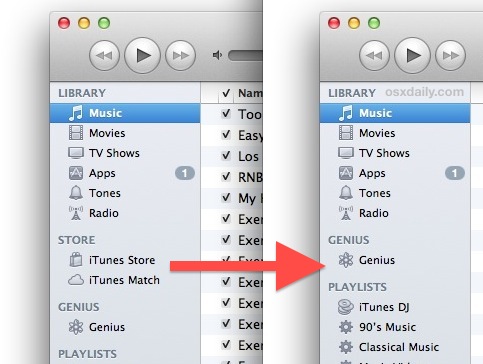
If you do find yourself in a situation where someone bought a bunch of apps or content you didn’t intend to happen, you can try to get a refund from iTunes and the App Stores. As long as you provide a genuinely valid reason, they typically follow through with the request without incident.






THIS DOES NOT WORK. Even after you disable the iTunes store with parental preferences. iTunes still gives you the “can’t connect to iTunes store” error message when opening the iTunes application. Thanks for NOTHING Apple
actually THIS DOES WORK, follow the instructions if you want to disable iTunes purchases.
Now that said, your problem is that iTunes can’t connect to the store… which also prevents purchases. So what are you complaining about exactly?
OR you could just sign out of your iTunes Account