
Save Images as GIF & Other Image Formats in Preview for Mac OS X
 Preview is a great basic image editing app bundled with Mac OS X, but newer versions of Mac OS have simplified the available image Export Format options down to JPEG, JPEG 2000, OpenEXR, PDF, PNG, and TIFF. Or at least that’s what you see on first glance, but it turns out you can still access all the traditional image format options from the Save, Save As, and Export screens just by using a simple key modifier when saving a file in Preview app on the Mac.
This is kind of a little known secret (well, at least until we told you about it!) but once you learn how to use it, you’ll be able to reveal many image format save options in the Preview for Mac application.
How to Access All Image Format Export Options in Mac OS X Preview
The secret to access the additional image format export options is holding down the Option key when clicking on the Format menu within the Save dialog box. Not sure where that is? No worries, here’s exactly what you’ll want to do:
- With any image open in Preview app, go to the “File” menu and choose either ‘Save As’ or ‘Export’
- At the Save screen, hold down the Option key and click into the “Format” menu – this will reveal all additional image file types that you can save as
- Choose your desired image file format as usual and save the file like any other
Here’s how this looks in modern versions of Mac OS X, with Preview Format options offering the image file formats including: JPEG, JPEG 2000, OpenEXR, PDF, PNG, TIFF, GIF, ICNS, BMP, Microsoft Icon, Photoshop, PGM, PSD, PVRTC, SGI, and TGA.
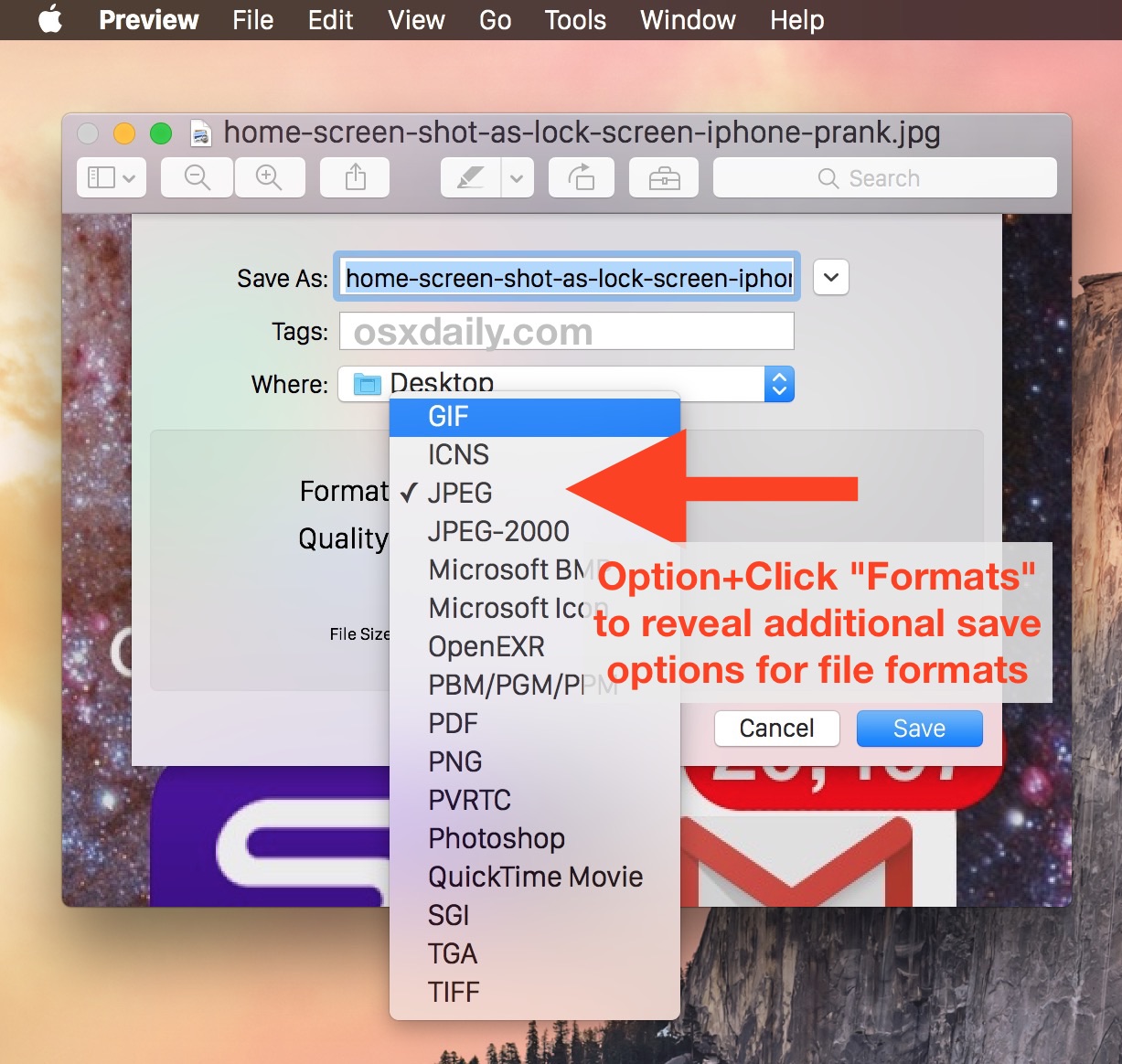
Holding the Option key when selecting Format reveals all possible image formats in all modern versions of Preview.
The video below shows a quick demonstration walkthrough of how to save an image file as a different image file type using the Option+Click Format trick:
Keep in mind that newer versions offer a few more image file format types than elder releases. Nonetheless, the same trick works in Mac OS X Mojave, Catalina, High Sierra, El Capitan, Yosemite, Mavericks, and Mountain Lion:
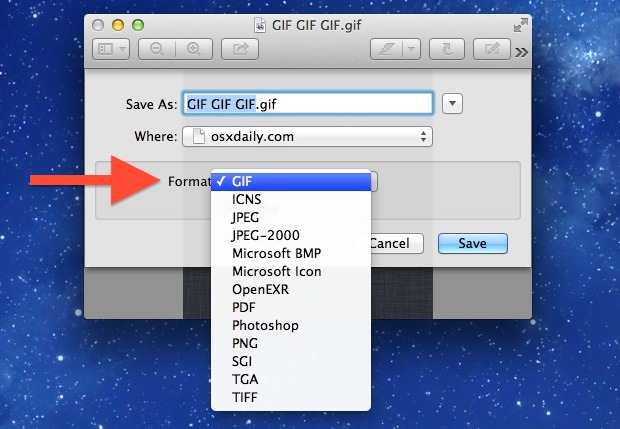
You can use this to convert existing images to different formats, or to save the file as a less common format to begin with.
If you’re at all confused, watch the video below for a quick demonstration of what you need to select. Keep in mind that the option key must be held down to reveal the other choices, just clicking on the format list otherwise will reveal the basic options:
This little known trick works in all versions of Mac OS X with Preview app, and presumably moving onward from here on out as Preview app has become simplified a bit to retain an easier user interface. Preview is a surprisingly powerful app, don’t miss some other great tips on things you can do with it.






This isn’t available on my mac running mavericks.
What a load of crap from crApple.
This works to save GIFS and PSD files and BMP and whatever else just fine in Mavericks and OS X Yosemite, read the instructions: HOLD DOWN THE OPTION KEY when clicking the “Format” menu and you’ll see GIF and the other image formats that you can save pictures as.
That’s just pathetic. Why create a feature and hide it from users? Do we pay $2000 to play hide-n-seek or find-me-if-you-can?
Why ?
Why is Apple crippling its own system? Loyal customer since 1992 but really, Leopard/Snow Leopard were superior to everything in Lion. Versioning? Perleeze.
Why do I get the feeling Apple are dumbing down everything in OS X…
Is there a way to set OSX to display these options by default (without holding down the option key)? I’m thinking there are other “optional” features hidden away in the menus, but you can’t use them if you don’t know about them. Would be a great daily tip.