
How to Encrypt an External Drive in Mac OS X Quickly
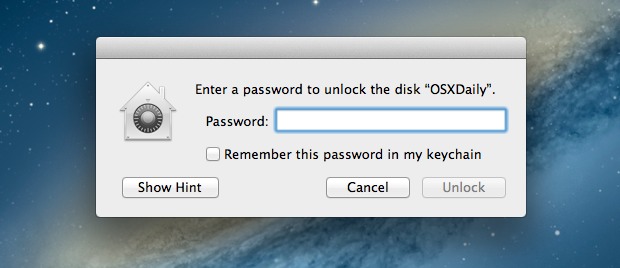
It’s now easier than ever to quickly encrypt external disks and hard drives from Mac OS X, whether they are USB drives, Firewire, flash drives, or even SD cards.
While you can still use the traditional route to encrypt disks through Disk Utility, from modern versions of MacOS and Mac OS X the process is streamlined directly into the Finder and desktop, making it easier and faster.
Keep in mind that an encrypted drive volume will not be readable without the password set at the time of encryption. In other words, don’t forget the password you set, or the files will become inaccessible on that encrypted volume.
Encrypting an External Drive from Mac OS X
When you’re ready to encrypt the drive and protect it with a password, here’s all you need to do:
- Connect any external drive to the Mac
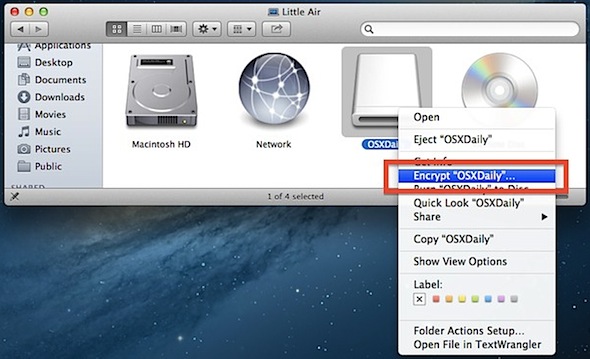
- Right-click on the external drives name in the Finder and choose “Encrypt DiskName…”
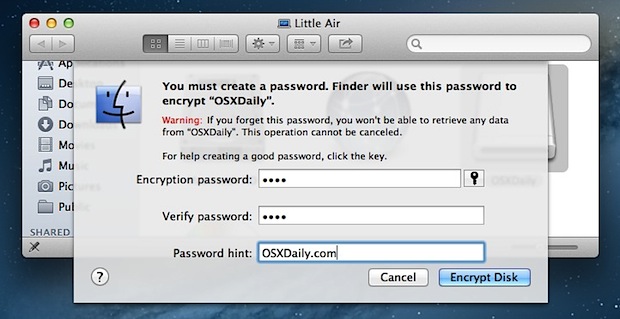
- Set and confirm a password, then set a reasonable password hint, followed by clicking the “Encrypt” button – do not forget this or you will lose access to the data!
- Wait while the encryption takes place
For help generating strong passwords, clicking the little key icon will summon the password strength tool and generator.
The encryption process can be very quick for smaller drives like USB keys and SD cards, but can take quite a while for large external hard drives used for backups or personal data. Be prepared to wait a bit for anything larger than a few GB in size, as the general encryption-to-GB time ratio seems to be about 1GB per minute.
Once the drive has finished encrypting and is disconnected, a password will be required before the data can be accessed from the Mac. To maintain the password protection, be sure to uncheck saving the password to the Keychain when asked.
The contextual menu approach makes this process very fast and easy, let’s just hope a future version of Mac OS X provides similar encryption and password protection directly for local files and folders as well. Until then, you can continue to password protect individual folders and data with Disk Images to achieve that, and using FileVault full disk encryption is recommended for most internal boot drives on a Mac.






Great article, thank you!
Just tried to encrypt a memory card on my Macbook Air. It says “A GUID Partition Table (GPT) partioning scheme is required”
What does this mean?
It means you need to reformat your hard drive. Open Disk Utility, select the drive from the sidebar, click Erase and select GUID from the dropdown menu. This will obviously erase everything on the drive, so make a backup.
What happens when the encryption pauses. I have been stuck in paused for three days now. It is a 3T drive with approximately 2T of free space.
Hello,
I just encrypted my thumb drive but now it doesn’t show when I connect it.
What’s happening?
I’m nervous to encrypt my main externals!
Thank you
Nice article and well explained.
After the encryption is completed the info about the disk will describe the format as Mac OS Extended (Journaled, Encrypted).
My question is: How do you undo this procedure leaving the disk in the original state as journaled only?
Once your volume is finished encrypting, the menu option will change from Encrypt to Decrypt. You can check on the status of your encryption to know when it is finished by typing:
diskutil cs list
into Terminal.
I can see 2 main disadvantages:
First, it is MacOS only. Second, it can be proved the disk is encrypted so the encryption could be simply broken by the Rubber-hose cryptanalysis.
IMO, truecrypt is safer option.
xkcd covered the “rubber hose” decryption method:
https://xkcd.com/538/
Sweet! I have replaced my optical drive with a second hard drive for all my data and was concerned because FileVault only works on my primary drive. This is great news!
awesome tip, one of my main reasons for updating to ML
What happens when you try to plug this into a windows machine after you have encrypted it? I assume its visible only on mac’s?
Not readable in Windoes because of the partition format HFS+
Does it mean then, that an external drive formatted as ExFat will need a reformat to HFS+?
Excellent idea for personal thumb drives, great tip!