
Add a “Dial Extension” Button to Contacts on iPhone
Though we have long been able to add automatically dialed extensions to contacts on the iPhone, the newest versions of iOS handle extensions much more intelligently, allowing you to create a “Dial Extension” button to any specific contact. That extension dialer can be activated manually, making the navigation of telephony menus infinitely easier.
How to Add an Extension Dialing Button to Contact Numbers on iPhone
Here is how to quickly add an extension dialing button to a contact on the iPhone:
- Open Contacts and tap the contact name to add the extension to, then tap the “Edit” button
- Tap the phone number entry, place the cursor at the end, then tap the “+*#” button to access additional options
- Choose “wait” then enter the extension afterwards, it will add a semicolon and the extension afterwards to the address appearing like so: 1-888-555-5555;123
- Tap “Done” and exit out of contacts
- Now dial the contact to discover a “Dial 123” button has appeared, tap that whenever you want to dial the extension
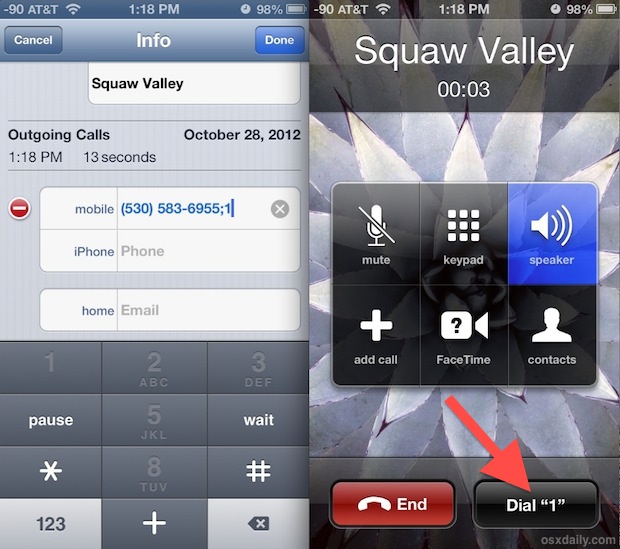
Here’s what this looks like on a phone call, as you can see in the phone entry of contact the contact number is segmented by the semi-colon, indicating the extension after the phone number.
Then, when on an active call to that saved contact, the “Dial ***” button will appear.
This works in all versions of iOS, though it may look slightly different, depending on what version of iOS you are running on an iPhone.:
The extensions can also be added from a Mac in Contacts (Address Book) by adding a semicolon to numbers followed by an extension, just be sure to sync it through the same iCloud account or it won’t go over to the iPhone.
Anyone who frequently uses extensions to reach specific people at an office, or anyone who has battled an automated phone system knows how useful this can be. You can even set a string of numbers, though the Dial button remains the same.






Just thought I’d let you know that it’s now 2021 and I just figured out this feature thanks to your 9-year-old post.
Yes the method is the same in 2022, most iPhone tricks continue to work regardless of age. Glad this helped you!
Using a comma for a pause in phone number strings goes back at least to the days of dial-up modems, where you might first have to dial a number to get an outside line, then the phone number itself, and so on. A comma is used to insert a pause to allow time for the preceding action to complete. It still works on most autodial systems, cellphones or otherwise.
What’s new here is using a semicolon to generate the manual “Dial #” button. No giant big deal, but it’s a nice implementation that I can imagine being useful on occasion.
wow, my 15 year old Nokia phone did this (; was actually a p). Is this really a new feature in iOS6? Is the iPhone really being developed by people who have never used a cell phone before? Imagine how much better it would have been if they actually had some prior experience. :)
The “Dial #” button is new, but of course inserting pauses and then sending more numbers is NOT new.
oooh!! that’s a good trick .. Thanks4u
If you don’t want to use the Dial 123 option, you can replace the wait with a pause (I typically use 2 pauses) after which the phone will send the extension tones.
using the example in the main article the number would become.
1-888-555-5555,,123 (“,” inserts ~ 2 second delay)
This is great for conference calls, as you can string together multiple numbers to automatically dial the call bridge, enter the bridge code, pause for name announcement as follows
1-888-555-5555,,#,,,,#
This type of number command sequence works on every cell phone
Thank you so much! I didn’t know this!
Snow phone! Though with that example the auto-dial “1” would be better I think.
Nice trick though as usual, thanks.