
Forgot a Mac Firmware Password? Don’t Panic, Here’s What To Do
Users who require higher than usual security measures often set a firmware password on a Mac, which requires that a password be entered before the typical OS X boot sequence begins. While these low level passwords are quite secure, but that higher security also means a forgotten firmware password can be a significant problem. Nonetheless, if you wind up in a situation where you or another user has forgotten a low level firmware password on a Mac, don’t panic, because you may be able to recover the password or bypass it using one of the methods outlined below. If all else fails, Apple can possibly help you too.
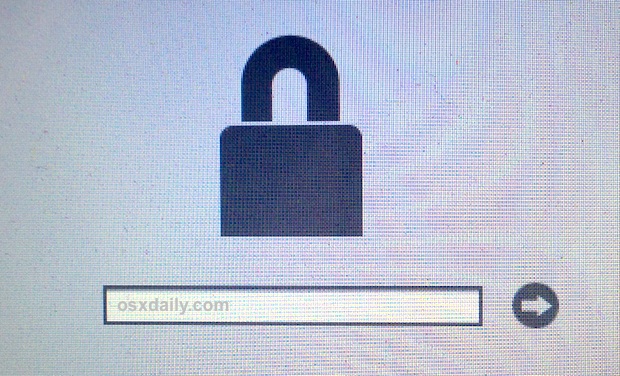
Do note that a firmware password is not the same as an administrator password or the general computer password used to login to a Mac. The firmware password appears immediately upon boot and is a gray locked icon, looking like this:
If the password you’re having trouble remembering is a general Mac login or administrator password, you can reset it with these instructions instead. Using the the Apple ID approach on boot is typically the easiest for modern Macs.
1: Try to Reset or Disable with Firmware Password Utility
You may be able to reset, change, or disable the firmware password using the same method you used to set the password to begin with, this requires booting into Recovery Mode:
- Reboot the Mac and hold down Command+R to enter recovery mode
- At the Utilities screen, go to the Utilities menu bar item and choose “Firmware Password Utility”
- Select to turn the Firmware Password to OFF
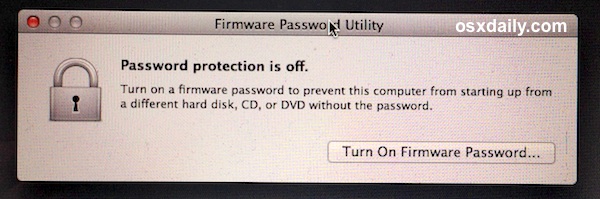
If this is successful it will tell you the firmware password is off.
Always check your caps key and num lock key before entering or modifying passwords, often mistakes are as simple as that.
Obviously you’ll need to enter a password to gain access to Firmware Password Utility, so why is this even mentioned, right? Because sometimes it works, maybe because of user error when typing the password to begin with. Yes you should actually try it.
2: Have Apple Unlock the Mac Firmware Password For You
If all else fails, you’re going to need to get ahold of Apple or an Apple Authorized Support center who can bypass and/or reset the firmware password using proprietary tools. This works on modern Macs, including the following (this list is not necessarily conclusive, always contact Apple directly if you can not remember your firmware password regardless of the Mac):
- MacBook Air (Late 2010 and later)
- MacBook Pro (Early 2011 and later)
- MacBook Pro with Retina display (all models)
- iMac (Mid 2011 and later)
- Mac mini (Mid 2011 and later)
- Mac Pro (Late 2013)
- (Maybe others too, contact Apple to find out for sure)
You can contact the official Apple Support channels by phone, or schedule an appointment with a Genius Bar at a local Apple Store. Again, even if your Mac is not on that list, you should contact them.
In most cases, you will need to provide proof of ownership of the Mac which has a locked firmware password in order for them to unlock the computer in question. There may be exceptions for a variety of unusual circumstances, discuss those with them if necessary.
3: The firmware locked Mac is not included in the above list, and the password reset didn’t work, what now?
Wait, did you contact Apple Support or an Apple Authorized Support agent and ask them? They can probably still help you to unlock the Macs firmware login.
But if you’re the do-it-yourself type (like myself), then you will find that many older Macs, particularly those that allow you to upgrade and change RAM yourself, allow a hardware bypass to get around firmware passwords by physically removing memory from the computer and following the instructions offered here. That is a fairly technical process, which makes it appropriate for advanced users and systems administrators, but it should not be attempted by a person with novice computer experience. With that said, it does work, and I’ve had to use it myself before in a variety of interesting IT and troubleshooting situations.
Have another solution to unlock a Mac with a long forgotten firmware password? Let us know in the comments.






The firmare password actually is the same as your login password. I used a usb keyboard and it got straight past the firmwear password and into internet recovery. CMD and R did nothing as did the other commands.
I formated my secondhand MacBook Air to erase the “other” memmory. Now but it is now asking me for a firmware PW which I can remember.
This is the dumbest guide ever. If the firmware password is in place, you can’t get into the recovery menu without it. Doy
My issue is a little different. I bought a macbook air pro used but had no idea a firmware password was set up. I found out after the computer died and I tried using the hard drive in a different mac (via an enclosure) but was blocked by the firmware password. I have some important info on this hard drive that needs to be retrieved. Please help!
My situation is similar but unique at the same time. My problem was I bought a macbook pro air off someone used and had no idea that a firmware password was set up. I found out after the computer died and I tried using the hard drive in an enclosure but was blocked by the password. The person I bought it off of also bought it used and is unable to track down the original owner for the Firmware password or proof of purchase. I have some important documents on this hard drive that I need to retrieve. Please help
did not work 😢
Hey Daniel that worked for me like a charm!! Thanks I appreciate that!!!
Firmware padlock he locked keyboard shortcuts cmd+r recovery not working nvram or cmd+s terminal not open ! How fix it mac 2017 ? Only with 2 pc software or sam connector? Screenshot explained dude ?
I had same problem, lock screen with firmware password!
i can not remember that i gave firmware password..
i have macbook pro 2010 late..
i try all solution which i find on google and youtube .. nothing help…
today i try again , and suddnley i gave my login password which i use everyday when i start mac and give my password on login windows !
this is the Firmware password !!
yes you read correct !
your login password is your FIRMWARE PASSWORD if you try to start your mac with CMD + R or ALT keeys …
it helped me and i think it will help you too if you remember your login password!
greatings from Austria :)
now i can install new mac from USB :)
Hi! I suddenly found myself locked out with the padlock screen, but for those who are new to the wording “firmware password” — for me, it turned out to be what I had set as my *master password* — I hope this helps you. I was just trying (I had tried my admin pass, my FileVault pass — access denied — and then decided to try my master password (which I know perfectly well).
It got me past the padlock screen and back onto my Mac!!!
So: FIRMWARE PASSWORD = MASTER PASSWORD
Again, I hope this helps you as it did me. =)
Hi, can you tell me please how did you do ? I have same problem
Hi, can you tell me what to do I have same problem
Apple would not help! I fixed it by putting one of my passwords for my other Apples on my networks in. It was not a firmware password just an OS password WHO FIGURED??????
If I completely delete my “find my” account would that help? Would I have to delete my iCloud account?
Hi Daniel, Ty but Apple had me remove my MBP from “find my” so I can no longer see it. They said that should release the lock which of course didn’t work. In my texts back-and-forth with Apple I have screenshots of find my with the Mac still there before they asked me to follow their directions and remove it. If I can upload the screenshots I will show you. It seems that since they instructed me to do that I am up a creek without a paddle…
But even when it was still showing on Find My, the unlock feature was grayed out and we weren’t able to do anything with it there. Not sure why it was grayed out, can only assume “find my “ was malfunctioning.
Boot up your MacBook, make sure it’s connected to the internet and enable the “Find my Mac” option. Then use another device to remotely lock your MacBook via the “Find my Mac” service. You will be given an unlock code, and the firmware password will be replaced with that code. Boot with Cmd+R and use the code to remove the password protection.
Don’t do this.. it would completely lock your mac and you won’t be able to use it anymore.
Worse advice ever!
Lawsuit? 😄 Because you managed to destroy your own property by setting a password you then don’t remeber? That’s not going to fly. And if you’re not the one who set the password, you’d have to sue the person who did. Don’t blame apple for implementing security features.
I am in much the same situation as I forgot my find my passcode and now if I boot up with command or it goes straight to the firmware password lock screen. I am a cancer patient that has been prescribed pain drugs for a considerable amount of time so my memory is not what it used to be. If any of you start a lawsuit please, please contact me.
I am in close to the same situation as much of you. I forgot my Find My password on my mbp . The funny thing is I don’t ever remember locking it. I just plugged it into a cat six ethernet hardline one day and it locked! If I reboot and hold down command are instead of going to safe mode it comes up with the firmware Lock Screen!
I have been to Apple and they will not help me as high but the MPP on Amazon marketplace. I have my proof of purchase but Apple will not help me because I am not the original owner so my proof of purchase doesn’t even matter to them. I have had marketplace send emails to the seller with no response. I have tried to get a hold of the seller with no response but I bought it in 2018 and the gentleman was 65 then so I fear the worst. HI am a cancer patient that is prescribed drugs for pain and my memory isn’t what it used to be and I feel very discriminated against being that I brought proof of my condition and my proof of purchase to Apple and yet they ignore me. I paid $860 for this mbp And don’t have the money to buy another. I want to go back to school while I’m going through immunotherapy for the next couple of years and I’ve already been through 17 radiation treatments but can’t without a computer. I am feeling very discriminated against by Apple As I said and if any of you start a lawsuit please, please include me!
If anyone starts a lawsuit please contact me cause I’m in close to the same situation.
I forgot my “find my” passcode and if I command + R at startup firm ware Lock Screen comes up. I never put a firmware passcode and Apple won’t help me when I have proof of purchase cause I’m not the original owner, I paid 860 usd for my MacBook Pro on Amazon Marketplace and have my proof. Apple needs to pay!!! I’m the only registered owner!!! This MBP is NOT stolen and I’m out 860 usd because I’m a cancer patient that is prescribed medication for pain that obviously affected my memory!
I feel discriminated against because I’ve been in to Apple and showed proof of my condition plus proof of ownership and because I was not original owner they won’t accept it or help me!!!
Big Tech (aka Big Pain In My…/”smart” this and that – beg to differ there…), could go on but I’ve had it with this Mickey Mouse bs. All of them, not just Apple (they hold a special place in my heart having been the first one’s to get on my last good nerve). Firmware, yes, upon initial setup…WHAT ABOUT IT?! 2015 MBPro, obviously going to have a few minor issues, nothing too crazy. Couple days ago, it decides to “remind” me of the firmware thus sending me into that good old mac frustration and nonsense.
I have no intentions of making an appointment with the Moron Bar, my bad, Genius Bar, only to waste a good hour and hear anther sales pitch. I just want my photos/make sure I have everything on my external then it’s off to the woods, a-la OfficeSpace.
Sorry about that diatribe – I agree with starting a lawsuit (YEAHYEAHYEAH you little Captain Obvious’ out there, they are Apple, big corp, etc.) but it’s about principle and what’s there to lose? I’ll have to look into that after I catch some zzz’s.
2010 15 MacBook Pro can only pram reset. No option to enter password. Question mark folder with most key combinations. White screen when hold command with mous cursor.
A flashing question mark folder usually means the boot drive or boot OS can not be found, try booting from a boot disk
This just means that your device has no drive to boot from. U need to boot from utilities and then reinstall the os and then the problem will be fixed
Hi Renee, can you please provide more details on this solution? Thanks a lot, A
The above did not work for me either. Apple indeed insists on a receipt, which I no longer have.
The reason I wanted to get my Firmware password reset is so I could perform a Factory Reset before giving away my old MacBook.
Alternative that worked:
* delete everything on my account,
* create new admin account,
* log into new account and delete old one,
* make sure to also choose ‘Delete Home Folder’.
I have formated the computer but now it asks for a firmware password on a blank screen
Hi Hina, at least you were able to formatted yours. This article has a huge problem in trying to help those who forgot firmware password: how the hell am i arriving at “firmware password utility” by pressing command+R if it is exactly by pressing command+R that the firmware password appears as required to access the machine? There’s no “firmware password utility”. And I still cannot format my Mac (late 2011).
Anyone?
I have a macbook pro, and i forgot the firmware password. Apple can’t help because I don’t have the original receipt and the owner gave it to my mom who passed away 2 years ago and I can’t find the receipt. I never expect something like this will happened lol.I just locked out of my macbook last year and now I just keep it without using it because my mum bought it for me and it means a lot to me.
If the police can’t confirm or prove its stolen he hasn’t committed any crime. If it’s not reported stolen he’s guilty of owning an Apple product & nothing more. Think about it. Besides every local law enforcement agency I’ve ever talked with allows you to call them to try to find out if an item is stolen before you purchase it or even if you already have purchased it. They haven’t charged a single person who inquired about the legal status of an item. If you know it’s stolen & you talk to the authorities about it you’re an ID 10 T!!!!!!!!!
Lets say you’ve bought a imac on facebook marketplace or some other third party site and found out months after your purchase that the person who sold it to you stole it from their job? You think apple would assist in bypassing the firmware login screen? Dumb question, I know, but its not your fault someone else committed a crime. you paid for and used a product for several months before some unknown person remotely accessed your computer and locked you out. The original owner of the computer should have a gripe with the person who stole it, wouldnt you say?
Hello,
i know another solution, but it costs 65 euros, you have to purchase a “Matt Card”, it is sold online from the website http://www.cmizapper.com
Technically, you have to open the lower case of the macbook for example and just plug the board (the matt card) on a connector, and boot up the mac, and that’s it ! you’re done !
Does this unlocking work?
Yes, I just tried it and it worked great! It takes about 3 weeks or so to get the card, but it’s worth the wait.
Cmd r.dont working cmd r-p not working plaese help me
Problem:
My MBP was working fine. I reboot into Windows 10 Pro via Boot Camp as I always did. All good until, I tried rebooting back to macOS – Mojave v14.14, via boot camp control panel – it rebooted to the black firmware lock screen.
What gives, when I had NOT set firmware password.
I can only boot into windows 10. It works fine as usual.
Plus I can use “My Paragon” software to see all my macOS volume – ok. However, I can only read any directory or files, since the mac volume is encryption. so cannot write to it.
But, I CAN copy files from macOS volume to a flash drive or to windows Boot Camp volume.
so it is not a complete lockout of my MBP. I just cannot boot into macOS. Only using the Boot Camp volume.
*In fact, I am writing this info on the very MBP I am querying about! (using Boot Camp-Windows 10 Pro volume)
Command -r brings me to the firmware pw window as well.
What gives?
Is there a work a round, since I do have access to macOS through the boot cam volume??
How can I correct this without having to hunt down my purchase document, and then having to send this mac out to an Apple depot??
Thanks
Glenn Collins
You can execute this command from terminal as an admin user:
user:~ computer$ sudo firmwarepasswd -unlockseed
12309849VUSIUHFIDUSN12934
Use that and put it on a USB and tell apple to unlock it, because the unlock seed is a valid password.
How do you know what there proper unlock seed is to use for this command?
My suggestion just change the motherboard. Ebay price range from $50 to $400.
why would that help anything buy a new mac at that point thats not a fix in my opinion
This post have no sense at all lol
True!
hi
i have 2 mac pro a1289 emc 2314 that has password and i cant install any os on this
i try serveral hard reset method but one of them password reset and other one no
please help me
Thanks for the tricks.
A MAJOR detail to be known : whatever your region/country is, the MacBook Pro 2018 boots with a keyboard in QWERTY mapping.
So another trick is : translate your password in qwerty mode!
hi
Please help
I forgot firmware password in iMac 2017
what Ido ?????
So I locked my Mac after someone at my home was stealing info from it while I was out of the state. In doing that it locked my firmware too. I have tried multiple times to unlock but nothing has worked. At one point I did upgrade memory for my Mac, would make me a difference? Please help! It has pictures that I want and I hadn’t done a back up in 2 months.
Hi, the firmware password was activated without me knowing it at all. Strange? I have got to visit Apple in central London to fix it and still under warranty. thanks for your help, interesting subject. TM
command R took me to the firmware password lock and after entering the password I pressed command R again and voila Utilities menu was there and I was able to delete the bloody password thing :)
Cloning it now. Thanks for the info.
Has anyone been able to sort this out?
Unfortunately been a victim of a crook and bought myself a second hand locked MBP. I filed a police report but they were not even able to tell me if it’s been actually stolen. Apple is useless won’t help except tell me I should buy second hands only from Apple resellers… how convenient. One of these days they should be sued honestly as this is BS. I asked them to inform the “original owner “ and put us in contact but they can’t contact original owners: so who are they helping except themselves. The iPad stolen from me never made it back home so what kind of security is that.
if *you* filed the report you would be admitting possession of stolen merchandise. The laptop will likely be confiscated.
Don’t know if his will help those with a forgotten EFI password, but here’s what happened to me. I am the original owner and am getting ready to sell a mid-2014 mbp. Backed up all my stuff, did the Cmd-R boot and set install a new version of he OS. It worked well and created a new home directory and all that. But there was still gigabytes if used data in the machine. I went into the Cmd-R reboot again and accessed the disk utility and erased the drive.
While setting up he new machine, went into find my device and selected the old machine and selected erase. It asked me to enter my iCloud password, which I did. Then it asked me to enter a six digit password to stop the erase on the old machine if I wanted to. I entered a six digit number (thankfully easy to remember, 123456) and was expecting the old machine to format itself any moment as both were powered on and connected to the internet. Nothing happened for a while. I out the old machine away for a few hours and played around on the new machine
A few hours later I thought I would do the Cmd-R on the old machine to ensure I had a clean OS on it and all of my data was gone. I did the install OS command and it downloaded the OS from the internet and rebooted. Then it presented me with the firmware lock, which I had never set. I entered the admin password I had used. No luck. I entered my iCloud password. No luck. Then I thought about it and entered 123456. It unlocked the firmware password. Phwew.
So, for those of you locked it, log into iCloud on a different machine. If the old machine is still listed in your list of devices, erase the machine. It will ask you to enter a code. Then try that for your firmware password. No idea if this will work, but that’s what happened to me.
Anybody tried this ?? Any luck ??
The firmware password aldo blocks recovery mode though. Need another way through…
Hello,
How are you able to boot from USB when it’s required the firmware password in order to boot from alternate drive?
On 2010 and older macbooks the RAM trick works just fine. But 2011 and newer requires either having a utility to rewrite the efi chip, have apple unlock it, or replace the efi chip with another programmed one. I always replace the chips and it works great.
Boot up your Apple computer while holding the option key. You will get the screen wanting the firmware passcode. Press Shift + Control + Command +Option + S at this screen. You will get a one time hash code. Call 1-800-275-2273 and tell them you have the has code and they will email You a file to put on a FAT formatted flash drive. Turn you computer off boot with the flash drive in while holding the option key and that should do it. Apple may require proof of purchase to do this.
Just phoned 1-800-275-2273, you have to go to apple (certified) centre / store with ID, invoice, make appointment at genius bar, and there they can resolve it…
Hi I am in the same situation as most of the people above. I bought an iMac 2nd hand and the previous owner had installed Windows 10 as the operating system. I wanted to reset it and install OS X so I thought it was a good idea to format the drive so I can do a clean install. I confess I saw the warning on file vault but since I knew I was formatting it I went ahead and formatted the drive. Now I am learning about the firmware lock the hard way around. Doesn’t help I am in Rwanda and the original buyer is in another country. If anyone finds a solution please post. David at Rabya dot biz.
Got a all in one apple computer . I got it at Best Buy 5 years ago.I turn it on and I am getting a flashing ? in side a file folder. So I shut it down and tried the command+R button now I am getting a lock symbol and what it looks like a place to put in a password. I never set up a password of any kind on this computer. And I have not got the receipt any more.If any one can help please e-mail me
Hey Terry, your problem is probably related to a defective Hard drive cable and/or a defective Hard Drive.
So anyone have a solution for this. ?
And why was I ever apprehensive about registering a new apple device and fearing foregoing privacy with each new device. Come to find out a tech brain super think tank of a company like Apple can’t even identify the new owner / first owner of a device without the original PAPER receipt!!? Haha. So initial registration of that device is really just to transfer data and of course enjoy all that iTunes has to offer but that’s it!!?? – maybe point of decive sale / time and date of purchase from authorized seller relative to the registration date of that device by its new owner who probably did not pay cash but rather plastic. . . Am I getting close to solving one of apples problems? Cause my invoice is already in the mail. . Gotta raise capital for a new UNLOCKED mac air – that’s 3 hole punched. that way I can keep it in my trapper keeper with all my other data, notes and receipts still on PAPER!
Very suspicious as my 2012 mac air locked itself down to the firmware password screen during normal operations. All the sudden the mac air basically crashed as it appeared then emerged a black screen with multiple languages hovering over the firmware padlock icon??? From MacBook Pros to a MacPro and Apple device in between and below, I’ve owned them all damn near for my work over the last decade and have never seen this firmware screen appear – especially in such a dramatic fashion – appearing to crash, which seemed like a real crash at the time because the computer kept resetting every 10-15 seconds back to this lock screen with foreign text.. now it’s just the firmware lockscreen described however my firmware passcode does not work and neither does my only other possible password (iTunes) as I make all passwords the same to prevent this – locked out of my own device. . It comfortable how it happened /. Have no idea how or why it happened… thAnk you all for sharing your insight and experience- learned a good amount While locked out
Several people mentioned that “all of a sudden, after years of normal use, the computer just locked itself”.
How is that possible? What exactly do you have to do to have a normally working Mac just “lock itself”?
I am asking seriously, not ironically. I’ve bought several used Macs on eBay and through classifieds, and never thought to ask about firmware passwords. Weird.
P.S. got to this discussion from website where I was checking serial number on Macbook Pro on eBay. Folks at the website sell a little USB device with LED display that they say reveals the firmware password on boot. Device costs a LOT.
P.P.S. GREAT point by person who pointed out that firmware password (same thing on PC) is entered “blind” and using USA keyboard. Very important to remember. I’ve had to reboot PC laptops several times in past because kept getting firmware password wrong, as was using non US keyboard. With PC you get unlimited tries, you just have to reboot after 3 wrong tries.
Bought my macbook pro on ebay.. a few years later it just happens to lock by itself. Took it to an apple store, and same thing happened to me. They told me they want proof of pucrchase such as the original owners reciept. My cousin try to unlock it but couldnt… all he ran into was this proplem. “Firmware password”. Can some one help me????
Clearly apple is incentivizing you to sell on craigslist to make it someone else’s problem.
I have a macbook air 2010 and bought when the owner did not know it had set the firmware password, but was set up and it turned out that he had no way to get it. Now, I’m without accessing the machine because it showed an error “panic (cpu 0 caller).”
This device is my only home and work computer. I need to get it back.
If you are seeing “panic (cpu 0 caller)” it is due to a kernel panic on boot.
You can try rebooting the Mac into Safe Mode (hold down Shift key on boot) and see if that helps, if so it may be a kernel extension or system plugin that is causing the problem. The Console app can sometimes help to locate the problematic issue, find the kernel panic in the Console log and look for what was running immediately before it, it can sometimes be telling.
It’s also possible that you may need to reinstall OS X if the kernel panic persists on the Mac. Rarely, it could be a hardware issue causing the kernel panic, like a component or some other accessory.
My Macbook Pro is locked by a theif using the findmyiphone in my stolen IPHONE 6, I already showed to apple my receipt and my box but they cant allow my mac to be reformatted because the serial number is not indicated in the receipt(not my problem anymore because the store forgot to include it ). Already Contacted apple security but they are very strict. The apple ID in the mac is registered under my name matches my ID but they never considered. I hate how they misjudge and dont help their loyal customer. I will not buy apple device again if they cant help the true owner of the device. I already brought it to the apple service center and paid a hundred dollar just to reformat it (not under warranty anymore) but it was not refundable and still my mac is locked because apple does not honor my receipt. Please teach me how to reformat it my self (contact me using my email). Thank you
There is now a brute force method created by orvtech to try all possible 9999 4 digit default efi codes each in turn untill it hits the correct code and unlocks there are many varients of the arduino code available some include a LCD screen to display the current code attempt which is usefully as you have to enter the correct code twice when it’s found I know that criminals will use this code for malicious purposes but it had also helped thousands of people being held at ransom for efi codes the full code and instructions for arduini/teensy microcontrollers can be found along with diagrams and bread board wireing schematics this will work but only if it is the default 4 digit code
How are you ment too ..Reboot the Mac and hold down Command+R to enter recovery mode,If the firmware password’s purpose is to blocke start up’s hidden shortcuts hmmm maybe they should of wrote hold command on start up to see this giant padlock(THAT IS F#*KN LOCKED) because thats all you can doo or just say you fdd up contact apple
If I press Comand R, it shows Firmware pass. The problem is my sister forgot it.
@Paul…why so condescending? There are many honest ppl trying to purchase expensive products secondhand. To think everyone is stealing is more of a reflection of yourself….duh.
Apple has the mind power to create a tracking system based on serial numbers. Register the device @ time of purchase. And upload that info into a database available for later. If a device has been stolen, they customer calls in. The device is locked simple. If there is no report of the de ice being stolen then apple should be able to assist. Customer service is another part of sales ppl tend to over look
Hmmmm if you go to buy a MBP you should probably learn to check to make sure they clean and rest the computer so that its a clean slate for you before you buy it and that includes the EFI.. Duh and if your going to set a password using a different keyboard .. Your fault duh think… Ahead.. Use some common sense.. Your all just crying after the s**t hit the fan.. My god ofc Apple won’t unlock it for you how do they know it’s not stolen even if you legibly bought it off somone else … Again it gets back to the seller who wants to sell it and buyer.. Need make sure things are clean.
this
Please help me i forgot my efi password
This Article, does not help at all… I have spent 4 years trying to write my EFI password correctely…
I have bought my MBP in Turkey, with a Turkish keyboard.
To set a EFI password, the system accepted Turkish characters ..( I still know the password) But before I write it, the keyboard becomes American , as default EFI langue …So , my ” true” password is not accepted, coz of keyboard problem..
Is it my fault??? Did any message apeared to say this to me before I set the pasword?? Of course, not….
I now have a dead machine that costed me 1400 USD..Also I’m far away from where i Bought it ..4000 miles..
Apple is not a friendly company…And that was the last apple product I buy..
PS: I have lost proof , or documents they give me when I bought it ..
Regards
I’m running into this same issue, but I know several people in similar tech fields, including Apple employees. Word on the street is that they need the original receipt because there are password bits in the original transaction numbers or something. If you don’t have the verified owner and original receipt they can’t access the password. I am still skeptical.
Users can unlock the firmware password as described above, but Apple wants the original receipt because they want proof of ownership, they are not going to unlock the firmware password for a stolen Mac, for example.
The Firmware Lock is hurting second hand buyers more than hurting thieves. I don’t even know the Firmware lock of the computer I purchased at Apple. If/When I sell this computer on Craigslist or to a classmate and that person locks it up on accident – they are screwed.
Even if they did contact me to help them out… what a burden. Am I really going to want meet up with them at an Apple Store to verify the situation?
The extent of the protection should be – IF your computer is stolen – F-ing REPORT IT STOLEN! If I call Apple and the computer I bought on Craigslist hasn’t been reported stolen then unlock it for me! Hell, charge me, fingerprint me, background check me, make me wait a grace period. ANYTHING! But to say “Sorry, for security purposes, we don’t unlock firmware locks for anyone other than the original purchaser with receipt.” Is close minded. Find a solution for this Apple to protect your customers. “Yes” your customers. A solution to this second hand sale glitch helps the seller and the buyer buy more Apple products.
This is very true!! F.. Apple as you’re saying F… Morons!! have to take care of this situation as I know many people (original owners) don’t remember password and don’t have the freaking purchase ticket!! And appl eis only going to say: Sorry!! F.. Up!!
Yesterday i saw a movie in my macbook. Today I cant login my macbook.. It doesnt accept actual password+masterpassword. I tried with Apple ID password. Anything didnt work.
What can i do..? I donot know about anything of this setteings. I am new to OS system.
if you set a firmware password mind that os x lets you set it using whatever keyboard layout is used by you but the firmware password lock itself uses the u.s. extended keyboard layout.
that’s especially tricky if you used any symbols like #@€ etc. but also for regular letters that might be situated somewhere else on the keyboard.
Maybe you should not have provided admin context to play a movie?
I cant find the firmware password utility :(
Just do command p when you’re booting the computer up. If i understood it right.
i wish i could delete that. It was command plus r not p xD
Hey when i pressed command+R it shows me the password
No it didn’t
it does on my macbook air 2011
BS…this isn;t even something that’d work on an unlocked mc. you’ have no busness here Troll. Beat it!
Hi, I am also getting this issue, I have not been able to fix this on an A1286 MacBook Pro I received for a ticket to re-image the computer.
Hey sdpoulter, I wonder if there are enough of us to start a class action suit against Apple. I bought my Macbook Pro a year ago from a doctor who is now out of the country and hard to contact. Two days ago my housemate copied an older Mac OS from a disk onto a thumbdrive on my machine and forgot to remove the disk. My machine evidently tried to boot from the disk and this triggered the firmware lock. I did not set up the lock and don’t know the code. Apple wants proof of ownership that I will not likely be able to provide. I feel the burden of proof is too high and that they have essentially stolen my machine.
I’m in the same boat. Bought my laptop secondhand from the owner off of Craigslist. Assuming HE didn’t steal it (there were several reasons for me thinking it was legit, including all the packaging he had with the laptop and our conversation about why he was selling it and the newer version he was going to buy with my cash as well as going onto the Apple Site together to register me onto the Applecare site).
Six months later, I hit a combination of keys or did SOMETHING to trigger the laptop to go into recovery mode and now it’s asking me for passcode which Genius Bar says they can’t give me or bypass without receipt from original owner.
Of course… my emails and texts to that individual are just past the end of my email and text chains so… I am stuck.
For those who are saying “DUH! It’s stolen. This is a victory against theft!” How? Apple won’t tell me who is on the original receipt and they won’t contact that person to find out if their computer was stolen. So… no one wins, everybody loses. And, by the way, I’ve checked the serial code against databases of stolen laptops and it’s not coming up there, so again… I believe this to be a legitimate case of an honest seller and buyer being screwed by overprotection.
Same situation here too!
The person I purchased from I have lost contact with as well. After using for six months mine locked up.
I went AGAIN to apple store today hoping for some sympathy or change of position on Apple’s part. Got a big earnest “So sorry, yeah that’s tough.” We could do it with receipt though.
Have you had any progress?
LOL Same here!
Last night, Mar 12 2019 (or was it this morning mar 13, 2019?), I spoke with the police department over the phone which is something this shop does from time to time (to verify our purchases as being the recipients of valid items), the clark county sherrif in Springfield Ohio stated that our serial number for the mac air is not stolen.
However I disagree with you in your one point expressed, that “no one wins”. Actually there’s a couple of entities that DO win as a result of our loss. First and foremost is the monopoly itself. Rendering an item as obsoleted or unusable forces the public back to the marketplace shelling out our kid’s inheritances to replace the junk made by monopoly. The “legal” department wins also. Since monopoly has set that you must produce a receipt, they could very possibly take your item (as in seize it) just as plausibly could the entire justus system. We record all video and audio here for every transaction in the hopes of warding off potential miscreants. ONE FINAL NOTE: NEVER HAS OUR SHOP EVER HAD AN ITEM COME BACK AS STOLEN (seems our programming programming programming might be a tad askew)
So your class comprise naive or ignorant users who harm their configuration?
We bought a Macbook Air on Craigslist and my wife wanted to do a factory reset on it because the previous owner’s info pops up, like their login id and that it is searching for Macbook Pro. When we did the reset the firmware lock appears and we do not have the password. We took it to Apple and they tried to reset but said that we needed to contact the original owner because it is locked down under the original owner’s id. We were given a phone number and I contacted the person and he agreed to pay me what I had paid for it, only when we met it was not the guy I bought it from but someone else. The guy I bought it from had bought it from this guy, who was the original owner. He said he would give me $500 for it because that is what he got from the other guy and then I told him that we paid $775 for it. He said he was sorry and could not do that. I told him all he had to do was call Apple and tell them to reset the password because the case is all logged and ready for him to call. Now he wants to buy the computer back from me for less money than I bought and won’t call Apple. I am being held hostage by this guy.
If apple can reset the password, everyone else can. Wen just need to know how to.
A great post, very good to know indeed. This doesn’t need to be a secret as we own our machines. Why pay for Apple or someone else to fix it. I like this knowledge. Seems to be some confusion on unlocking the 2011’s and up. This may require a SPI Programmer and a clip with wires in order to do a clean dump/flash. Dohhhh
I have a different, but similar question.
When I attempt to use sudo in the terminal, the reply is enter password, which I don’t have and never remember setting it. In all previous terminal machines this never happened. In many cases, e.g. remove a file from root, or open a downloaded app., or find password in keychain, etc., a password is required, I enter the one I remember with no prob. So a diff. password.
bc
The sudo password is the same as your login password.
I use File Vault. That’s safer. I selected the option to allow Apple to store my decryption key, so if I forget my password, I can get help.
I’d love to use Failvault. Really would.
We use Symantec Endpoint on our PCs at work and although I know the OS and the hardware is different I can’t help but remember how helpless everybody was when the encryption key was corrupted and I lost the whole drive.
The process Apple gives to authorized service providers is a bunch of work. If I remember correctly, they send you some encrypted disk images and a terminal command that you have to use to put it onto a dedicated USB drive. The password they give you is really long, and I think it involves more terminal commands. There’s even more to it than that I think. It’s a lot different than just pulling the RAM. It’s true that having this info out on the internet is kind of sketchy for people with older Macs though. I’m sure you aren’t the only site with it up though.
It’s actually quite easy.I work for Apple and scrub Firmware daily.A sbc file is sent to me after I give apple the Hashcode.They email me a sbc file,i apply it with a script to a usb file.Boot the computer.Thats it.
Any chance you can help me? I have hashcode Etc. Happy to pay a fee!
Any chance you can help me? I have hex code Etc.
i have proble my macAir A1370 Made year 2011..its need system lock pin i have hash code…Can you help me to get password in Efi to reset
please help me
This is probably a long shot given how old this post is. BUT I’m desperate for some any help please?
Chuck your HD into an identical mac with no FW PW. Reinstall osx, then put back into yours. Should boot as normal. Worked for me haha FUAPPLE!
please, what is “FW PW”; I want to try this
Firmware Password
I agree. If you install a firmware password you should know the consequences of losing it. Please don’t publish information on how to override it.
Read AND understand!
No, let’s also keep the consequences secret to prevent education.
I was given my nephew’s old laptop so I could use it with my band. The kid had been poking around where he shouldn’t have been, set a firmware password, then promptly forgot it. So I received a fancy white doorstop.
I even tried pulling the HD, wiping and installing a fresh copy of the OS, then reinstalled it. Waste of time. Do I want to blow money at an Apple Store disabling this password? Not really.
Has anyone actually tried this? I’m pretty sure locking the firmware blocks Recovery Mode.
It does.
Thats what I was going to say….as far as I know all keys are closed off if the firmware password is set. All you can do is hold the Option key down and enter the firmware password.
If your in the OS you could boot off another volume with the firmware tool, but that is about it with the new models or call Apple.
Like mentioned the older models you could change the amount of memory and reset the PRAM and that usually turned it off.
Yes correct, a firmware password is required immediately and no alternative boot modes can be entered. The firmware reset is possible through Apple or removing RAM only.
Paul.
In option1., you say”
“Reboot the Mac and hold down Command+R to enter recovery mode.”
I remember that using a firmware password disables a Mac’s ability to boot from a drive other than the selected boot drive, thereby making option 1. impossible.
Am I correct?
Thanks.
Yes you are correct, the article format needs to be clarified and updated if this is causing some confusing, apologies. The first option is how to disable or change the firmware password, and it’s not possible to get there without entering the password – this is mentioned but perhaps not clear as to why (to resolve an erroneous password entry). The second option is how to reset a lost firmware password.
sounds correct to me
Thanks for teaching criminals how to reset our security options.
Please, consider taking this post down. It was quite inconvenient on your part.
Please read the article to understand this is not a risk, to reset the firmware password you need proof of ownership provided to Apple or an Apple Authorized Service Provider. A criminal would not have that documentation (like a receipt in your name and the computer registered in your name, for example).
A quick google search can find any of this information from any number of other web sites. These tips are no secret by any means.
“Thanks for teaching criminals”
What a tool
If you think this is teaching criminals, then you know nothing about cyber threats and are a tool for thinking it. There is more than enough out there in the normal and dark web that will teach you a lot more than this simple trick to unlock a computer. This is a baby step. The real fun is when you can do more than that remotely. If you are that worried about your computer, then don’t take it anywhere otherwise anyone is at risk. Learn before you show how ignorant you are for the whole world on the web can see.
Thanks for making ridiculous assumptions and wasting this servers disk space. Having to read your crap was “quite inconvenient on” our part. Since the mac needs to be physically in someones hands to do this maybe you shouldn’t leave it in stupid locations?
… or for teaching regular citizens how to reset a system password that was set by criminals themselves AFTER the system was stolen and later recovered by police… which is currently the scenario I’m in.
What are you doing here?
I lost my firmware password don’t know how, but the Apple Authorised Provider needed copies of my receipt,
proof of ID before it was changed and was returned to me. As my MacBook Pro was out of warranty, and there are no Apple Genius or Apple Authorised dealers within about 90 miles of me, plus I’m 77 with poor health I had to pay to have the the firmware password renewed ( or reset ?) Plus return carriage of £48, about £90 for finding the fault.
I knew what the fault was, just didn’t know how to fix it
Thank you Paul for giving instructions in case it happens again.
That has to be one of the most narrow-minded ignorant responses to this tutorial and instruction page. Unlike the delusions of what may have been due to years of built-up programming (too much tele-vision), not everyone is criminal (nor as paranoid or judgmental or …pick your word).
always good to have these tips