Subscribe to OSXDaily

Subscribe to RSS Subscribe to Twitter Feed Follow on Facebook Subscribe to eMail Updates

Shared on Facebook

Shop at Amazon

Ad

OSXDaily on Facebook

Search Twitter for Mac

Twitter 2.1 for Mac OS X Includes a Developer Console

May 12, 2011 - 3 Comments

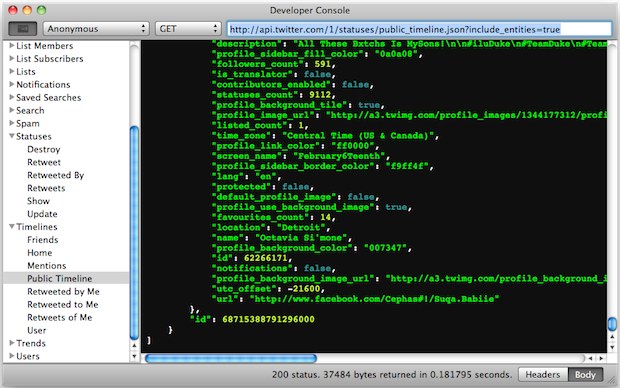
Twitter 2.1 for Mac developer console

Twitter developers have a compelling new reason to update to Twitter 2.1 for Mac: the developer console!

You can enable the developer features through Preferences > Developer tab > “Show Developer Menu”. Unfortunately for tinkerers and those just looking to casually poke around, you’ll need Twitter apps API keys to actually use and access the dev console.

Other notable changes in Twitter 2.1 are some significant UI tweaks, font size adjusting, AppleScript support, the ability to spin tweets off into new windows, and of course various bug fixes. It’s a worthwhile upgrade, even if you aren’t a developer. You can download Twitter for Mac directly from the Mac App Store, it’s free.

Screenshot and tip via Twitter @rsms

Click & Drag URLs in Twitter for Mac

Mar 7, 2011 - 1 Comment

click-drag-urls-twitter-mac

You can click and drag any URL in Twitter for Mac to another application, this is particularly helpful if you want to open a URL in a different browser rather than the default.

Getting it right can be a little challenging at first, but all you need to do is click and hold on a URL until the URL is darkened, then you can drag it elsewhere from the Twitter app.

If you liked this one, you can check out a few more Twitter for Mac tips.

Set Twitter for Mac to livestream new tweets and automatically scroll to top

Jan 30, 2011 - 5 Comments

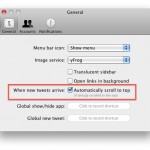
twitter for mac livestream auto update

If you use Twitter to livestream news and events, this feature in the Twitter for Mac desktop app is a must use. Here’s how to enable the livestream:

  • From the Twitter menu, open Preferences
  • Click the checkbox next to “When new tweets arrive: Automatically scroll to top”
  • Close Preferences

Now if you’re at the top of the twitter feed, updates will automatically appear in the feed and stream in live. It’s smart enough so that if you’re scrolling down in the feed to read older items, the feed will stay put.

This is one of those features that I think should be enabled by default, it’s too useful not to be. Combine this with enabling Growl notifications for the Mac Twitter client and you’ll find it easier than ever to stay on top of Tweets.

Enable Growl Notifications in Twitter for Mac

Jan 28, 2011 - 4 Comments

growl notifications twitter mac

You can get desktop Growl notifications in Twitter for Mac, here’s how:

  • From Twitter for Mac, go to the Twitter menu and open Preferences
  • Click on the Notifications tab
  • From the drop down menu, select ‘Growl notification’ for either Tweets, Mentions, or Messages
  • Close out Preferences and changes are immediate

Now just a word of warning, if you follow a ton of people, having Growl notifications for Tweets can be a firehose of desktop notifications atop Mac OS X. I just enabled the feature for Mentions and Messages, and if you have a large and active follow list this might be the best choice.

Notice that you can also set notifications to appear on the Dock icon. In the screenshot below you can see the little red star badge appear on the Twitter icon, alerting you to a mention or message.

twitter dock notifications mac

Twitter for Mac is a great twitter client with a lot of cool features. I wasn’t originally sold on the app, but after using it and discovering the cool features like sending a tweet from anywhere in Mac OS X, I’m now a regular user.

Thanks for sending in the tip Adem!

Tweet from anywhere in Mac OS X with Twitter for Mac

Jan 14, 2011 - 7 Comments

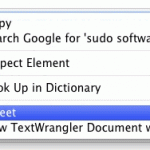
tweet from finder mac

The Twitter for Mac client has a great feature that lets you send tweets from just about anywhere in Mac OS X, including the Finder. I’ve tested this out in the Mac OS X Finder, iTunes, Chrome, Safari, iChat, TextEdit, Terminal, and can confirm that this works all over the place.

To access the ‘Tweet’ from anywhere function:

  • Highlight some text in Mac OS X
  • Right-click on the highlighted text
  • Select “Tweet” from the pop-up menu

This will automatically send the highlighted text to the Twitter app in Mac OS X.

tweet from mac os x

I saw the headline on MacStories and low and behold, it works as advertised.

Twitter for Mac is a free download on the App Store (direct link), it’s arguably the best Twitter client for Mac and well worth installing.