Subscribe to OSXDaily

Subscribe to RSS Subscribe to Twitter Feed Follow on Facebook Subscribe to eMail Updates

Shared on Facebook

Shop at Amazon

Ad

OSXDaily on Facebook

Search wireless troubleshooting

How to Quickly Fix iPad 3 Wi-Fi Reception Problems

Mar 21, 2012 - 43 Comments

iPad 3 No Reception

If your new iPad 3 has poor wi-fi reception, you’re not alone. After getting a shiny new iPad 3rd gen, I immediately noticed it wasn’t registering any bars of wireless reception, and wi-fi was strangely slow regardless of the network I joined or the distance to the router. It must be defective and I should storm down to the Apple Store and get a refund, right? Wrong. It’s actually really easy to fix, so before you call AppleCare support, give this fix a try, it worked for me.

  • Open Settings and tap on “General”
  • Tap “Network” and tap “Wi-Fi”
  • Tap the blue arrow next to the wireless router you are connected to
  • At the next screen, tap “Forget this Network”
  • Go back to Wi-Fi and rejoin the network you just forgot

Like magic, you should now have full reception bars, as visible in the upper left wifi indicator.

iPad 3 with Full Wi-Fi Reception

If wi-fi is still not working, try this as well:

  • From Settings, tap “General” then “Reset”
  • Tap “Reset Network Settings”
  • Reboot the iPad
  • Connect to a wireless network again

Resetting network preferences loses router passwords, be sure to have those handy beforehand.

Often these issues are software related and fairly easy to handle, as I’ve resolved a number of times with OS X Lion too, so don’t assume some of the complaints you’ll read on Gizmodo and Apple Discussions are all hardware related. That said, if you’ve attempted both of the methods outlined above and your 3rd gen iPad wi-fi is still problematic, you might actually have a genuine problem and it would be worth contacting Apple or AppleCare.

Fix for Mac OS X Not Remembering Wireless Networks

Feb 15, 2012 - 13 Comments

Mac OS X Forgets Wireless Network

I recently encountered a strange issue where Mac OS X Lion stopped remembering a specific wireless network, forcing me to manually select the connection and then enter the password each time I wish to connect to that wireless router. This appears to be a common enough issue with wireless connectivity in OS X Lion and it usually occurs when waking from sleep or rebooting a Mac, which is followed up the connection failure. I came across the answer in the comments on a past Lion wi-fi issue article here on OSXDaily, and it resolved the troubles for me.

Before proceeding, I would recommend updating to Mac OS X 10.7.3, which also includes a bug fix to address some Lion Wi-Fi stability issues. That alone may resolve it for you, but continuing with the following solution won’t harm anything either way.

  1. Open the “Disk Utility” application, found within Applications > Utilities
  2. Select “Macintosh HD” from the lefthand side menu, then click on the “First Aid” tab on the right
  3. Click on “Repair Disk Permissions” and let this run, this may take 15 minutes or longer
  4. Repair permissions in Mac OS X

  5. Reboot the Mac
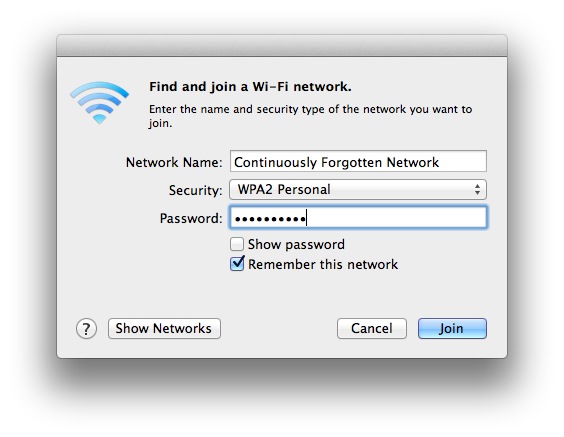
  6. Join the wireless network as usual, checking the “Remember this network” box

You should now be able to sleep and reboot the Mac without connection failures or forgetting the wireless network. This is one of those rare instances where repairing Disk Permissions, an oft referenced generic Mac placebo for many troubleshooting issues, actually does something and resolves the problem. Try it yourself and let us know if it worked for you.

If you continue to have wireless difficulties, check out a lengthy list of tips for fixing wireless problems in OS X Lion.

Still Having Lion Wi-Fi Problems? This Solution Works

Nov 6, 2011 - 163 Comments

Lion WiFi Problems Resolved

We’ve published a variety of fixes for wireless connections dropping in Lion, and even a keepalive script that helps many users maintain a connection in some of the stubborn cases, but some Mac OS X Lion users continue to have problems with their internet connection failing. After diagnosing another MacBook with wireless stability problems post-Lion, I found a solution that hasn’t failed yet and doesn’t require any of the other tips.

Before proceeding, make sure you have done the following:

  • Be sure you are running the latest version of Mac OS X ( get 10.7.2+)
  • Apply all available system and software updates available to your Mac from  Apple menu > Software Update
  • Reset the WiFi Router

After you’re positive you’re on the newest version of OS X and have all software updates applied to the Mac in question, proceed with the solution:

Add a New Network Location & Renew DHCP Lease

  • Launch “System Preferences” from the  Apple menu
  • Select the “Network” panel
  • Click on the “Location” pull down menu and choose “Edit Locations…”
  • Click on the + plus icon to add a new network location, give it a unique name, and click “Done”
  • Back at the Network panel with the newly created location selected, click on “Advanced” in the bottom right corner
  • Click on the “TCP/IP” tab
  • Click on “Renew DHCP Lease” and wait for the numbers on the left to repopulate, then click “OK”

Renew DHCP in Mac OS X Lion

You should now have a stable wireless connection under Mac OS X Lion 10.7.2.

For most users the wifi stability issue was resolved with installing the latest OS X Lion updates, but in some cases is seems that old network connection profiles brought the problem forward for to the newest OS update. You may have to enter the wireless network password again before you can connect to the router, if you don’t know that be sure to find it out from someone who does before troubleshooting with this tip.

Did this work for you? Let us know in the comments.

Get Detailed WiFi Info From the Menu Bar

Jun 15, 2011 - 9 Comments

Extended WiFi Networking Data

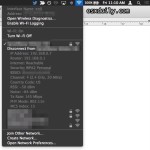
You can retrieve extended wireless connectivity data from anywhere within Mac OS X by holding down the Option key and then clicking on the WiFi menu icon.

Option-clicking will display a sub menu under your active wifi connection that shows what wireless band you are using (PHY Mode), the routers SSID (BSSID), what channel the wireless router is using, which encryption method (Security), signal strength (RSSI), the transmit rate, and MCS index (whatever that is).

You can also mouse-over other SSID’s to see a slightly more condensed version of this information. All of this can be helpful for avoiding potential channel conflicts, or when troubleshooting wireless problems.

And yes, I called it the WiFi menu rather than AirPort, since Lion is moving away from the AirPort references, at least in regard to the menubar.

Enable and Disable AirPort Wireless from the Command Line in Mac OS X

May 31, 2011 - 8 Comments

AirPort Wireless icon Sometimes the easiest fix when troubleshooting an AirPort wireless connection problem is to just turn AirPort on and off. Instead of using the menu item or System Preferences, we can enable and disable AirPort very quickly directly from the Mac OS X Terminal.

Turn Airport Off via Command Line
networksetup -setairportpower airport off

Turn Airport On via Command Line
networksetup -setairportpower airport on

You won’t see any confirmation in the Terminal that the command succeeded or failed, but if you watch the AirPort menu icon you will see the bars disappear indicating the wireless interface is turned off, or reappear indicating that wireless is activated again.

We can also string the commands one after the other to power cycle the wireless interface on a Mac:

Quickly Power Cycle AirPort with Mac OS X’s networksetup Tool
networksetup -setairportpower airport off; networksetup -setairportpower airport on

The AirPort wireless card seems to respond faster to the command line networksetup tool than any other method, making this an ultrafast method of power cycling the wireless interface. This is often enough to resolves basic wireless router connectivity issues like IP conflicts or malfunctioning DHCP requests.

I have enough regular encounters with one particularly flakey router that I created an alias to power cycle my AirPort card, you can do this by adding the following to your .bash_profile just be sure it is on one line:

alias airportcycle='networksetup -setairportpower airport off; networksetup -setairportpower airport on'

Now like any other alias, you only type ‘airportcycle’ and the wireless interface will immediately turn itself off and on again.

Disabling and reenabling AirPort is not the same as connecting to a wireless network from the command line, although you can do that too also by using the networksetup tool.

Forgot your Wireless Password? Here’s How to Recover It

Dec 10, 2010 - 16 Comments

recover forgot wireless password If you have ever forgotten your wireless router password, you aren’t alone. Thankfully it’s very easy to recover a forgotten wireless password:

How to Recover a Forgotten Wireless Password (Works with AirPort Passwords)

Before you get started, you will need access to your Mac’s Administrator account and you will need the name of the wireless router or Airport you are trying to recover the password from. Now let’s begin:

  • Launch Keychain Access located in /Applications/Utilities/
  • Sort the Keychain list by “Name” and locate the name of the wireless router that you forgot the access password to
  • Double click on the router name
  • Click on the checkbox next to “Show Password”

recover forgotten wireless password

  • Enter the Administrator password when asked and click “Allow”
  • The wireless access password will now appear for you to paste it elsewhere in readable form

I’ve had to use this feature on more than one occasion when trying to recall passwords to routers that my Mac has access too, but I just can’t seem to remember. This is especially helpful if you use very complex passwords and you need to enter them on a new Mac or iOS device that has yet to join the network.

You can check out some other articles related to password recovery, including how to reset a forgot Mac password and how to bypass a Mac firmware password.

Test wireless signal strength from the command line

Jul 7, 2010 - 4 Comments

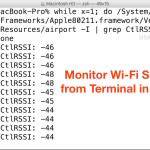
If you’re trying to tweak a wireless router to get the best signal, being able to continuously measure the signal strength while you toy with the antennas, placement, and whatever else is really valuable. Here’s a way you can do this through the command line using the airport wireless tool we’ve discussed in the past:

To see a running tally of signal strength use the following command:
while x=1; do /System/Library/PrivateFrameworks/Apple80211.framework/Versions/Current/Resources/airport -I | grep CtlRSSI; sleep 0.5; done

You’ll see something like ‘agrCtlRSSI: -38′ with the last number changing frequently, but printed repeatedly on your terminal screen. You can stop this command from refreshing by hitting Control+C.

To report just a single line with signal strength, use the following:
clear; while x=1; do /System/Library/PrivateFrameworks/Apple80211.framework/Versions/Current/Resources/airport -I | grep CtlRSSI | sed -e 's/^.*://g' | xargs -I SIGNAL printf "\rRSSI dBm: SIGNAL"; sleep 0.5; done

Again just hit Control+C to stop the command. I found both of above code samples on MacOSXHints and they’ve been a big help when trying to position my hardware for maximum reception quality.

How to use ping on a Mac: pinging websites, domains, or IP addresses

Apr 28, 2010 - 3 Comments

Ping is an essential utility for network administrators, but it’s also pretty handy to check if websites are online, your internet connection is working, or if a network resource is available. Here’s how to use it the ping utility in Mac OS X:

* Launch the Terminal
* Type the following command: ping google.com
* This will ping to google.com repeatedly until you stop the ping command from running with Control+C
* You can send a specific number of packets to an address by using the -c flag:
ping -c 5 192.168.0.1

The ping command only works if the server you are pinging responds to ping requests (most do if they’re online, except perhaps the most hardened networks).

I use ping constantly to make sure network servers are available, it’s a lot faster to ping an IP than to try and connect to it through any number of protocols.

Mac Wireless Problems? Guide to Troubleshooting Airport & Wireless Problems on your Mac

Dec 22, 2009 - 31 Comments

mac wireless troubleshooting Mac’s are amazingly reliable and have few problems, but it’s not incredibly unusual to run into problems connecting to a wireless network. If you’re having problems connecting your Mac wirelessly to an Airport or other WiFi router, check out this guide and try out these troubleshooting tips to fix your wireless internet connection.

Mac Wireless & Airport Connection Problem Troubleshooting: The Basics

* Turn Airport on & off – You can do this via the Airport menu bar or from the Network Preferences. This is the first thing you should try when troubleshooting Mac wireless problems.

* Reset your router – This is the second thing you should try doing. You can fix a surprising amount of wireless problems just by resetting the airport/router. All you need to do is turn the thing off for a few seconds and turn it back on.

* Reset your Cable/DSL modem – You’ll usually want to reset this in combination with your wireless router. Reset this first so the DHCP information will be pulled to the wireless router properly.

* Change Wireless Channels – sometimes your router’s wireless broadcast channel will interfere with a neighbors, be sure you have your router set to a unique channel. Even if it’s a weak signal there can still be interference.

* Make sure Wireless/Airport card software & firmware is up to date – This is usually done just by going to the Software Update menu, if there are any updates available for your Mac or Airport, install them.

Mac Wireless Troubleshooting: Intermediate

* Change wireless security protocol – You shouldn’t be using WEP anyway for security reasons, but sometimes changing from WEP to WPA/WPA2 or WPA to WPA2 can resolve wireless connection difficulties.

* Make sure router firmware is up to date – Check your router manufacturers website for firmware updates, if there are any available, install them.

* Delete and recreate connection – Try deleting and recreating/reestablishing the wireless connection, sometimes a setting can be corrupted and this may fix it.

* Create a new Network Location – Similar to the above suggestion, try creating a new and different wireless network location to see if it resolves the connection problems.

* Change DHCP auto settings to manual – sometimes there is a problem with the DHCP server, and if you manually set an IP address on the network you can be fine. Remember to set the IP to a high number so it wouldn’t interfere with other DHCP machines. As long as you have the subnet mask, router, and DNS settings configured manually as well, this shouldn’t be a problem.

* Disable “Wireless G/N/B only” mode – Sometimes a setting is selected that only broadcasts your wireless signal in Wireless B, G, or N mode (depending on the routers abilities). If this is set, try disabling it.

* Flush the DNS cache – Launch the Terminal and enter the following command onto one full line within the Terminal:
dscacheutil -flushcache

Mac Wireless Connection Problem Troubleshooting: Advanced

* Zap the PRAM – Reboot your Mac and hold Command+Option+P+R during restart until you hear another chime, let the Mac boot as usual.

* Delete Wireless Config files – Delete com.apple.internetconfigpriv.plist and com.apple.internetconfig.plist files from ~/Library/Preferences and reboot

* Trash your home directories SystemConfiguration – Remove all files within ~/Library/Preferences/SystemConfiguration/ and then reboot your Mac.

* Reset your Mac’s System Management Controller (SMC) – For MacBook and MacBook Pro’s: Shutdown the MacBook/Pro, remove the battery, disconnect the power, hold the Power Key for 15 seconds. Replace the battery, reconnect power, and zap the PRAM and wait for 2 chimes before letting the keys go. Let boot as usual.

Many of these tips are from our fixing dropped wireless airport connection problems in Snow Leopard article.

How I fixed my dropping wireless Airport connection problem in Snow Leopard

Sep 1, 2009 - 134 Comments

snow leopard wireless I don’t know why but when I upgraded to Snow Leopard my wireless internet got all wonky, connections were dropping left and right and I couldn’t maintain any worthwhile airport connection for longer than a few minutes. DHCP was behaving particularly strange and the automatic settings pulled from my router were dropping every few seconds. I’m reposting this here not only as some sort of catharsis but also in the event that it helps someone else troubleshoot their wireless problems in 10.6.

Here’s what I did to fix my Airport wireless connection from dropping in Snow Leopard. There was no silver bullet, but each setting allowed my airport connection to become more stable, and the combination of all of these changes has sustained a connection without dropping:

* Changed DHCP auto settings to manual – now I manually set my IP address on the network, I just set something high so it wouldn’t interfere with other DHCP machines. As long as you have the subnet mask, router, and DNS settings configured manually as well, this shouldn’t be a problem.

* Change Wireless Channels – I noticed that a neighbor recently changed their wireless channel to the same one I was on, it’s a weak signal but can still cause interference. I logged into my wireless router and changed the wireless channel to a more obscure and unique one.

* Disabled “Wireless G only” Mode – what seems to have finally sealed the deal was disabling ‘Wireless G Only’ mode that I had set on my router, yea things could theoretically be a little slower but I haven’t noticed, and I’ll wait an extra millisecond or two for a webpage to load if it means I can use my MacBook wirelessly at home as intended.

Interestingly enough, I tried doing each of these things entirely on it’s own and it did not resolve the problem, it was the combination of everything that seems to have ‘fixed’ my airport connection problems. I know my wireless connection issues with Snow Leopard are a fluke here, I imagine it’s something unique to my network and router that only a few other users will encounter. Anyway, if you’re having any wireless connection problems in Snow Leopard 10.6 too, try these things out and see if it works for you as well.

Update: Mac OS X 10.6.3 has been released and contains a few Airport bug fixes, it would be wise to install that software update in addition to trying these tips.

Some more Wireless connection troubleshooting tips:
* Update to the latest version of Mac OS X (10.6.3 includes numerous Airport fixes)
* Reset your router
* Reset your cable modem/DSL
* Disable WPA/WEP protection
* Change security protocol from WEP to WPA/WPA2
* Switch wireless channels – pick a channel no neighbor is using.
* Turn Airport on & off (via menu or Network preferences)
* Delete and then recreate/reestablish wireless network connection
* Create a new Network Location
* Make sure your router firmware and Airport card firmware is up to date
* Zap the PRAM on your Mac (hold Command+Option+P+R on restart)
* Flush the DNS cache using the Terminal command: dscacheutil -flushcache
* Delete the com.apple.internetconfigpriv.plist and com.apple.internetconfig.plist files from ~/Library/Preferences
* Trash your home directories SystemConfiguration folder and reboot – Remove all files within ~/Library/Preferences/SystemConfiguration/ and reboot your machine. Make sure you delete the proper folder, this is in your home directory.

If all else fails, try this, which has worked for some individuals:
* Reset your Mac’s System Management Controller (SMC) : Shutdown the MacBook/Pro, remove the battery, disconnect the power, hold the Power Key for 15 seconds. Replace the battery, reconnect power, and zap PRAM and wait for 2 chimes before letting the keys go. Check out more information on when and how to reset your SMC.

-David Mendez