
Run Linux on iPad with LinPad
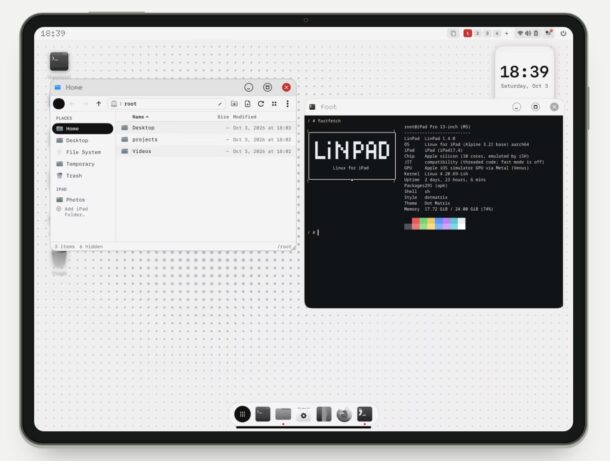
iPad has many uses, either as a touch device, or even as a pseudo-laptop of sorts with the Magic Keyboard, or as a desktop-like device with an external mouse and keyboard, and for better or worse, iPad is always running iPadOS. While many Mac users wish iPad could also run MacOS, a completely different and new option outside of the Apple ecosystem is available for the adventurous; running Linux on iPad, with the help of the new LinPad app.
LinPad offers Alpine Linux on any M-series iPad, and it comes with a tiling desktop with windows, a real terminal, apps you’re already familiar with like Firefox, and more. It’s a full local Linux environment running on top of iPadOS as an app, so there’s no remote connections required, and there’s no jailbreaking or modifications required of iPad either.
Getting LinPad setup on iPad is not ultra fast or as simple as downloading an app from the App Store though, as LinPad arrives on iPad through side loading, making this most appropriate for advanced users. But then again, those with an interest in Linux tend to be more advanced computer users anyway, so that shouldn’t shy any Linux enthusiast away from trying out LinPad on their device.
Installing LinPad requires side loading the app, and the developer says the entire installation process takes about 20 minutes to finish when you account for side loading steps. After the install has complete, updating LinPad is done through a tap and is much simpler. It’ll take up about 3GB on your device initially, but of course will grow if you add more and more stuff to the Linux environment.
This is an interesting project and will be fascinating to see how it develops over time, and perhaps one day things will change enough with the App Store to allow LinPad to be able to run and install directly through Apple’s App Store instead of through side loading. In the meantime, if you’re a Linux enthusiast or tinkerer with an iPad to play around with, LinPad might be a worthwhile app to explore and enjoy, and perhaps it’ll even change how you use your iPad too.





