Tips & Tricks

Tips and tricks for all things Apple! Whether you want to learn tips for a Mac, iPhone, iPad, Apple Watch, or much more, you will find many tricks, tips, tutorials, and excellent walkthroughs for Apple devices and software here.

Search Tips & Tricks

Free Final Cut Pro X Video Training Tutorials

Jun 29, 2011 - 4 Comments
Free Intro to Final Cut Pro X Tutorial

Interested in learning how to use the all-new Final Cut Pro X? Don’t miss this free video learning tutorial set from IzzyVideo. There are no signups or strings attached (other than owning Final Cut Pro X of course), just set aside some time and start learning.

Quickly Create a New Image File from Clipboard Contents with Preview

Jun 29, 2011 - 10 Comments
Create new image from clipboard

With Mac Preview you can quickly create a new image file from your clipboard contents. On it’s own that might not be too enthralling, but this feature extends beyond Preview, meaning any image that you have copied from anywhere using Command+C will work as the source image to create a new image file. This includes … Read More

How to Convert a Text File into a Spoken Audio File via Command Line

Jun 28, 2011 - 16 Comments

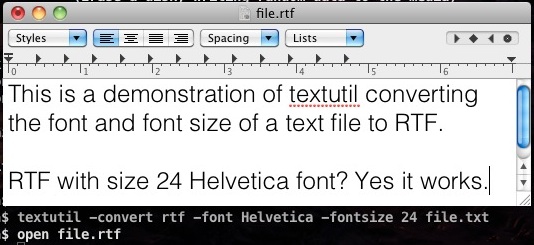
Using Mac OS X Text to Speech tools, we can convert any .RTF or .TXT file into a spoken audio file which can then be transferred to your iPod or iPhone for later listening. Update: There is an easier way to do a text to audio file conversion using the OS X Services menu, the … Read More

Convert Flash SWF to HTML5 with Google’s Swiffy Tool

Jun 28, 2011 - 2 Comments
SWF to HTML5

Swiffy is a new experimental tool from Google that easily converts SWF Flash files to HTML5, making Flash-only content accessible to hardware like the iPhone and iPad in just a few seconds. This should be a really useful utility for designers and it’s well worth a bookmark if you work with HTML5 and Flash content … Read More

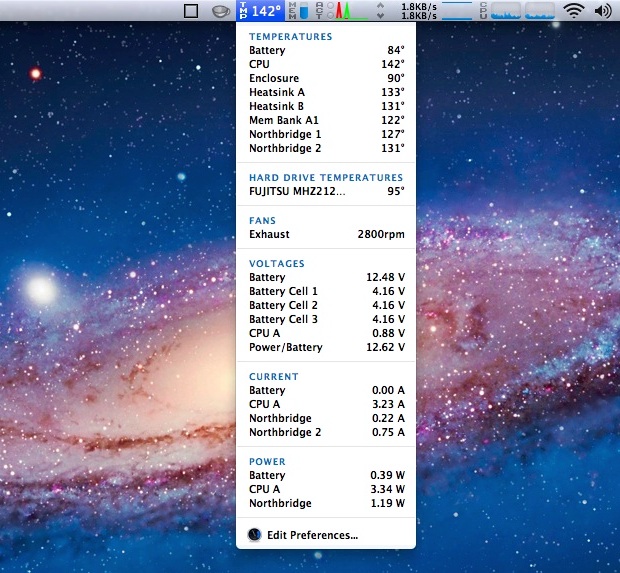
Monitor System Activity in the Mac OS X Menu Bar for Free with iStat Menu 2

Jun 24, 2011 - 12 Comments

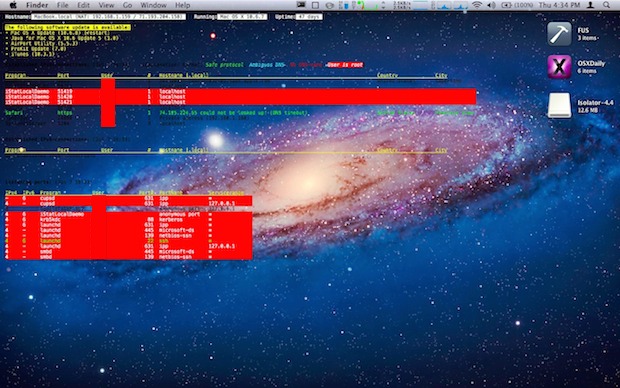
You can display and monitor virtually all essential system activity directly from your Mac OS X menu bar using a great utility called iStat Menu:

Check Battery Cycle Count on a Mac

Jun 23, 2011 - 17 Comments
Battery Cycle Count

If you have a MacBook, MacBook Air, or MacBook Pro, you can check the battery cycle count. This lets you see how many charge and drain cycles have been used on the battery, and gives you an idea of overall battery health. This functionality exists in all versions of macOS and Mac OS X, and … Read More

Use an External USB Hard Drive with a Time Capsule and Save $$$

Jun 21, 2011 - 29 Comments
Time Capsule

You can plug any USB hard drive into a Time Capsule and expand the available disk space of the Time Capsule that way. This is then accessible as usual as a Network Attached Storage device for your Mac backups or whatever, and you can then even directly backup wirelessly to that external drive connected to … Read More

Uninstall Mac Applications

Jun 20, 2011 - 58 Comments
Uninstall a Mac App

Uninstalling applications from Mac OS X is probably the easiest method of removing apps from any operating system, and it’s far easier on a Mac than anything you’ll encounter in the Windows world. Deleting apps is so simple that some new Mac users are left wondering what else they’re supposed to do, I have received … Read More

Summon Dictionary & Wikipedia for Words in Mac OS X with Three-Finger Tap

Jun 20, 2011 - 15 Comments
Dictionary in web browser on Mac

Did you know you can instantly access a dictionary, thesaurus, or Wikipedia entry for a word or phrase, from nearly anywhere in Mac OS X? All you need to do is remember a super easy three-finger tap trick.

How to Save 15% to 20% When Buying Mac OS X Lion

Jun 17, 2011 - 11 Comments
iTunes Gift Card

OK so Mac OS X Lion won’t be released until next month, but if you do a little preparation now you should be able to save at least 15% off the already low $29.99 price. How? Simple, buying iTunes Gift Cards on sale and redeeming them on the Mac App Store. Here’s the deal with … Read More

Enable iTunes Automatic Downloads of Music, Apps, and Books via iCloud

Jun 17, 2011 - 17 Comments
Enable iTunes Automatic Downloads

The latest version of iTunes includes the great “Automatic Downloads” ability which automatically syncs your new app, music, and book purchases to all of your other iOS devices. This is the first part of iCloud that is available free to iTunes users, but most users won’t see the benefit because it’s not enabled by default. … Read More

Set Mac Desktop Background Wallpaper from any Image in Safari

Jun 16, 2011 - 12 Comments
set Mac OS X desktop background wallpaper picture from Safari

You can set any image on the web as your Mac desktop background wallpaper directly from Safari. This means you don’t even need to download the picture to your computer to set it as the desktop background, you can just find a picture on the web and immediately use it as the wallpaper on the … Read More

Get Detailed WiFi Info From the Menu Bar in Mac OS X

Jun 15, 2011 - 13 Comments
Option-click Wi-Fi menu extended details in Mac OS X

You can retrieve extended wireless connectivity data and details from anywhere within Mac OS X by using a nifty trick that toggles the Wi-Fi menu bar item to display additional specifics about any wireless router. To do this, hold down the Option key and then click on the WiFi menu icon found on the Mac.

Monitor Progress, Errors, & Watch All Activity During a Mac OS X Install

Jun 14, 2011 - 4 Comments
Show all logs in the Mac OS X install process

You can watch what’s going on behind the scenes during a Mac OS X system installation by accessing the Logs window after the installer has begun. From Logs, use the pulldown menu to select “Show All Logs” to see a live stream of all activity pertaining to the OS X installation and/or upgrade process. “Show … Read More

Maximize Screen Space with the Tiny iTunes Micro Player

Jun 13, 2011 - 4 Comments
iTunes Micro Player

If you want iTunes to take up the absolute least amount of screen space, yet still be able to control music and volume, use the iTunes Micro Player (Yea I just named it that, I don’t know what the official name is). First minimize iTunes so that it’s in the standard mini-player mode, but then … Read More

Find an iPhone, iPod touch, or iPad UDID

Jun 10, 2011 - 10 Comments
iPhone UDID

All iOS devices come with a Unique Device Identifier number, known as a UDID. The UDID is kind of like a serial number for that device, except that it’s even longer at 40 characters. By far the most simple way to retrieve your iPhone, iPad, or iPod‘s identifier number is through iTunes itself.

How to Create & Burn a Bootable Mac OS X Lion Install DVD

Jun 8, 2011 - 120 Comments
Make your own OS X Lion Bootable Installation DVD

Apple announced that Lion would be released exclusively through the Mac App Store for $30. This is great because the App Store policy allows a single purchase to install on all your Macs, but what if you don’t have broadband access on all your Macs, or what if you just want a bootable installation disc? … Read More

Enable “Click to Play” for Plug-ins & Flash in Google Chrome Web Browser

Jun 3, 2011 - 6 Comments
Click to Play plugins like Flash in Google Chrome browser

Rather than disabling Flash completely in Chrome, an excellent option is to enable a hidden “Click to Play” feature that prevents that plugin and all others from automatically loading. With Click To Play turned on, if you want Flash or another browse plug-in to run and load, you simply click on it to play or … Read More

Subscribe to OSXDaily

Subscribe to RSS Subscribe to Twitter Feed Follow on Facebook Subscribe to eMail Updates

Tips & Tricks

News

iPhone / iPad

Mac

Troubleshooting

Shop on Amazon to help support this site