Tips & Tricks

Tips and tricks for all things Apple! Whether you want to learn tips for a Mac, iPhone, iPad, Apple Watch, or much more, you will find many tricks, tips, tutorials, and excellent walkthroughs for Apple devices and software here.

Search Tips & Tricks

Change the Delay When Dragging Windows Within Spaces on Mac

Feb 10, 2010 - 8 Comments

Spaces is a really nice feature of Mac OS X that lets you place different windows and applications within their own workspace. Dragging a window to a new Space is just a matter of holding onto the window and pulling it towards the end of the screen. You may have noticed that there’s a delay … Read More

Waterproof an iPhone on a Budget with a Zip Lock Bag

Feb 8, 2010 - 15 Comments

Did you know that you can put an iPhone inside a plastic bag and still use the touchscreen? Yes, that’s right, stick your iPhone in an airtight ziplock bag, and you’ll have an instant and amazingly cheap waterproof case for your iPhone. Well, waterproof may be a bit aggressive, and perhaps water resistant is a … Read More

Lock the Dock in Mac OS X

Feb 8, 2010 - 11 Comments

If you need to prevent the Dock icons from changing or being modified on a Mac, you can use defaults command strings to lock down the OS X Dock and prevent any adjustments or changes to how it appears on screen.

How to Always Secure Empty Trash

Feb 7, 2010 - 11 Comments

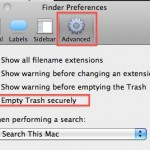
You can set Mac OS X to always securely empty the Trash and add a significant layer of security when removing files from the Mac. This is done just by adjusting a preference setting within the Finder, and it’s very easy to configure, here’s what you will want to do to use this option:

Control iTunes and QuickTime with your iPhone Earbuds

Feb 5, 2010 - 4 Comments

This is a very cool feature I had no idea existed but accidentally stumbled across while on a recent flight. If you have an iPhone, you probably know that the earbuds included with it have a button to adjust volume and what not, well guess what, you can control the volume level in iTunes and … Read More

How to Prevent .DS_Store File Creation

Feb 3, 2010 - 15 Comments

.DS_Store files store folder level metadata information (such as icon placement and background pictures) for Mac OS X to understand, this is fine and dandy and you’re likely to never even notice if you’re a bunch of Macs working together. Unfortunately, these .DS_Store files can be really pesky in a multi-platform network environment, they can … Read More

Virtual Desktops in Mac OS X

Feb 1, 2010 - 10 Comments

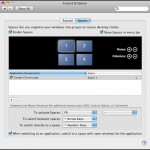
A colleague of mine is a recent Mac switcher and he was complaining to me that virtual desktops are not included in Mac OS X, the irony is that they are, they just have the name Spaces (coming from a heavy Linux background, I guess the naming convention just threw him off). Virtual Desktops are … Read More

How to Mute the Mac Startup Sound

Jan 28, 2010 - 36 Comments

Many Mac users are fond of the Mac startup sound that chimes on system boot, but there are definitely times when booting that you’d rather just be quiet, say a library or coffee shop. Thus, we’re going to show you how to mute that boot up sound on any Mac, MacBook model (Pro, Air), iMac, … Read More

Track an Applications Usage in Mac OS X with opensnoop

Jan 27, 2010 - 4 Comments

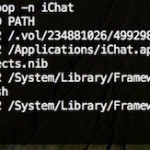
Using the command line tool ‘opensnoop’ you can track any Mac applications (or system process) usage of the file system. This is a very handy tool for administrators and troubleshooting! The simplest way to use it is as follows:

How to Set a Manual IP Address in Mac OS X

Jan 26, 2010 - 11 Comments

There are times when a user will need to to manually set an IP address in Mac OS X to one which will be compatible with a joined network, either wi-fi or ethernet. Here will cover how to change a Mac IP address to a manual setting, and also how to pick an IP address … Read More

Inspect Mac .pkg Package Installer Files

Jan 26, 2010 - 3 Comments

I just came across a really useful QuickLook plugin called SuspiciousPackage that lets you inspect those .pkg package installer files that so many Mac apps and downloads come in. Using this plugin, you can determine if an admin password is required, how many install scripts are in the package file, where the installation locations of … Read More

Change the Mac Login Screen Background in Snow Leopard

Jan 25, 2010 - 8 Comments

You can change the Mac OS X login screen background picture using a few different methods. We have covered this tip before but it was based around a few Terminal commands that might not be easy to follow for the average Mac user without command line experience. With that in mind, here are ways to … Read More

Convert Images in Mac OS X: JPG to GIF, PSD to JPG, GIF to JPG, BMP to JPG, PNG to PDF, and more

Jan 24, 2010 - 42 Comments

You can convert many different image file formats in Mac OS X for free using the included Preview application, there’s no need to download additional tools or do anything overly complex. As of any somewhat modern version of Mac OS X, the Mac Preview app supports the following file types and will convert between any … Read More

How Long Has My Mac Been On?

Jan 21, 2010 - 12 Comments
Terminal in macOS

If you’re ever wondering how long your Mac has been turned on and running for, you can discover exactly how long the computer has been on since last boot with two different methods available in OS X. Let’s learn a bit more about discovering how long a Mac has been left turned on for, and … Read More

How to Delete Pages in a PDF Document with Preview on Mac OS X

Jan 20, 2010 - 6 Comments

You can delete specific pages from a PDF file with the built-in Mac Preview app, available in all versions of OS X. This is really useful for paring down large PDF documents if you only need a few select pages, and learning how to delete specific pages from PDF files is bound to make any … Read More

Create a New Floating Stickies Note from Anywhere in Mac OS X with Shift+Command+Y

Jan 18, 2010 - 9 Comments

You may already know that you can use a keystroke to make a Stickies Note from Safari app in Mac OS X, but did you know that same keystroke works in many more apps on the Mac? Yes, it turns out you can instantly create a Stickies note from almost anywhere and any application in … Read More

Use quotation marks with Spotlight to search for a phrase within a document

Jan 15, 2010 - Leave a Comment

If you know a phrase that is contained within a document, but can’t remember the document file name, try searching for the phrase that you know appears within the document. Make this phrase search even more precise by putting the phrase itself within quotation marks, for example “all rights reserved” will find all files that … Read More

Stop the Mac Startup Sound on Older Macs with a Preference Panel

Jan 13, 2010 - 14 Comments

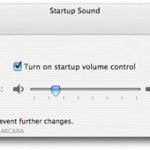
Mac’s have a very distinct startup sound that chimes whenever they boot, this is fine for most people but if you’re in a quiet office or library it can be very obnoxious to have the loud startup sound announcing to the world that you are on a Mac. Thankfully there’s a nice little utility that’s … Read More

Subscribe to OSXDaily

Subscribe to RSS Subscribe to Twitter Feed Follow on Facebook Subscribe to eMail Updates

Tips & Tricks

News

iPhone / iPad

Mac

Troubleshooting

Shop on Amazon to help support this site