
Tips & Tricks

Tips and tricks for all things Apple! Whether you want to learn tips for a Mac, iPhone, iPad, Apple Watch, or much more, you will find many tricks, tips, tutorials, and excellent walkthroughs for Apple devices and software here.

Search Tips & Tricks

Taking Screenshots in Mac OS X and Changing the Default Filetype to JPG from PNG to Whatever

Dec 8, 2006 - 23 Comments

Finder icon on the Mac

Many Mac users take screenshots of their desktop for various reasons, be it showing off their setups, post to their blog or flickr, development, whatever. Most of us just use command-shift-3 and command-shift-4, but did you know there’s more options than just those two keyboard shortcuts? I’m not talking about third party apps, but options … Read More

Using the Unix command line in Mac OS X to manipulate images

Dec 1, 2006 - 4 Comments

Anytime I find myself doing a repetitive task, it is crucial that I discover small tricks and workarounds to make my daily routine as efficient as possible. I have long been a Linux user, so naturally I lean towards opening up the Terminal and using the familiar bash shell environment that I have mastered on … Read More

How to Launch Application on System Start in Mac OS X

Nov 29, 2006 - 40 Comments
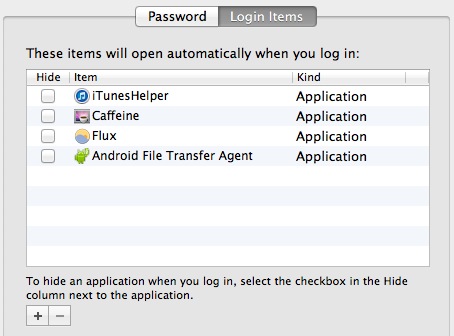
Login items in Mac OS X

Mac users may find it helpful to automatically launch an application upon system start of Mac OS X. Basically this means as soon as the Mac is done booting, the approved auto-launch apps will open themselves once the user has logged into the Mac and the Mac OS desktop has displayed. You can add as … Read More

Front Row Enabler – Run Front Row on Unsupported Macs

Nov 29, 2006 - 4 Comments

Does your Mac not support Front Row? Have you been drooling green in envy as your friends flip through their media collections? Drool no more, there is a solution to get Front Row running on your Mac! Front Row Enabler is a simple app that patches Mac OS X and allows the installation of Front … Read More

Instant Dictionary Keystroke in Safari for Mac: Control-Command-D

Nov 27, 2006 - 5 Comments

Here’s a very useful key combination that allows you to instantly summon a dictionary from the web browsers in Mac OS X. If you’re in Safari (and many other Mac OS X apps and browsers), hit control-command-D keystroke together while you hover over a word, a dictionary will pop up with that words definition!

Ten OS X Command Line Utilities You Might Not Know About

Nov 22, 2006 - 86 Comments

The Mac OS X command line interface is home to thousands of programs that the average user doesn’t know exists. Leveraging years of hard work by the GNU foundation and others in the open source community, Apple designed a wonderful OS that doesn’t “need” any use of the command line. While using the command line … Read More

Subscribe to OSXDaily

Subscribe to RSS Subscribe to Twitter Feed Follow on Facebook Subscribe to eMail Updates

Tips & Tricks

News

iPhone / iPad

Mac

Troubleshooting

Shop on Amazon to help support this site



