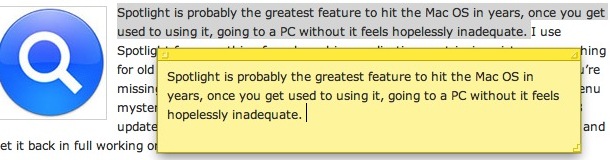
Want a block of text to float over your Mac desktop so that you can reference it easily? That’s a perfect usage for the Stickies app in OS X, and using a little known trick you can instantly create a new Stickies note from within Safari.
The secret to this trick is quite simple: you’ll need need highlight some text, images, or both, and then just hit the following command key sequence: Command+Shift+Y
If you know some specific attributes of a file, application, or item you are looking for on a Mac, you can use Spotlight Search Operators to dramatically narrow down your returned results in the Mac OS search feature. For example, if the file type of a document you are looking for is a PDF, you can pre-qualify search results by using operators to return only PDF’s within Spotlight. There are tons of search operators to use, and some can get very specific. Let’s jump into this a bit to learn more.
Remember, to access Spotlight search on a Mac, hit the Command+Spacebar keys together. Then just type in the little popup search box to start narrowing down the queries and returned items. Spotlight adjusts files live and on the fly depending on what is looked for and specified, thus if you want to try an operator it will immediately adjust the search to accommodate the search operator request.
Here are a some sample operators and parameters to enter before your search query that you can try yourself in Spotlight for Mac OS X:
You can easily open OS X Finder windows containing any search results from the Spotlight menu.
After you have entered a search query into Spotlight, highlight the item you want by navigating to it in the search results, and as the desired item to be opened in the Finder is selected, hit Command+R to reveal the item within the Mac Finder.
Did you know the Mac has a little file inspector tool that can be used in the Finder for quickly getting information about files, folders, and anything else selected in a Finder window?
The File Inspector is basically a dynamic “Get Info” window on the Mac, as it adjusts depending on what you select in the Finder of Mac OS. This is very useful for so many reasons, but particularly if you frequently use the “Get Info” command in Mac Finder to reveal details about finder items.
If you’ve ever needed to get music off of your iPod or iPhone and onto a different machine, then you’ll know it’s not always as easy as you’d like it to be. Let’s say you got a new computer or lost your old one, but still have your iPhone or iPod with music files on it. Because the iPod/iPhone is attached to the old computer’s ID, you can’t just hook up the iPod to a new computer and expect to be able to get the files off. So how do you get music, pictures, and videos off of the iPhone or iPod? My personal choice is to use the easy, and free (for Mac users at least) Pod to Mac software, it’s no frills but easy enough to use and reliable.
Update: Pod to Mac was freeware, but now the developer is charging for Mac versions of the application on their site, you can still download the free version on BrotherSoft.com and possibly CNET
You can also transfer music files that you purchased through iTunes using iTunes itself, and if you’re feeling a bit more adventurous you can get music, videos, and whatever else off your iPod using just the Finder. The Finder method doesn’t work with the iPhone or iPod Touch though, so don’t bother if you’re using one of those. Instead of covering the iTunes or Finder methods myself, I’ll point our a nice how-to guide on Endgadget, check it out here:
When you go to change the file extension in Mac OS X you will get a dialog box notifying you that by changing a file type it may open in another application. Chances are if you are changing the file extension deliberately, you did this intentionally and the warning is not necessary, but it’s shown just in case.
That’s ok though, because a keystroke expedites the process. You can quickly accept this file type extension change by using a simple keyboard shortcut that’s pretty easy to remember: Read more »
Happy New Year to all of you from the writers of OS X Daily! It’ll likely be a slow day around here, but here are some of the more popular posts of 2009 to keep you busy for now:
I frequently get asked about the purpose of .DS_Store files by Mac users and Windows System Administrators who have a few Mac’s on their networks, where seeing the files turn up when hidden files are made visible.
Here is an explanation as to what a DS_Store document is in macOS and Mac OS X, what happens if you delete them, and how to disable their creation if you’d rather not have them around any longer on network environments. Read more »
Have you ever gotten emails from someone that you really don’t want to get? Be it just plain spam or annoying messages from people you’d rather not hear from, you can reduce this unwanted email by using the Bounce feature of Apple’s Mail app. Bounce tells the message sender that your email address isn’t valid, which is very effective when dealing with real people, but less so when dealing with spammers.
You can restore the original location of a file that has been sent to the Trash very easily. This quite literally sends a file that is within the Trash back to where it was originally stored on the Mac OS X file system.
Using the “Restore to Previous Location” feature is really easy, you’ll need to open the Trash can and then do one of the following (one is a keystroke, the other is a right-click option, both work the same however): Read more »
If you’ve ever accidentally deleted pictures from your digital cameras memory card, you’re not alone. That feeling of dread when you forever lose photographic evidence of memories and experiences in digital form can sometimes be resolved though – so don’t freak out quite yet!
Using an excellent free tool called Exif UnTrasher, Mac OS X users can attempt to recover deleted images from memory cards, USB drives, and other volumes, and it works pretty well as long as you can mount the volume, card, or drive that the pictures were deleted from.
You can easily sync your Mac Contact list or Address Book contacts with your Google Contacts. This is quite easy to set up, we’ll show you how to do so in all versions of OS X.
So, you want to connect to your Mac remotely from your iPhone? It’s possible, and it’s easier than you might think. and though you may have heard of people controlling their Mac’s via their iPhone but assumed it was something just for the jailbreak crowd, well that’s assumed wrong, because it turns out that iOS has VNC clients that allow you to remotely control a Mac that is setup for remote control.
It’s actually really easy to control your Mac from the iPhone, iPad, or iPod touch, we’ll run through a look at how it works. Read more »
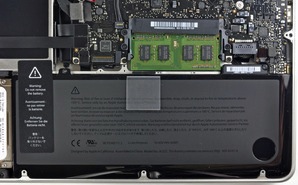
Looking to repair your Mac? Troubleshooting hardware problems on your Mac? Planning a do-it-yourself battery replacement with a Unibody MacBook Pro? How do you change the harddrive on a 20″ aluminum iMac? If it involves dissembling a Mac and putting it back together, there is no better resource than iFixIt, who has the single most comprehensive list of free guides to take apart and rebuild nearly any Mac that is still in use. Every screw, tab, connector, and cable has been covered, if you follow these guides carefully you really can’t go wrong.
This site is absolutely fantastic and a must bookmark for any techy Mac user, Mac IT professional, or general enthusiasts who aren’t afraid to get their hands a little dirty. Do not miss it!
Need to quickly boot from Mac OS X to Windows? Don’t want to fiddle around in System Preferences or hold down the Option key during the Mac restart to access the Boot Loader? QuickBoot to the rescue!
QuickBoot is a great little tool that sits in your menubar and lets you easily select boot volumes from Mac OS X to Windows and vice versa. Simply click the menu, select the volume, reboot your Mac, and you’ll be in Windows.
Mac’s are amazingly reliable and have few problems, but it’s not incredibly unusual to run into problems connecting to a wireless network. If you’re having problems connecting your Mac wirelessly to an Airport or other WiFi router, check out this guide and try out these troubleshooting tips to fix your wireless internet connection.
Mac Wireless & Airport Connection Problem Troubleshooting: The Basics
* Turn Airport on & off – You can do this via the Airport menu bar or from the Network Preferences. This is the first thing you should try when troubleshooting Mac wireless problems.
* Reset your router – This is the second thing you should try doing. You can fix a surprising amount of wireless problems just by resetting the airport/router. All you need to do is turn the thing off for a few seconds and turn it back on.
* Reset your Cable/DSL modem – You’ll usually want to reset this in combination with your wireless router. Reset this first so the DHCP information will be pulled to the wireless router properly.
* Change Wireless Channels – sometimes your router’s wireless broadcast channel will interfere with a neighbors, be sure you have your router set to a unique channel. Even if it’s a weak signal there can still be interference.
* Make sure Wireless/Airport card software & firmware is up to date – This is usually done just by going to the Software Update menu, if there are any updates available for your Mac or Airport, install them.
Mac Wireless Troubleshooting: Intermediate
* Change wireless security protocol – You shouldn’t be using WEP anyway for security reasons, but sometimes changing from WEP to WPA/WPA2 or WPA to WPA2 can resolve wireless connection difficulties.
* Make sure router firmware is up to date – Check your router manufacturers website for firmware updates, if there are any available, install them.
* Delete and recreate connection – Try deleting and recreating/reestablishing the wireless connection, sometimes a setting can be corrupted and this may fix it.
* Create a new Network Location – Similar to the above suggestion, try creating a new and different wireless network location to see if it resolves the connection problems.
* Change DHCP auto settings to manual – sometimes there is a problem with the DHCP server, and if you manually set an IP address on the network you can be fine. Remember to set the IP to a high number so it wouldn’t interfere with other DHCP machines. As long as you have the subnet mask, router, and DNS settings configured manually as well, this shouldn’t be a problem.
* Disable “Wireless G/N/B only” mode – Sometimes a setting is selected that only broadcasts your wireless signal in Wireless B, G, or N mode (depending on the routers abilities). If this is set, try disabling it.
* Flush the DNS cache – Launch the Terminal and enter the following command onto one full line within the Terminal: dscacheutil -flushcache
Mac Wireless Connection Problem Troubleshooting: Advanced
* Zap the PRAM – Reboot your Mac and hold Command+Option+P+R during restart until you hear another chime, let the Mac boot as usual.
* Delete Wireless Config files – Delete com.apple.internetconfigpriv.plist and com.apple.internetconfig.plist files from ~/Library/Preferences and reboot
* Trash your home directories SystemConfiguration – Remove all files within ~/Library/Preferences/SystemConfiguration/ and then reboot your Mac.
* Reset your Mac’s System Management Controller (SMC) – For MacBook and MacBook Pro’s: Shutdown the MacBook/Pro, remove the battery, disconnect the power, hold the Power Key for 15 seconds. Replace the battery, reconnect power, and zap the PRAM and wait for 2 chimes before letting the keys go. Let boot as usual.
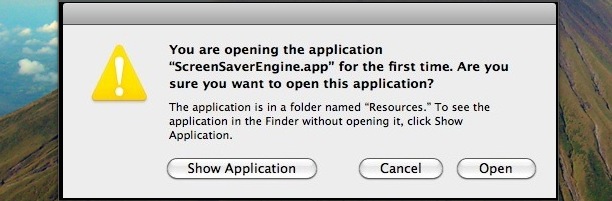
“You are opening the application ScreenSaverEngine.app for the first time. Are you sure you want to open this application?”
My Mac’s screensaver was officially not working. That’s the odd message I got out of the blue today, which is rather peculiar since ScreenSaverEngine.app has been activated many times considering it is what drives the screensaver in Mac OS X! I set out to resolve this peculiar problem and found a solution (note this was only tested in Mac OS X 10.6 Snow Leopard).
Fix problem with ScreenSaverEngine.app to get screensaver working again
* Launch the Terminal and enter the following command all onto one line: cd /System/Library/Frameworks/CoreServices.framework/Frameworks/LaunchServices.framework/Support
* Now enter the following at the command line: sudo ./lsregister -r -apps local,system,user
* You will be asked for your Admin password since you are using the sudo command to execute the lsregister command, enter it
* After a few seconds you will see: ThrottleProcessIO: throttling disk i/o and then you will be returned to the Terminal, which you can now close.
* Try initiating the ScreenSaver again, it should work (use a hot corner to test)
If you’re curious, the lsregister script that was executed rebuilt the LaunchServices database, and since ScreenSaverEngine.app is part of this functionality, it seems to do the trick. I found this solution by digging around in the Apple Discussion Forums but I realize that messing around in the Terminal can be perplexing for many Mac users, so you may want to just try a simple reboot beforehand.
I don’t have any explanation as to why my screensaver suddenly stopped working, I haven’t installed any updates or new apps recently, and my Mac hasn’t been rebooted in 9 days (you can check your Mac’s uptime with the terminal). It’s a bit of a mystery to me as to what caused it, but the above fix worked and my screensaver is working as usual, all without rebooting my Mac!

 If you know some specific attributes of a file, application, or item you are looking for on a Mac, you can use Spotlight Search Operators to dramatically narrow down your returned results in the Mac OS search feature. For example, if the file type of a document you are looking for is a PDF, you can pre-qualify search results by using operators to return only PDF’s within Spotlight. There are tons of search operators to use, and some can get very specific. Let’s jump into this a bit to learn more.
 You can easily open OS X Finder windows containing any search results from the Spotlight menu.
 If you’ve ever needed to get music off of your iPod or iPhone and onto a different machine, then you’ll know it’s not always as easy as you’d like it to be. Let’s say you got a new computer or lost your old one, but still have your iPhone or iPod with music files on it. Because the iPod/iPhone is attached to the old computer’s ID, you can’t just hook up the iPod to a new computer and expect to be able to get the files off. So how do you get music, pictures, and videos off of the iPhone or iPod? My personal choice is to use the easy,
 Have you ever gotten emails from someone that you really don’t want to get? Be it just plain spam or annoying messages from people you’d rather not hear from, you can reduce this unwanted email by using the Bounce feature of Apple’s Mail app. Bounce tells the message sender that your email address isn’t valid, which is very effective when dealing with real people, but less so when dealing with spammers.
 If you’ve ever accidentally deleted pictures from your digital cameras memory card, you’re not alone. That feeling of dread when you forever lose photographic evidence of memories and experiences in digital form can sometimes be resolved though – so don’t freak out quite yet!

 Looking to repair your Mac? Troubleshooting hardware problems on your Mac? Planning a do-it-yourself battery replacement with a Unibody MacBook Pro? How do you change the harddrive on a 20″ aluminum iMac? If it involves dissembling a Mac and putting it back together, there is no better resource than
  Need to quickly boot from Mac OS X to Windows? Don’t want to fiddle around in System Preferences or hold down the Option key during the Mac restart to access the Boot Loader? QuickBoot to the rescue!
  Mac’s are amazingly reliable and have few problems, but it’s not incredibly unusual to run into problems connecting to a wireless network. If you’re having problems connecting your Mac wirelessly to an Airport or other WiFi router, check out this guide and try out these troubleshooting tips to fix your wireless internet connection.