Have you ever noticed the Bluetooth menu bar icon on a Mac start flashing or blinking? The blinking Bluetooth icon on the Mac means one thing; the connected Bluetooth device has a low battery.
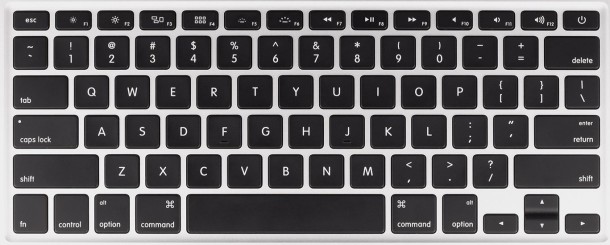
You can access and type foreign currency symbols in Mac OS X in much the same way that other special characters are typed out. That means you’ll use a keystroke combined with the “Option” key to type the respective character. A few common currency symbols are available on default keyboard layouts, including the $ dollar, € Euro, ¥ Yen, and £ Pound, but other foreign currencies can also be accessed through a special character panel. Let’s review each of these: Read more »
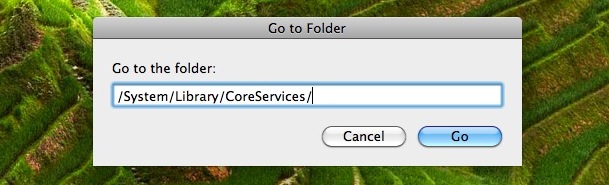
If you want to change the wallpaper that sits in the background of your Mac’s login screen in OS X Leopard and Snow Leopard, from the Finder hit Command+Shift+G to open the ‘Go to Folder’ screen. Type /System/Library/CoreServices/ and click ‘Go’:
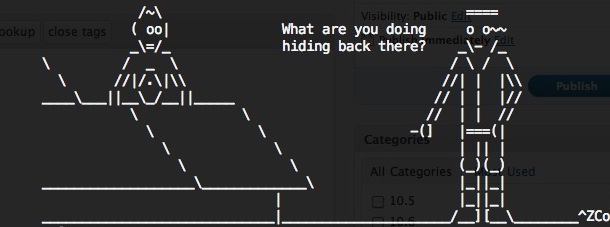
ASCII art is just one of those wonderful retro throwbacks to the earliest days of computing. So, if you’re looking for a nostalgic return to the the days of BBS, MUD, and IRC, and perhaps a little bored at school or work, why not watch the entirety of Star Wars Episode IV: A New Hope discretely thanks to being rendered entirely in ASCII art?
Yea seriously, you read that right, you can watch Star Wars in ASCII art, so live your wildest dreams because we’ve got you covered here, thanks to a fully rendered ASCII version of the movie that you can access with Telnet via your command line of just about any modern operating system with a command prompt. Read more »
Like many of us, I’m often busy and out of the home, leaving my Mac on a desk. I regularly use my home machine as a local fileserver though and other people in the household are dependent on it being up and running. Now here’s the situation I’m presented with: I leave town earlier than my housemates do, but I don’t want to have to rely on someone who is not particularly computer savvy to put my Mac to sleep, so what do I do? Schedule the sleeping and waking events, of course! And in this case, it’ll be done through the command line.
Update: VLC has posted this clarifying the state of the VLC for Mac project, stating ‘VLC for Mac death is “greatly exagerated”‘, and emphasizing that the majority of development issues are in regards to the GUI, apparently it’s not as perilous as the web has assumed.
VLC Player for Mac OS X may well be nearing the end of it’s life, unless some Mac developers can step in to take over support of the codebase. In a sobering reality check, VLC developer Rémi Denis-Courmont says the following:
“There are now effectively zero active developers for MacOS.
As an immediate consequence, the 64-bits releases for MacOS has already been put on hold.
I don’t need to mention the stale status of the MacOS user interface.
If it goes on like this, MacOS support may be discontinued as of VLC 1.1.0. There is nobody to make the necessary updates to the MacOS support code, for instance to support the new VLC video output architecture.
Taking into account the learning curve to VLC development, I think it is fair to say that the situation is now critical.”
VLC is my favorite video player by far, it’s cross platform compatible and works flawlessly with nearly every video type thrown at it. I really hope some capable developers step in to take over the Mac OS X division, it would be very sad indeed if Mac users lost out on any further VLC releases.
Ever wonder what Apple.com would look like in 1983? It would be promoting the Apple Lisa which ran at a blazing 5mhz, had 1mb of RAM, and cost $9,995 (which is $21,335 in inflation adjusted dollars!). Designer Dave Lawrence designed the mockup and it’s a good laugh, he’s also a huge fan of the Apple Newton and has managed to connect one to Snow Leopard… don’t ask why.
If you’re looking for a cool fire screensaver for your Mac look no further. Aurora Screensaver allows you to start fires all over your Mac desktop by the use of your multitouch trackpad! Each finger burns it’s own fire, it’s really quite fun to play around with. Since multitouch input is used, you just have to hit a key to exit the screensaver. This is Snow Leopard only and requires a trackpad.
You can easily batch resize groups of images within Mac OS X by using the included Preview app, that is, taking a group of pictures set at one or various resolutions, and collectively resize them all together in a group to a new resolution, outputting either as the same file or as a new file saved at the newly desired resolution. Long ago you had to buy expensive third party software for this purpose, but no longer is there a need for any additional downloads or expensive photo editing applications to perform these tasks on a Mac. Instead you only need Preview, which is free with every Mac and every version of Mac OS X!
Here is how to use Previews’ powerful yet easy batch image resize feature to change the resolution of multiple files in one fell swoop, all in a few simple steps.
It’s that time of year again, the holiday season is upon us! What better way to celebrate than to download a hoard of free Christmas songs from Apple, courtesy of iTunes?
From Barry Manilow to Amy Grant to Weezer to Aretha Franklin, this is quite a diverse set of holiday songs that are sure to get you in the spirit. Head on over to Apple, launch the link in iTunes, and enjoy your free music!
Finder, the Mac OS X file system browser, is ultimately just a nice looking GUI application, and it can be interacted with fluidly from the command line.
This means you can jump to directories and open literally any Mac Finder window directly from the terminal by using a simple command string based upon the ‘open’ command.
This is a fantastic tip from Apple regarding your iPhone, particularly if you’re prone to losing your device… set a custom background image on your iPhone with some contact information and an “If Found” note.
What does that mean exactly? Basically just create an image with some contact details on it and a message to someone who potentially finds the misplaced device. Try a message like the following, of course filling it with your appropriate name, address, phone number, and maybe an email address too:
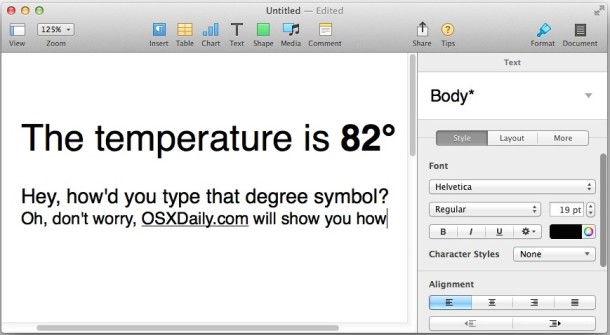
Ever wondered how to type the temperature / degree symbol in Mac OS? Typing the degrees symbol on a Mac, or any computer, may seem like a giant mystery since it’s not immediately visible on any keyboard, but it’s really quite easy if you know the proper keyboard shortcut.
There are actually two keyboard shortcuts for typing degree signs in MacOS and Mac OS X, and you can insert the degree temperature symbol into any Mac OS X app where your cursor is located by hitting one of the the following keystroke commands, depending on which symbol you want to show:
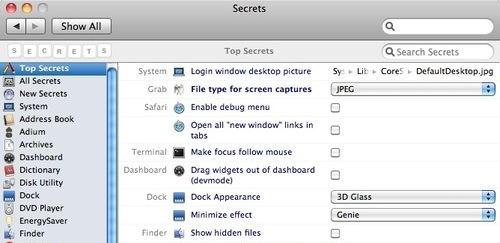
Secrets is a pretty nifty system preference panel add-on that lets you access all sorts of hidden ‘secret’ preference options. Instead of typing a bunch of default write commands you can basically just click checkboxes or change dropdown options to easily enable some pretty cool stuff.
It’s pretty comprehensive, with a bunch of options for Safari, Dock, Finder, Xcode, and so much more. There’s really too much to list, so if you like tweaking with your Mac’s settings, install secrets to make your life easier.
Knowing how to clear cookies is pretty important for any number of reasons, be it for personal preference or troubleshooting issues with websites. You may be wondering how to remove cookies on a Mac running the Safari web browser, and that is exactly what we’ll show how to do. There are actually a few ways to delete cookies in Safari on Mac OS X, we’ll show you how to delete all cookies from Safari, and how to delete specific site cookies from Safari on Mac too.
With the pbcopy and pbpaste commands, you can use the command line to manipulate clipboard contents but also access your Mac OS X clipboard directly through the Terminal. Yes, that means you can access what you copied in a GUI app and use it in the command line seamlessly, and vice versa. We’ve shown a brief introduction on how to use both pbcopy and pbpaste from the command line before, but we wanted to demonstrate a few additional methods to use these incredibly useful tools on the Mac, like how to directly access whatever is currently stored in the Macs clipboard from the terminal prompt.



 Update: VLC has posted
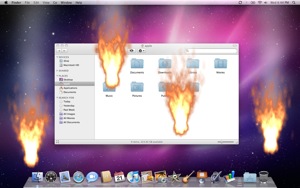 If you’re looking for a cool fire screensaver for your Mac look no further. Aurora Screensaver allows you to start fires all over your Mac desktop by the use of your multitouch trackpad! Each finger burns it’s own fire, it’s really quite fun to play around with. Since multitouch input is used, you just have to hit a key to exit the screensaver. This is Snow Leopard only and requires a trackpad.
 You can easily batch resize groups of images within Mac OS X by using the included Preview app, that is, taking a group of pictures set at one or various resolutions, and collectively resize them all together in a group to a new resolution, outputting either as the same file or as a new file saved at the newly desired resolution. Long ago you had to buy expensive third party software for this purpose, but no longer is there a need for any additional downloads or expensive photo editing applications to perform these tasks on a Mac. Instead you only need Preview, which is free with every Mac and every version of Mac OS X!
  It’s that time of year again, the holiday season is upon us! What better way to celebrate than to download a hoard of free Christmas songs from Apple, courtesy of iTunes?
 You can reset a lost Administrator (the original account you created) password in Mac OS X by utilizing a Mac OS X installation DVD, here’s how:
 Knowing how to clear cookies is pretty important for any number of reasons, be it for personal preference or troubleshooting issues with websites. You may be wondering how to remove cookies on a Mac running the Safari web browser, and that is exactly what we’ll show how to do. There are actually a few ways to delete cookies in Safari on Mac OS X, we’ll show you how to delete all cookies from Safari, and how to delete specific site cookies from Safari on Mac too.
  With the pbcopy and pbpaste commands, you can



