Got a Mac and a PC running Ubuntu and want to control both from one computer? Make your life easier and share a mouse and keyboard between the two machines using Synergy! There’s a nice walkthrough on how to do this at Donncha O Caoimh’s blog, don’t pass it up if you’re an Ubuntu user.
If you Option-Click the Airport Menu you can get extended information about the wireless network you are connected to (and the ones you’re not as well), including Channel information, MAC address of the access point, signal strength, and the transmission rate. This is Snow Leopard only, if you haven’t upgraded to Snow Leopard yet and your Mac is compatible, it’s highly recommended.
Thanks to reader Jim Thorpe for the tip and screenshot!
You can easily convert WMV movie files to MOV format for free by using the FlipForMac Quicktime component plugin and QuickTime itself. Here’s what you will need to do:
Convert WMV file to MOV format in Mac OS X
First download FlipForMac, it is a WMV component plugin for Quicktime, the free version is all you will need to download and install. After you have installed the free FlipForMac plugin, launch QuickTime Player.
Now within QuickTime:
* Open the WMV movie file you want converted to .MOV format
* From the File menu select “Save As”
* Select the file type as ‘Movie’ and you will notice the filetype changes .mov
* Click “Save” and wait, the processing time depends on the length and size of the movie file.
All done! You just converted a WMV file to MOV format for free!
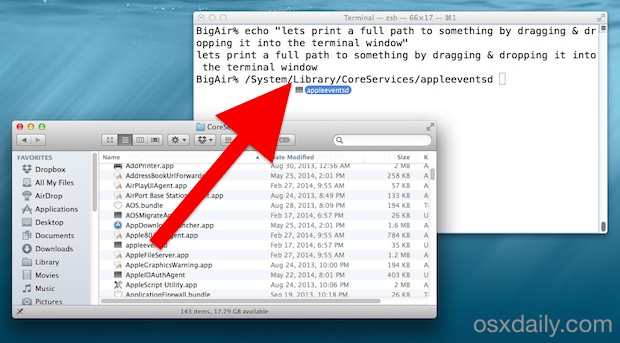
Did you know you can quickly copy a files path to the Terminal just by dragging and dropping the folder or file into the Terminal window? Try it out, open any terminal window then take something from the Finder and drop it into that Terminal, it’ll instantly print out the full path to the file, effectively copying the file path from the Macs Finder GUI to the command line.
By itself it will only print the directory structures path, it won’t execute without hitting the RETURN key (which, unless the file/folder path is prefixed with some compatible command string anyway, it wouldn’t do anything).
This is particularly helpful when a file is located in an obscure location that you happen to already in within the Finder of Mac OS X, but want to quickly jump to the command line, or just make an edit.
Want an interesting way to spruce up the MacBook Pro Apple logo? How about some crossbones?
I saw someone at a local coffee shop with a spiffy skull & crossbones style sticker stuck on their MacBook Pro, but in place of the skull was the usual Apple logo that naturally glows.
While I didn’t get a chance to ask them where they got it, but when I got home I searched around and finally found someone on Etsy selling the little apple crossbone stickers for $3. Not bad! Want one? Well…
The last few days the tech world has been blazing about Google’s latest creation, Chrome OS, which is a lightweight and free Linux-based operating system intended to run on Netbooks and, eventually, Desktops. It’s basically just the Chrome web browser with some other features unique to the OS itself, which makes it very fast and able to run without much of a strain on hardware.
OK so talk is all fine and dandy, but how about we run this thing within Mac OS X! It’s actually pretty easy to do, you’ll just need to download the Chrome OS image (via torrent) as well as the free virtual machine software known as VirtualBox. The torrent is provided by PirateBay and has tons of seeders so you should be able to pick up the image file very quickly, again the OS is free so there’s no piracy issues here.
If you’re familiar with running VM’s, you likely won’t need a walkthrough guide, you just select the image and boot it. If you’re new to virtual machines or would just like a little more guidance, TechCrunch posted a great and easy to follow walkthrough on installing Google Chrome OS within VirtualBox on top of Windows, Linux, and of course Mac OS X (the walkthrough uses Mac OS X screenshots, like the one below).
I ran Chrome OS for about two minutes and got bored, it’s basically just a web browser running in a VM. It’s obviously still under development and has work to be done before it is a really usable operating system, but with how easy it is to install in a virtual machine it’s a fun way to geek out and try something new. At the very least I think it’s a glimpse into the future of OS’s, with more and more of our lives and data being found, shared, and accessed online.
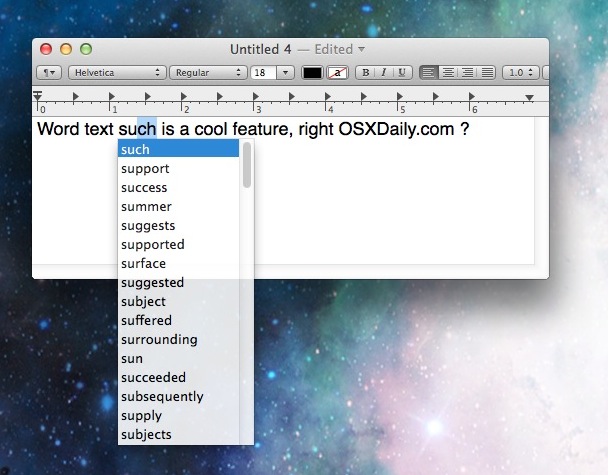
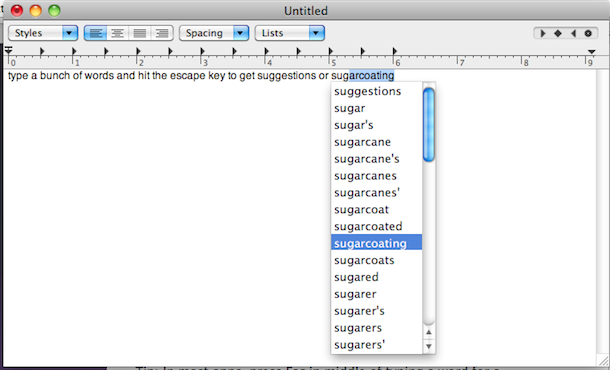
You can suggest words while entering text into many applications by simply hitting the Option+Escape keys while typing in most OS X apps. This is so useful for writing. For example, if you can’t remember how to spell a word but remember that it starts with a V? No problem, type V and then hit Escape and a list of words will come up that start with V…
The screenshot below demonstrates how this is used for word suggestion functionality, showing the feature in action within the TextEdit app of Mac OS X. Try it out yourself, start typing a word, then hit Escape (some older Macs require Option+Escape to summon the suggestion menu)
This works in many Mac OS X apps and just about every version of OS X, though it’s not supported in every single app that is built for the Mac. It even works pre-autocorrect, so older versions of Mac OS X without the text correction feature available to them can use this instead to get suggestions offered by the built-in dictionary and use that as a corrective mechanism instead. Speaking of autocorrect, because this works without the feature, if you decide to turn that off for some reason, you can still use this for assistance when spelling words!
You really should try it out yourself to get an idea of how it works, so launch TextEdit or another app that you like to write in and give it a test, you’ll find it’s quite useful!
You can adjust your Mac’s sound volume level silently by holding down the Shift key and then pressing the volume up or volume down keys. This complete silences the audio feedback of quacking and beeping as the sound goes up and down, allowing you to change the volume without creating a bunch of noise.
Remember, you have to hold down the Shift key each time you adjust volume to gain a result from this, it’s not a permanent change. This per-adjustment approach is really handy when you’re in a quiet office or library and don’t want the beep sounds blaring as you adjust system volume.
You can easily resize any disk partition in Mac OS X using the included Disk Utility app, located in /Applications/Utilities, and you can even resize a mounted volume. In fact, you can grow or shrink HFS+ (Mac OS X) Partitions on the fly, with the resizing done live regardless of whether the drive is internal or an external drive, or even the boot volume.
A word of advice: Resizing mounted boot volumes isn’t always the best idea in the world because there’s a tiny potential something could go wrong. Before you go messing around and resizing your partitions, be sure to backup your data using Time Machine or whatever other backup service you prefer and make a recent back up.
If you’re a GeekTool user and you’re looking for a bunch of awesome GeekTool scripts, look no further. Geeklets is a site run by the UK based MacOSXTips, and it allows for users to submit their own GeekTool scripts and rate others. It’s newly launched so there’s a limited supply of scripts and vote data to work with, but this is definitely going to be a great repository for all us GeekTool fans. Each script listed includes a screenshot of it running on the Mac desktop within GeekTool, information on the script itself, and of course the ability to download the scripts. Definitely check this out!
The above screenshot is pulled from the site showing a couple GeekTool scripts running, there’s a ton to choose from, so poke around and see what you find.
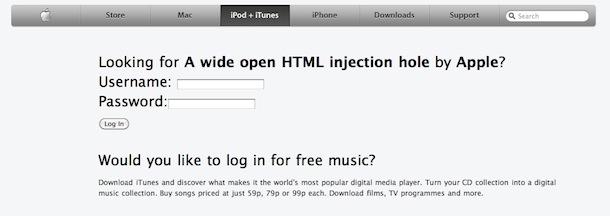
Update: Apple has fixed the exploit, the below link is preserved for posterity but no longer works to display anything abnormal.
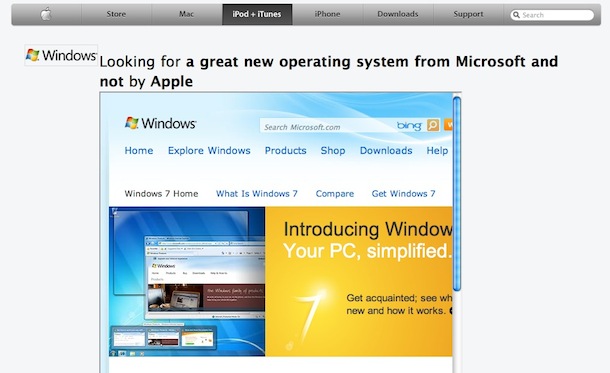
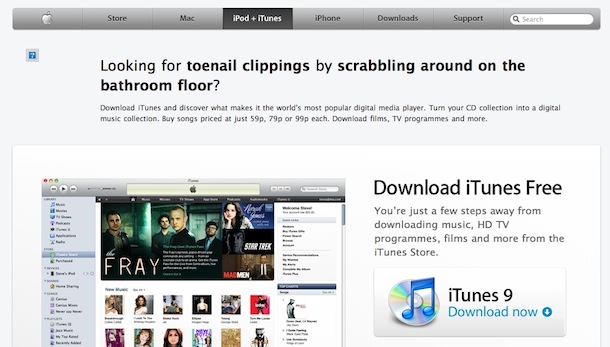
A few weeks ago, there was an active XSS Exploit on Apple.com with their iTunes site. Well, a tipster sent us the exact same cross site scripting exploit found again on the Apple iTunes site (UK in this case). As a result, there are some rather amusing variations of the Apple iTunes page appearing, and again some very frightening ones, as the above screenshot demonstrates a login page that accepts username and password information, stores this login data on a foreign server, then sends you back to Apple.com. The most annoying variation sent to us tried to stuff about 100 cookies onto my machine, initiated an endless loop of javascript pop-ups with Flash files embedded in each of them, and iframed about 20 other iframes, all while playing some really awful music.
Here’s a relatively harmless variation of the XSS capable URL, it iframes Google.com:
If you regularly use Spotlight (or Services) to access the dictionary app in Mac OS X, you may have noticed that with each definition a new window is spawned. This can quickly lead to clutter, which annoyed TUAW enough to ask MacOSXHints for a solution. Like magic, MacOSXHints provided one and that’s what we’re sharing here. Basically, this causes Dictionary to only use a single window on the Mac.
This is accomplished with a defaults command string, so you need to have some command line experience or just copy and past the pertinent text below.
To force Dictionary to use only one window, launch the Terminal and type the following:
Holy cow. Tim Royer has posted a graph of GeekBench benchmark test suite scores for the iMac 27″ Core i5 and iMac Core i7 models, and the numbers are pretty amazing. The 27″ Core i7 model just barely underperforms a brand new $2999 Mac Pro. So what? Well, the 27″ iMac Core i7 model is only $2199, and it includes a massively beautiful 27″ LCD that doubles as a monitor. Wow. The iMac Core i7 model is a $200 upgrade to the Core i5, which is also lightning fast, but the performance increase from the Core i5 to the i7 is dramatic, so that looks to be money very well spent.
Suddenly my MacBook Pro with a 3300 GeekBench score seems hopelessly inadequate!
The Command-Tab key sequence in Mac OS X works to summon a quick application switcher, it’s an excellent trick that many advanced users frequently use to switch apps and help multitasking, but it seems lesser known amongst Mac users in general. Even if you know of the Command+Tab trick, it turns out there are many more features available within the Command-Tab application switcher than just hitting Command+Tab itself, in fact you can navigate within the app switcher, hide apps, quit apps, and more.
There are multiple ways to convert AVI video files to MOV video format on the Mac. Perhaps the easiest free ways to convert video from an AVI file to MOV format in Mac OS X is bt using an external app like Miro, VLC, or by using the Perian plugin for QuickTime.
Here’s a step by step guide of what you’ll need to do using one of these apps: Read more »
Did you know you can quickly access Wikipedia from anywhere in OS X by using Spotlight? Yes seriously you can, similar to the Spotlight dictionary feature.
Here’s how Wikipedia access from Mac OS X works: Read more »
Sunday Funday… and now we’re driving cars with iPhones. We all know that texting and driving is distracting, but what about using your iPhone to actually drive a car? Someone actually figured out how to do this, and here’s the video. This seems nice and safe, nothing could possibly go wrong here…

 Got a Mac and a PC running Ubuntu and want to control both from one computer? Make your life easier and share a mouse and keyboard between the two machines using Synergy! There’s a nice walkthrough on how to do this at Donncha O Caoimh’s blog, don’t pass it up if you’re an Ubuntu user.
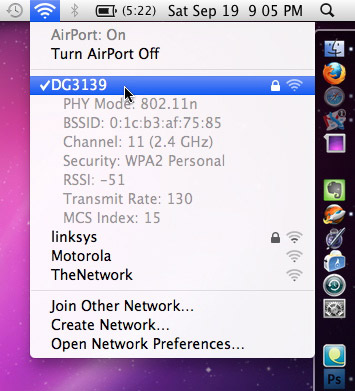 If you Option-Click the Airport Menu you can get extended information about the wireless network you are connected to (and the ones you’re not as well), including Channel information, MAC address of the access point, signal strength, and the transmission rate. This is Snow Leopard only, if you haven’t upgraded to Snow Leopard yet and your Mac is compatible, it’s highly recommended.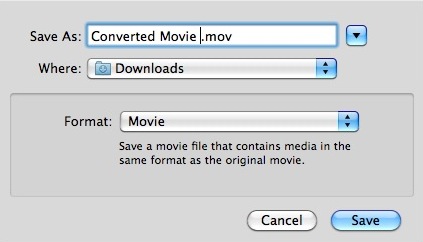

 The last few days the tech world has been blazing about Google’s latest creation, Chrome OS, which is a lightweight and free Linux-based operating system intended to run on Netbooks and, eventually, Desktops. It’s basically just the Chrome web browser with some other features unique to the OS itself, which makes it very fast and able to run without much of a strain on hardware.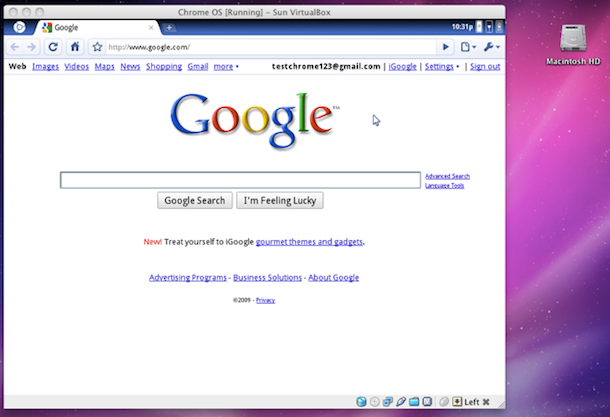

 You can easily resize any disk partition in Mac OS X using the included Disk Utility app, located in /Applications/Utilities, and you can even resize a mounted volume. In fact, you can grow or shrink HFS+ (Mac OS X) Partitions on the fly, with the resizing done live regardless of whether the drive is internal or an external drive, or even the boot volume.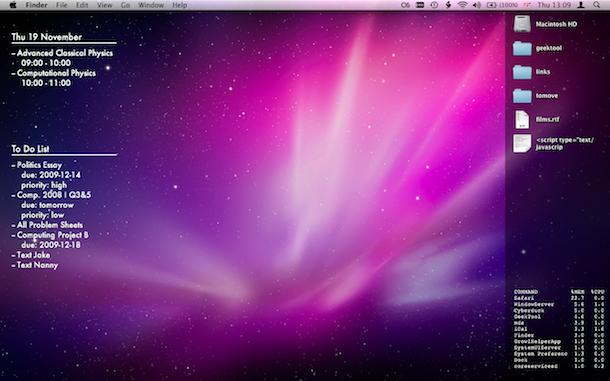


 If you regularly use Spotlight (or Services) to access the dictionary app in Mac OS X, you may have noticed that with each definition a new window is spawned. This can quickly lead to clutter, which annoyed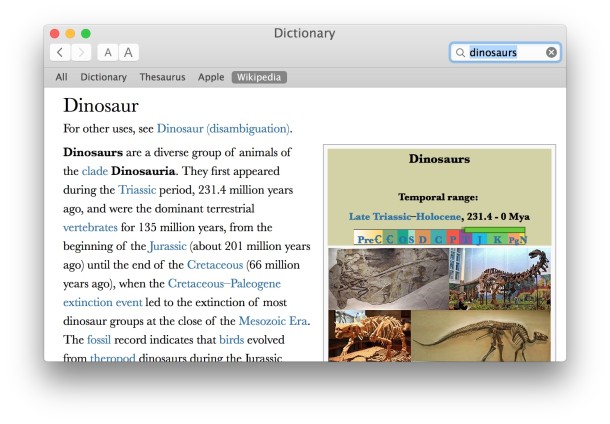
 and iMac Core i7 models, and the numbers are pretty amazing. The 27″ Core i7 model just barely underperforms a brand new $2999 Mac Pro. So what? Well, the 27″ iMac Core i7 model is only $2199, and it includes a massively beautiful 27″ LCD that doubles as a monitor. Wow. The iMac Core i7 model is a $200 upgrade to the Core i5, which is also lightning fast, but the performance increase from the Core i5 to the i7 is dramatic, so that looks to be money very well spent.
 The Command-Tab key sequence in Mac OS X works to summon a quick application switcher, it’s an excellent trick that many advanced users frequently use to switch apps and help multitasking, but it seems lesser known amongst Mac users in general. Even if you know of the Command+Tab trick, it turns out there are many more features available within the Command-Tab application switcher than just hitting Command+Tab itself, in fact you can navigate within the app switcher, hide apps, quit apps, and more.