
Setup Older OS X Mail to Use a Gmail Account
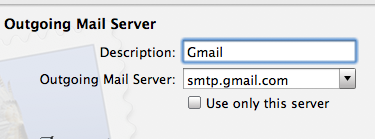
Got an older version of Mac OS X that you want to use Gmail with? While newer versions of Mac OS and Mac OS X allow for simple integration of using Google accounts with a Mac, older versions of Mac OS X don’t necessarily have these capabilities.
But not to worry, you can still use Gmail on older OS X versions with the Mail app on Mac, you just have to know how to set it up!
This is a question you may see from time to time, particularly with people who have older hardware and OS X versions. In this situation, a friend of mine asked me how to setup the Mac OS X Mail.app to use Gmail and just when I was about to write up a detailed how-to for her, I came across an excellent guide on one of OS X Daily’s very own readers sites.
Rather than reinvent the wheel, check out Khürt Williams excellent walk-through, complete with screenshots:
IslandInTheNet.com – How to setup Mail app to use Gmail
Thanks Khürt!
Of course with newer versions of Mac OS X you can simply add the Gmail email account directly to the Mail app or through System Preferences, but the techniques described here apply to older versions of Mac OS X and OS X.

 This is a particularly handy trick for when you have limited screen real estate and want to fit more of a windows display on screen. A perfect example of this are the
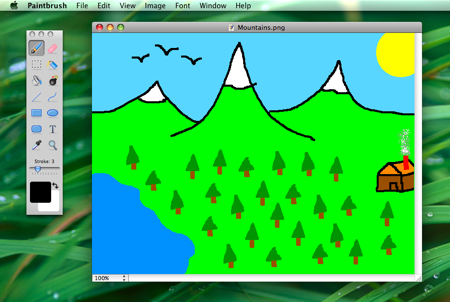 Paintbrush is a Microsoft Paint clone of sorts for Mac OS X, it’s an absolute joy to use in it’s simplicity and we are pleased that a new version is available with even more MS Paint type functions for your Mac. And we mean it, this thing is awesome at simple pixel drawing and is sure to remind you of what it was like to use the paint program way back when.
 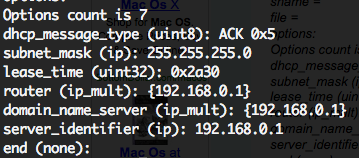 If you’ve ever needed to troubleshoot a network or internet connection, you know how frustrating it can be (particularly when you’re on techsupport with various broadband providers). This quick tip can make the job a little easier on yourself by retrieving all relevant DHCP information, like DHCP server IP, client, subnet mask, router, DNS servers, everything – directly from the command line.
  I like Safari but find myself in Firefox nearly always because of a multitude of reasons. One thing I’ve long missed though is the ability to view PDF’s within the browser within Firefox, which Safari does wonderfully. If you’re tired of Firefox launching the Preview app (or even worse if you’re settings are different: Acrobat), then try this great little Firefox extension, which will pop open the PDF file into a new browser tab. Note this requires Firefox 3

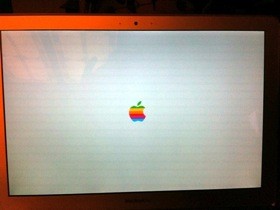 I’ve been bored with the standard Mac OS X boot up screen and it’s grey Apple logo, and a few times I have scoured around trying to change it manually to no avail. Today though, I stumbled into a post on my friends blog that makes changing the Mac OS X boot image a snap with a nice little program fittingly called BootXChanger.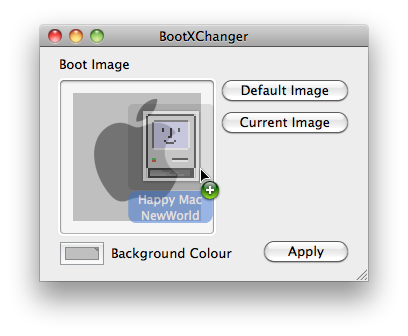
 I just found out about Skim and I find it to be wildly useful for personal use, but I can imagine this could be a huge productivity booster for anyone in academia in particular. In short, Skim views any PDF files quickly as expected, but more importantly it allows you to take notes and annotate sections of the PDF file itself, how cool is that? If you’re a student, teacher, researcher, educator, or anyone using PDF files regularly, you absolutely have to try out Skim and you will thank me later.
 Creating your own cheap Mac Hackintosh out of a PC Netbook is pretty popular right now, so I compiled a list of various how-to guides mostly for myself but figured I would share it with our readers as well. The guides rank from reasonably easy (Dell Mini 9) to an arduous hack, and it’s technically against Apple’s OS X EULA agreement, so whether or not it’s worth proceeding with making one of these frankenstein Macs is entirely up to you.
 I really enjoy videochatting with friends and family using iChat, so I was pretty frustrated when seemingly out of nowhere iChat video started freezing completely after a video chat session was initiated. I searched around a bit and noticed other people having the same problem and symptoms – iChat video freezes but iChat audio still works, so I know this isn’t a rare thing. While I don’t know the cause, I did manage to find a solution, and here it is:
 It’s very easy to mirror an entire web site on your local machine thanks to the terminal command wget, this tutorial will show you how to do it via the command line. wget is available for Mac OS X, Linux, Unix, and many other popular operating system platforms, thus this is universally applicable assuming you have wget anyway.
 Need to show hidden files on a Mac? This is pretty common if you find yourself needing to access hidden files on your Mac, like an .htaccess file you downloaded, a .bash_profile, a .svn directory, – literally anything preceded with a ‘.’ indicating it is invisible by default – you can run the below command from the terminal to set hidden files to become visible throughout Mac OS X.




