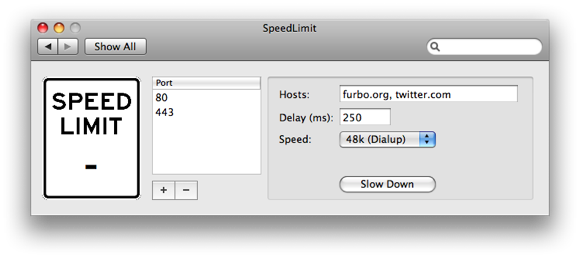
Do you need to limit your internet speed for testing? Maybe put a cap on your transfer and download speeds for simulation of slower connections? SpeedLimit is an open source project that allows you to do that.
Microsoft officially stopped developing Internet Explorer for Mac’s a few years ago, but you can still download and run Internet Explorer on your Mac using either an older version of the software or a few different tools. We’ll cover how to run Internet Explorer under Mac OS X using a tool called WineBottler, which allows you to run windows apps like IE6, IE7, or even IE8 on your Mac. Now I don’t know anyone that wants to run Internet Explorer 6 for personal use, but if you’re doing any kind of development work for the web, you likely are required to check for IE6 compatibility. Many Mac users install Windows in VMWare or Parallels to get the ability to check their work in IE, but that’s not needed thanks to WineBottler. WineBottler is dependent on Wine to be able to run Internet Explorer 6, IE7, or even IE8 on your Mac and it’s included in the WineBottler download package.
Run Internet Explorer 6 in Mac OS X with WineBottler
Developer home
Download the latest version of WineBottler
You may have noticed that WineBottler was previously named IEs4OSX, but its functionality remains the same: you can still run Internet Explorer 6, IE7, or even IE8 in Mac OS X by using it.
If you’re like me you tend to have 10,000 windows open at once on your Mac while you work and multitask, thanks to Expose this is not a particular problem in Mac OS X. But, there comes a time when you don’t want to use Expose to either clear the screen or select a specific window, you just want to move some of the background clutter around, to access the Desktop or something of that sort. Easily done! Hold the Command key and select a Window titlebar in the background to move it around elsewhere and clear up space, now you can access that JPG on your desktop easily without having to hide all windows!
If you really want to lock down your Mac from other users, you can set an Open Firmware (PPC) or EFI (Intel) password that will require a firmware level password immediately upon system boot, prior to Mac OS X being loaded. This is somewhat of an advanced trick and if you accidentally mess something up in OpenFirmware or EFI you could have some serious issues with your Mac.
If you’re interested in pursuing the boot level password protection though, here are two helpful links. Read more »
I was driving myself up the wall recently trying to figure out why the Mac Preview.app would not save my image rotations when I exported a picture from Preview in OS X, so in looking for a solution I stumbled onto our friend MurphyMac‘s site and found a solution!
Basically after you have rotated the JPG image in Preview to your desired orientation do the following:
Go to Save and click on “Use Exif Orientation Tag” to insure that your image rotation will be preserved
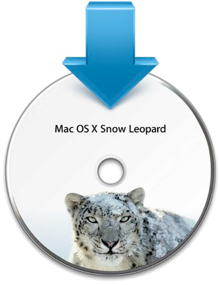
The Mac Rumor mill is churning out all sorts of juicy tidbits on Apple’s latest operating system update, known as Snow Leopard. MacRumors has said that 10.6 build 10a432 has gone Golden Master, and Daring Fireball has a short cryptic post saying that 10.6 Snow Leopard will be available as early as Friday, August 28! Also of interest is AppleInsider’s suggestion that OS X 10.6’s disc art will feature a Snow Leopard, literally (shown in accompanying image). And according to ArsTechnica, the install process for 10.6 has been dramatically improved over past versions as well, making for a more simplified, slimmer, and substantially faster upgrade.
Snow Leopard is coming to Mac users at a surprisingly cheap price, you can pre-order Mac OS X 10.6 Snow Leopard from Amazon.com for $29 and it will ship for free as soon as it arrives. Mac users rejoice, a fantastic system update awaits us all very soon!
GeekTool is a fun system preference utility for Mac that allows you to really customize your desktop. You can dump log files, system status messages, graphs, CPU usage, and all sorts of things right onto your desktop background. Basically if you can run it in the Terminal, you can have it appear on your desktop. Check out the screenshot below, and if you’re a customization geek absolutely download GeekTool yourself. Be sure to read the excellent walkthrough on MacLife linked below that shows how to setup GeekTool to really make your mac desktop customized too. If you want weather information displayed on your desktop, LifeHacker has you covered, so read on.
It seems like people either love or hate Spotlight, if you love it then ignore this tip, but if you hate Spotlight and want to turn Spotlight off in 10.5 here’s your new favorite post. You can completely disable Spotlight in OS X 10.5 by moving a few system files (or you could delete them but that is strongly not recommended for various reasons). Here are the files you should move, be sure to place them in another location for backup in case you want to enable Spotlight again.
Disable Spotlight
Move these two files to another safe location and then reboot your mac
If you want to re-enable Spotlight just move those files back to their original location, reboot, and Spotlight will work again. Please backup the files, if you delete them you will not be able to re-enable Spotlight without a system reinstall!
If you ever want to hide a file or folder, you can quickly make it invisible with a command line utility called setfile. This is a really cool tip that should be particularly useful to those who share their mac with other people.
The Mac menu bar contains icons for things like the status indicators and toggles of various apps, including a clock, date, time, battery, wi-fi status, sound and volume levels, displays, Time Machine backup status, user account, Spotlight, a Notifications toggle, and much more. There’s a lot of data and status details in those menu bar items of Mac OS X, and you can generally choose to order them or rearrange icons however you want.
Here’s something that’s bound to be popular. The University of Washington is offering a Certificate program in iPhone Development, the coursework covers Cocoa too but there’s plenty of Cocoa development programs out there so it’s really the iPhone development that makes it stand out. For now the program is only offered at the University of Washington Seattle campus, but ArsTechnica reports that an online offering will be available next year.
Here’s the program description, directly from UW:
Learn the language, framework, processes, and skills to develop quality applications for Apple’s iPhone. Become familiar with Objective-C and begin developing applications in the Cocoa framework, using the iPhone SDK (Software Development Kit). Gain the tools to design, build, and test your applications, and to effectively market them through the App Store. Expand your knowledge to include more advanced Cocoa programming skills.
If you are interested in iPhone Development and aren’t interested in paying for a certificate program, a great place to start is Apple.com’s very own iPhone Developer site, iPhone Dev Center and by picking up a good book, we recommend Beginning iPhone 3 Development: Exploring the iPhone SDK available from Amazon.com
I’ve been on a bit of a retro and minimalism kick lately, preferring simplified apps that take me back to the good old days of BBS’s and 2400bps modems (ok maybe not the modems), and when I saw that GLTerminal has a new release I was pleased since I can finally run it in a modern version of Mac OS X.
GlTerminal is basically just a Terminal replacement that uses GL to create the appearance of an oldschool terminal, complete with monitor curvature and all. Everything else works as it should, so if you’re looking for a fullscreen old school alternative for Terminal, or just want something fun to work in for a while, try out GLTerminal.
If you’re a Comcast customer and you’ve entered in an incorrect URL or had a server time out recently, you’ve probably been extremely annoyed when you discovered you were being redirected to a page filled with Comcast ads. Comically, this obnoxious DNS redirect is named the ‘Comcast Domain Helper service’, and was forced on you whether you wanted it or not.
Remove Comcast DNS redirect
Things you’ll need to stop Comcast from redirecting your improper URL’s:
1) Your main Comcast account User ID / email address
In typical Comcast style, they altered your service without your consent, and you have to actually opt-out of the DNS hijacking service, thankfully you can do it online. Good grief.
Got an older version of Mac OS X that you want to use Gmail with? While newer versions of Mac OS and Mac OS X allow for simple integration of using Google accounts with a Mac, older versions of Mac OS X don’t necessarily have these capabilities.
But not to worry, you can still use Gmail on older OS X versions with the Mail app on Mac, you just have to know how to set it up!
This is a question you may see from time to time, particularly with people who have older hardware and OS X versions. In this situation, a friend of mine asked me how to setup the Mac OS X Mail.app to use Gmail and just when I was about to write up a detailed how-to for her, I came across an excellent guide on one of OS X Daily’s very own readers sites.
Rather than reinvent the wheel, check out Khürt Williams excellent walk-through, complete with screenshots:
Of course with newer versions of Mac OS X you can simply add the Gmail email account directly to the Mail app or through System Preferences, but the techniques described here apply to older versions of Mac OS X and OS X.
The iPhone, iPhone accessories, and iPhone ringtones are all the rage right now, so why not make your own iPhone ringtone? With a Mac or Windows PC it’s pretty straightforward using iTunes, follow these 10 steps and you can easily create your own iPhone Ringtone from whatever song you want. Note that songs with DRM will not usually work, meaning things purchased from the iTunes Music Store will probably not be able to turn into ringtones if they have DRM protection.
This is a particularly handy trick for when you have limited screen real estate and want to fit more of a windows display on screen. A perfect example of this are the Hackintosh owners out there that are working with small netbook screen resolutions and some windows just don’t display properly, or won’t even fit on the screen. Instead of changing the actual screen resolution and losing screen real estate, you can scale all windows within OS X up or down by using the Terminal:
defaults write -g AppleDisplayScaleFactor 0.8
This will render all displayed elements at 80% of their original size
killall Finder
To set back to the default simply change the Scale Factor to 1.0 like so:
defaults write -g AppleDisplayScaleFactor 1.0
If you want to make things larger and easier to see, scale up to 1.2 or more, just play around until you find what works best for you. Remember to kill the Finder after each change in order to make changes take place.
Note: Virtually scaling up and down GUI elements can lead to some quirky appearance issues with certain apps, so test scale factors to find what works best for you and your apps.
We don’t want it to happen, but there may come a day in all Mac owners lives that their warranty expires, and that date is related to your original date of purchase, give or take the time for any additional AppleCare warranty service you have purchased in addition.
So how do you check your Macs warranty information online? Follow these steps to find your devices serial number, then check for warranty status on the Apple Website.
Paintbrush is a Microsoft Paint clone of sorts for Mac OS X, it’s an absolute joy to use in it’s simplicity and we are pleased that a new version is available with even more MS Paint type functions for your Mac. And we mean it, this thing is awesome at simple pixel drawing and is sure to remind you of what it was like to use the paint program way back when.
If you’re missing Microsoft Paint for your Mac then Paintbrush will scratch your itch just fine! Check out the screenshots to see just how MSPaint like this app really is, and be sure to download it now. Read more »

 Microsoft officially stopped developing Internet Explorer for Mac’s a few years ago, but you can still download and run Internet Explorer on your Mac using either an older version of the software or a few different tools. We’ll cover how to run Internet Explorer under Mac OS X using a tool called WineBottler, which allows you to run windows apps like IE6, IE7, or even IE8 on your Mac. Now I don’t know anyone that wants to run Internet Explorer 6 for personal use, but if you’re doing any kind of development work for the web, you likely are required to check for IE6 compatibility. Many Mac users install Windows in VMWare or Parallels to get the ability to check their work in IE, but that’s not needed thanks to WineBottler. WineBottler is dependent on Wine to be able to run Internet Explorer 6, IE7, or even IE8 on your Mac and it’s included in the WineBottler download package.
 If you’re like me you tend to have 10,000 windows open at once on your Mac while you work and multitask, thanks to Expose this is not a particular problem in Mac OS X. But, there comes a time when you don’t want to use Expose to either clear the screen or select a specific window, you just want to move some of the background clutter around, to access the Desktop or something of that sort. Easily done! Hold the Command key and select a Window titlebar in the background to move it around elsewhere and clear up space, now you can access that JPG on your desktop easily without having to hide all windows!

 The Mac Rumor mill is churning out all sorts of juicy tidbits on Apple’s latest operating system update, known as Snow Leopard.
  and it will ship for free as soon as it arrives. Mac users rejoice, a fantastic system update awaits us all very soon!
 GeekTool is a fun system preference utility for Mac that allows you to really customize your desktop. You can dump log files, system status messages, graphs, CPU usage, and all sorts of things right onto your desktop background. Basically if you can run it in the Terminal, you can have it appear on your desktop. Check out the screenshot below, and if you’re a customization geek absolutely download GeekTool yourself. Be sure to read the excellent walkthrough on MacLife linked below that shows how to setup GeekTool to really make your mac desktop customized too. If you want weather information displayed on your desktop, LifeHacker has you covered, so read on.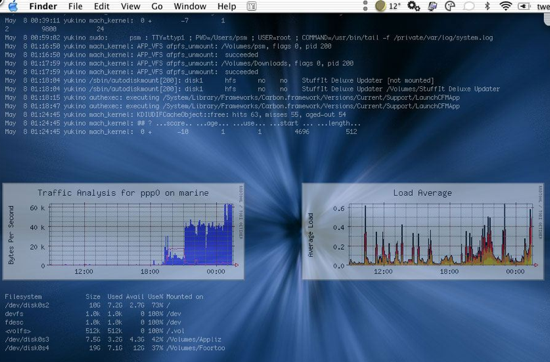
 It seems like people either love or hate Spotlight, if you love it then ignore this tip, but if you hate Spotlight and want to turn Spotlight off in 10.5 here’s your new favorite post. You can completely disable Spotlight in OS X 10.5 by moving a few system files (or you could delete them but that is strongly not recommended for various reasons). Here are the files you should move, be sure to place them in another location for backup in case you want to enable Spotlight again.
 If you ever want to hide a file or folder, you can quickly make it invisible with a command line utility called setfile. This is a really cool tip that should be particularly useful to those who share their mac with other people.
 Here’s something that’s bound to be popular. The University of Washington is offering a Certificate program in iPhone Development, the coursework covers Cocoa too but there’s plenty of Cocoa development programs out there so it’s really the iPhone development that makes it stand out. For now the program is only offered at the University of Washington Seattle campus, but
  available from Amazon.com
 I’ve been on a bit of a retro and minimalism kick lately, preferring simplified apps that take me back to the good old days of BBS’s and 2400bps modems (ok maybe not the modems), and when I saw that GLTerminal has a new release I was pleased since I can finally run it in a modern version of Mac OS X.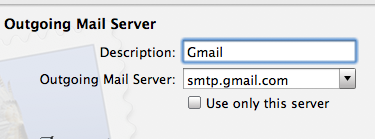

 This is a particularly handy trick for when you have limited screen real estate and want to fit more of a windows display on screen. A perfect example of this are the
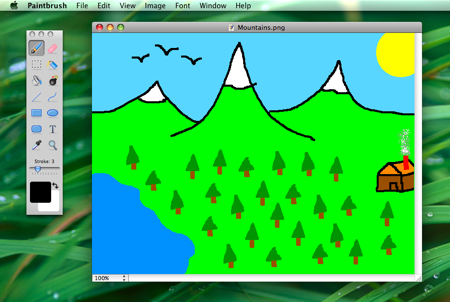 Paintbrush is a Microsoft Paint clone of sorts for Mac OS X, it’s an absolute joy to use in it’s simplicity and we are pleased that a new version is available with even more MS Paint type functions for your Mac. And we mean it, this thing is awesome at simple pixel drawing and is sure to remind you of what it was like to use the paint program way back when.



