
LotsaSnow – A Simple Falling Snow Screensaver for Mac OS X

There are a fair amount of winter themed screensavers for Mac OS X, from talking snowmen, snow storms, and blinking Christmas trees, but I think LotsaSnow is probably the best snow screensaver there is available for Mac.
It is simple and elegant, doesn’t use much CPU, and has some really nice looking flakes. LotsaSnow can also be easily used to put some falling snow on your Macs desktop, so say goodbye to the pixelated xsnow port and hello to LotsaSnow!
If this sounds interesting to you, you can download the screen saver free from the developer:
- Get LotsaSnow from the developer home here
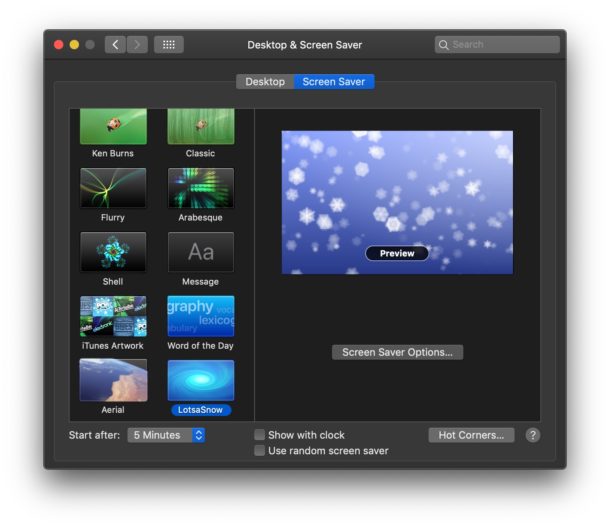
The screensaver by itself is nice and certainly puts a winter tranquil mood to your resting Mac, but one of my favorite things to do is to combine this screensaver with BackLight. BackLight is a small program that allows screensavers to run as the background of your desktop, and this combination creates the best looking falling snow effect I have found for the Mac. If you don’t want to download another app like Backlight, you can get the same effect by using this terminal command to set a screensaver as a Mac desktop wallpaper too. So winterize your Mac and let the snow fall!
Lotsa snow goes great with the other Holiday themed eye-candy apps we went over a few weeks ago too, so check those out.
Updated: 12/21/2018 – LotsaSnow works in MacOS Mojave, High Sierra, and Sierra! Cool!
Update 12/3/2007: Check out other Holiday Mac OS X apps including the SnowFall screensaver from the Apple stores!
 This is a rumor as of now, and uncomfirmed. Apple seeded a new version of Leopard (build 9A326) to internal Apple employees yesterday. This latest build is reported to have fixed bugs from the last build (9A303) such as Quicktime crashing, printing problems and issues with .Mac such as iDisk synching. Apple continues to gloss over the interface, refining it even more and there is an overly presence of black gloss. This build is also completely stable on Apple’s latest Core 2 Duo MacBook and MacBook Pro. Apple is trying to gear down development to get this build out to developers before the New Year.
 Think of this program like a Mac encyclopedia. Mactracker provides detailed information on every Apple Macintosh computer ever made, including vitals such as processor speed, memory, optical drives, graphic cards, supported Mac OS versions, and expansion options. Also included is extensive information on Apple mice, keyboards, displays, printers, scanners, digital cameras, iPod, AirPort Base Stations, Newton, and Mac OS versions. This is one of the most useful tools I have seen for system administrators or general Mac geeks, a simple must-have app. And the best part? It’s free!
 On tuesday, Blizzard released its infamous 2.0 patch to its hit online role playing game, World of Warcraft. This patch is significant as it is the first main stream game to support multi-threaded OpenGL on the Macintosh. Support for multi-threaded OpenGL is limited to Intel users, and if you are a lucky owner of such a machine, people are reporting up to 2x better frame-rates with the new version.
 Gizmo is a cross platform (Linux, Windows and Mac) VoIP client. I’ve enjoyed Gizmo for the six months that I have had it, and suggest you give it a try over at
  Spotlight is one of my favorite features of Mac OS X, I probably use it more than even the Dock. Being able to hit command-space to quickly locate documents, emails, and launch Applications is endlessly useful. For some of us, it’s necessary to be in the terminal, and wouldn’t it be cool to have this ultra seach feature in the command line? Well it’s there, open up your Terminal (or
  Virtually every kid in the late 1980’s and early 90’s has fond memories of horsing around on a Mac LC in some schools computer lab with Kid Pix, the super friendly and incredibly entertaining paint program for children. The inventor of Kid Pix, Craig Hickman, is now developing a similar program called Beautiful Dorena. Beautiful Dorena is self proclaimed ‘half baked unfinished software’, but that doesn’t stop it from being a total riot.
 System Maintenance is probably everyones least favorite part of owning a computer. It’s one of those necessary chores to keep everything running smoothly, but it tends to be such a pain in the butt that we often put it off. Enter MainMenu, a great little app that adds an item to your menubar that allows you to run all sorts of maintenance scripts, all from one easy to use and centrally located place. This really is a must have for Mac owners.
 Max is a tool that simply no iPod user should be with out. This program can generate audio in over twenty compressed and uncompressed formats. Whether it be FLAC, OggVorbis, MP3 or AAC, just drop the file onto the Max icon and away you go. Max can also handle ripping your personal audio cds to your hard drive. It can even preform error correction on cds that are less than pristine. Whats even more amazing about Max, is that it’s totally free! Yet another program for the Macintosh that has harnessed the power of open source, resultlng in a robust, solid and stable application. For you open source heads, some of the internals that make up Max include libsndfile, cdparania, LAME and libflac.
 Have you ever thought it’d be cool to use a screensaver as your desktop background? Freshly Squeezed Software thought it would be, so they made a super easy to use application to render any Mac OS X screensaver as your background. BackLight provides a menu to easily select a screensaver and turn the desktop effect on and off. BackLight is pure eye candy, and it easily satisifies your desktop indulgence.
 Something that has long bothered me about Apple’s Terminal.app is its lack of the ever so common “tabbed” navigation option. We see it in Safari, why not also benefit from this space saving technology when using the terminal? Behold, iTerm, a GPL’d (open source) free alternative to the Terminal.app. iTerm’s features matches what Apple’s Terminal.app has to offer on every front plus more, like tabbed terminals and Growl notifications. Apple has a history of taking good ideas from the community and including them in their operating system (widgets for example) and I hope they do the same with some of the quality work that has gone into iTerm. I haven’t noticed any downsides to using iTerm, as it appears to open just as fast as Terminal.app and it effectively gets the exact same job done. Check it out.
 It’s December, the Christmas season is in full force, and it’s time to celebrate on your Mac desktop. Last week’s article on
 Mac users may find it helpful to automatically launch an application upon system start of Mac OS X. Basically this means as soon as the Mac is done booting, the approved auto-launch apps will open themselves once the user has logged into the Mac and the Mac OS desktop has displayed. You can add as many apps as you want to the automatic launch list, but it’s best to use this feature prudently so you don’t needlessly slow down the boot time of the computer.
 Does your Mac not support Front Row? Have you been drooling green in envy as your friends flip through their media collections? Drool no more, there is a solution to get Front Row running on your Mac! Front Row Enabler is a simple app that patches Mac OS X and allows the installation of Front Row on technically unsupported Macs.



