iOS

iOS is the mobile operating system that runs on iPhone, iPad, iPod touch, and other mobile hardware from Apple. Though it may look differently and run on different hardware, iOS is based upon a highly modified variation of Mac OS, the desktop operating system software that runs on Macs.

Search iOS

Use iPhone Lost Mode to Remotely Lock a Missing Device

Nov 19, 2013 - 45 Comments
Enter a call back number for Lost Mode

Lost Mode is an outstanding feature of Find My iPhone that allows you to remotely lock an iPhone with a passcode and an on-screen message, rendering the device unusable while in “Lost Mode” until the passcode is entered correctly. Making this feature even better is the ability to choose a contact phone number for the … Read More

iOS 7.1 Beta 1 Released to Developers

Nov 18, 2013 - Leave a Comment
iOS 7.1 beta 1

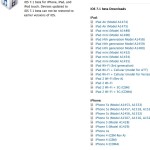
Apple has released the first iOS 7.1 beta to registered developers. The build arrives as 11D5099e, and is available for iPad Air, iPad Mini Retina, iPad 4, iPad 3, iPad 2, iPad mini 1, iPhone 5S, iPhone 5C, iPhone 5, iPhone 4S, and iPhone 4. The 5th gen iPod touch is the only supported iPod … Read More

Fixing the “Unable to Verify Update” Error in iOS

Nov 15, 2013 - 61 Comments
Fix the Unable to Verify Update error for iOS

It seems that an “Unable to Verify Update” error message arrives at random for some users with just about every single iOS software update, perhaps unsurprisingly, the problem has resurfaced for some when trying to download and install the recent 9.3, 7.0.4, and various other iOS updates. The error seems to be exclusive to using … Read More

How to List All IPSW Files from Apple Servers Using the Command Line

Nov 15, 2013 - 10 Comments
Get a list of all IPSW files available from Apple

Many advanced users prefer to use firmware files when updating their iOS devices to the latest version, and every time an iOS update comes out we post direct download links for the latest versions. Every once in a while we get questions from users who wonder how we find those file links, since they’re tucked … Read More

iOS 7.0.4 Download Released with Bug Fixes [IPSW Direct Download Links]

Nov 14, 2013 - 10 Comments
iOS 7.0.4 download

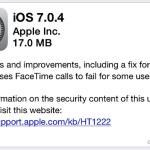
iOS 7.0.4 has been released by Apple for compatible iPhone, iPad, and iPod touch models, with a build of 11B554a. The update includes several bug fixes and improvements, and addresses an issue with FaceTime calling that caused video chat and voice calls to fail continuously under some circumstances. Other small feature changes may be present, … Read More

Check the Weather for Multiple Locations at the Same Time on iPhone

Nov 13, 2013 - 3 Comments
View weather for multiple locations at once in IOS

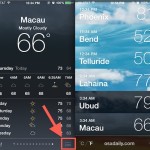
Want to see the weather for multiple locations at once on a single screen, without having to flip between locations in the Weather app of iPhone? This is simple on the iPhone since modern iOS updates, and with holidays, summer, or ski season approaching for the northern or southern hemisphere it should be an increasingly … Read More

6 Easy Tips to Help Extend the Battery Life of iPad Air & Retina iPad Mini

Nov 12, 2013 - 5 Comments
Adjust brightness in Control Center for iPad

The iPad Air has a great battery life which is said to last up to 10 hours of continuous use, but like many other devices that are running iOS 7, the battery life of the device can be maximized by adjusting a few settings accordingly. Some of these tricks will reduce eye candy and special … Read More

Export a Map of Any Location in PDF Format from Mac OS X

Nov 11, 2013 - 5 Comments
Apple Maps icon in OS X

A full featured Apple Maps app is now bundled on all Macs running modern versions of Mac OS. Most people will probably use Maps to get directions and cruise around the globe for virtual tours, but there’s an excellent little feature that allows you to export any regions map as a PDF file. This is … Read More

5 Helpful Safari Keyboard Shortcuts for iPad

Nov 10, 2013 - 4 Comments
Safari Keyboard Shortcuts for iOS

The latest versions of Safari in iOS support new keyboard shortcuts to help speed up web browsing and general web navigation for iPad and iPhone users that have external keyboards attached to their devices. Those who have memorized the keyboard shortcuts for Safari on the Mac will find these to be identical to their Mac … Read More

Change iOS System Settings like Wi-Fi & Display Brightness with Siri

Nov 9, 2013 - Leave a Comment
Toggle system settings in iOS with Siri

Need to quickly toggle a system setting on your iPhone or iPad like Bluetooth or Wi-Fi on or off? Want to turn down the brightness of your iPhone without touching it? Now you can just summon Siri and ask your very own iOS personal assistant to change some of the most frequently accessed system settings … Read More

How to Add Web Sites to Safari Favorites Page on iPhone & iPad

Nov 8, 2013 - 6 Comments
Adding web pages to Safari Favorites page in iOS

When opening a new page in Safari for iOS, the first thing seen is the “Favorites” page, which is basically a collection of website recommendations and bookmarks. That Favorites page is what you see when you have no active pages open in both normal and private mode, and also what you see when you tap … Read More

Make Free VOIP Calls from iPhone with FaceTime Audio

Nov 7, 2013 - 7 Comments
Make a FaceTime Audio call

With FaceTime Audio, the iPhone can now make free VOIP (Voice Over Internet Protocol) calls directly from the built-in phone or FaceTime app, without the need for any third party services or applications. This basically means you make phone calls to anywhere in the world for free, so long as the recipient of the call … Read More

Open Any Settings Panel in iOS Directly from Siri

Nov 6, 2013 - 5 Comments
Open Settings panels with Siri

The Settings app for iOS has tons of individual preference toggles, adjustments, tweaks, and customizations, adding up to what is likely hundreds of options. Each of the settings is segmented into a variety of categories, like General, Sounds, Notification Center, Privacy, Location, plus just about every default app, and many third party apps too. While … Read More

iPhone Wi-Fi Won’t Turn On? Here’s What To Do

Nov 6, 2013 - 21 Comments
Wi-Fi

Most iPhone users have trouble-free use of their device whether it’s on a cellular connection or wi-fi, but wireless connectivity issues do occur from time to time. These type of problems can manifest in a variety of ways; sometimes the Wi-Fi on and off toggle switch is grey and unusable (sometimes resolved by simply quitting … Read More

Set “Do Not Disturb” to Always Be Silent on the iPhone

Nov 4, 2013 - 4 Comments
Do Not Disturb mode turned ON in iOS

Do Not Disturb is an excellent feature of iOS that, when turned on, mutes notifications and alerts for all incoming calls, messages, and apps. It’s easy to toggle on and off, providing for some digital peace and quiet with a quick switch. But if you’re actively using an unlocked iPhone, iPad, or iPod touch while … Read More

How to Change the Dock Color & Appearance in iOS

Nov 3, 2013 - 8 Comments

The Dock received a significant visual overhaul along with almost everything else in modern iOS versions, and though the days of the OS X look-a-like are gone, you can still customize the coloration and transparency of the Dock a bit. One option is to change the wallpaper, which has a profound effect on the appearance … Read More

Quickly Clear Notifications from the Lock Screen in iOS

Nov 2, 2013 - 1 Comment
Clear the lock screen notifications quickly with a swipe up and down

Have a bunch of Notifications and Alerts sitting on the lock screen of your iPhone or iPad that you don’t want on there anymore, but don’t want to unlock the device or leave the lock screen? No sweat, rather than swiping to unlock the iOS device and then manually addressing the notifications, you can shuffle … Read More

Customize “Today View” in Notification Center for iPhone & iPad

Oct 31, 2013 - 8 Comments
Customize Today View in Notification Center for iOS

Swiping down from the very top of your iPhone screen (or iPad), you’ll find Notification Center swoops on down, where alerts, notifications, iMessages, and missed calls appear. There’s also the “Today” tab, which aggregates information from your Calendars, Reminders, Stocks, and destinations, and puts them into an active days summary of what’s on tap for … Read More

Subscribe to OSXDaily

Subscribe to RSS Subscribe to Twitter Feed Follow on Facebook Subscribe to eMail Updates

Tips & Tricks

News

iPhone / iPad

Mac

Troubleshooting

Shop on Amazon to help support this site