macOS

Search macOS

Convert PNG to JPG or Convert JPG to PNG

Jan 12, 2010 - 20 Comments
Converting a PNG file to JPG, or converting JPEG to PNG, is really easy in Mac OS X. You can use the built-in Preview utility to perform the file format change quickly, and Preview is a great choice since it’s bundled with all versions of MacOS and Mac OS X, meaning it does not matter … Read More

Improve Spotlight Searches with Search Operators in Mac OS X

Jan 6, 2010 - 12 Comments

If you know some specific attributes of a file, application, or item you are looking for on a Mac, you can use Spotlight Search Operators to dramatically narrow down your returned results in the Mac OS search feature. For example, if the file type of a document you are looking for is a PDF, you … Read More

Access the File Inspector on Mac with Command-Option-i

Jan 4, 2010 - 4 Comments

Did you know the Mac has a little file inspector tool that can be used in the Finder for quickly getting information about files, folders, and anything else selected in a Finder window? The File Inspector is basically a dynamic “Get Info” window on the Mac, as it adjusts depending on what you select in … Read More

Open Current Folder in Finder from Terminal of Mac OS X

Nov 30, 2009 - 14 Comments

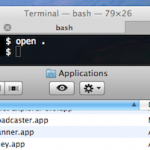
Want to open a Finder window from the current directory location in Terminal? Mac OS makes this easy! From the Mac Terminal, you can immediately open whatever folder or directory you are working within into the Finder of MacOS and Mac OS X by simply typing the a short command string and executing it. To … Read More

Type Accented Letters with Accent Codes in Mac OS X

Nov 11, 2009 - 14 Comments

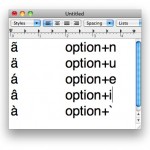
Grave, tilde, acute, circumflex, umlaut… all the fun accent codes that you might need to use. So if you need to type an accented letter in Mac OS X, we’ll show you how to quickly type them using the special option key based keystroke modifiers.

Play MP3’s, M4A, AAC, and Other Music Files from the Command Line

Oct 27, 2009 - 3 Comments
Terminal in macOS

Ever wanted to play music while you’re working in the command line? Maybe you want to play a podcast from the command line on Mac? With the command line tool ‘afplay’ you can do just that, you can play practically any audio file format, whether it’s M4A, AAC, MP3, WAV, AIFF, or whatever else is … Read More

Show Hidden Files in Mac OS X

Feb 25, 2009 - 48 Comments
Finder of Mac OS X

Need to show hidden files on a Mac? This is pretty common if you find yourself needing to access hidden files on your Mac, like an .htaccess file you downloaded, a .bash_profile, a .svn directory, – literally anything preceded with a ‘.’ indicating it is invisible by default – you can run the below command … Read More

Use Quick Look from the Command line with qlmanage

Dec 24, 2007 - 3 Comments
terminal

Quick Look is a nice feature in Mac OS X for quickly previewing documents, images, and other file data before opening it into a designated application. I use Quick Look often for glancing at the content of various documents and it certainly beats launching an application when you just need to take a quick peak … Read More

Navigating Mac OS X with Only the Keyboard

Dec 13, 2007 - 13 Comments
Finder icon on the Mac

Did you know you can navigate Mac OS with only the keyboard? If you’re an avid typer it can be annoying to have to interrupt your flow, lift your hand(s) from the keyboard, simply to use the mouse and navigate around Mac OS X. Instead of dealing with that frustration, try using exclusively the keyboard … Read More

Change the Default Web Browser in Mac OS X

Apr 6, 2007 - 30 Comments
Default web browser in Mac OS X

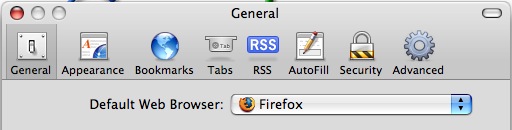
Updated: 11/27/2021 Ever wondered how to change the default web browser app on your Mac? Maybe you prefer Chrome to Safari, or maybe you want to use Firefox instead of Safari, or vice versa? Whatever your choice, it’s easy to do in macOS Monterey, macOS Big Sur, macOS Catalina, macOS Mojave, High Sierra, Sierra, OS … Read More

How to Always Boot Mac OS X in Verbose Mode

Mar 25, 2007 - 31 Comments
Terminal in macOS

Booting Mac OS X as usual shows the Apple logo and eventually you’ll wind up at a login screen or desktop, that’s attractive and all, but some users would prefer to see what’s going on behind the scenes. That’s what Verbose Boot Mode does, it shows you what is really happening during system startup on … Read More

How to Get Image Thumbnail Icons in the Mac Finder

Mar 13, 2007 - 31 Comments
Image thumbnail previews in Mac OS X Finder

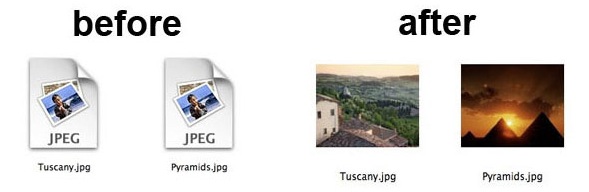
Ever wondered how you can get image thumbnails to show up in the Finder of the Mac? You’re not alone, and a good question from one of our readers came in on this very topic. A recent switcher to the Mac, Carol Kavanaugh writes: “I got a Mac a few months ago and love it … Read More

Changing your Mac’s Computer Name

Feb 15, 2007 - 79 Comments
Change the computer name of a Mac

Want to change the name of your Mac computer? You can change the identified computer name of a Mac easily from the Mac OS system settings. This not only changes the Macs computer name, but it also changes what the name of the Mac is as identified by other users on a network, and by … Read More

Put a Mac to Sleep Remotely via eMail or Text Message

Feb 6, 2007 - 4 Comments
Mail icon

How many times have you left your Mac on, and later while you’re out and about you wish you would have turned the thing off or put it to sleep? Wouldn’t it be nice to be able to put it to sleep remotely with a quick email or text message? You can, and it’s easier … Read More

Subscribe to OSXDaily

Subscribe to RSS Subscribe to Twitter Feed Follow on Facebook Subscribe to eMail Updates

Tips & Tricks

News

iPhone / iPad

Mac

Troubleshooting

Shop on Amazon to help support this site