tips

Search tips

Set IP Address from the Mac Command Line

Sep 1, 2010 - 23 Comments

The quickest way to set your IP address from the command line is to use the versatile and powerful ipconfig utility, which is bundled directly with Mac OS X. We’ll show you how to set an IP address with ipconfig by retrieving one from a DHCP server, and also demonstrate how to set a specific … Read More

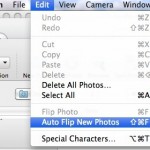
How to Set Photo Booth to Flip Images on Mac

Aug 27, 2010 - 6 Comments

Photo Booth on the Mac defaults to flipping your images horizontally, this happens automatically without any user input and without it being noticed, it’s just how the camera within Photo Booth displays pictures, making it function more like a mirror rather than a traditional camera. If you don’t images to flip like that, you can … Read More

Show Line Numbers in TextWrangler

Aug 26, 2010 - 2 Comments

Line numbers are so useful to have in a good text editor that I’m surprised they aren’t enabled by default in TextWrangler. Regardless, they’re easy to display so here are two different ways to show line numbers in a text file. The first is through the View menu: In TextWrangler, open the View Menu Navigate … Read More

Launch Mac VNC Screen Sharing Client from Safari or Finder

Aug 18, 2010 - 3 Comments

Did you know that that Mac OS X includes a bundled VNC app? It’s called Screen Sharing, and you can quickly launch the bundled VNC client from either the OS X Finder, Safari by typing an address into the URL bar, or directly from the app itself.

Drag or Paste Link in Safari Downloads Window to Download on Mac Immediately

Aug 17, 2010 - 2 Comments

Did you know you can download a file instead of opening it in Safari on the Mac, simply by dragging a link to the Downloads window of Safari? And did you know you can also start a download in Safari on Mac by pasting a copied download URL into the Safari downloads window? This combo … Read More

Change the Screen Shot File Format in Mac OS X

Aug 16, 2010 - 19 Comments
Change the screenshot file format in Mac OS X

All versions of Mac OS X default to saving captured screen shot files to PNG format, but if you’d rather have screenshots save as another file type, it’s actually quite easy to modify the file format and change the default to something new. Whether the desired format output is JPG, TIFF, PDF, GIF, or back … Read More

The Mac Task Manager

Aug 15, 2010 - 47 Comments

Many new Mac users are coming from the Windows world where they would access the Task Manager to end tasks and stop errant processes. The Mac has it’s own Task Manager but it goes by another name: Activity Monitor. Activity Monitor functions in a very similar way to how Task Manager does in Windows, letting … Read More

Immediately Zoom Back to 100% in Photoshop with Command+1

Aug 13, 2010 - 2 Comments

If you’re a Photoshop user and you’re frequently zooming in and out on images and photoshop files, you’ll likely find this simple trick to be particularly handy. You can immediately zoom back to 100% on any document within Photoshop by hitting Command + 1 (yes like the number one). If you’re not a fan of … Read More

Convert to EPUB – How to convert PDF, HTML, Word DOC, and more to EPUB format

Aug 12, 2010 - 34 Comments

EPUB stands for ‘electronic publication’ and it’s the accepted standard format for digital book publishing. If you want to make an ebook that can be read on a digital device, you’ll need it in this EPUB format. You can convert virtually any text containing document to EPUB format, which is the preferred format for reading … Read More

Run iPhone in James Bond Mode: Set your iPhone to Self Destruct and Erase All Data After Failed Password Attempts

Aug 12, 2010 - 26 Comments

There’s a pretty interesting feature included in iOS that lets you run your iPhone in James Bond mode, causing the device to self destruct if an incorrect password is entered 10 times concurrently. Ok, well it’s not really called James Bond mode and it doesn’t actually self destruct, but it does erase all the data … Read More

How to Merge Directories in Mac OS X with ditto

Aug 12, 2010 - 6 Comments
Terminal in macOS

If you have two directories you need joined together, you can either drag and drop everything together, use the ‘mv’ command to move files manually, or, as we’ll show here, you can quickly merge any two directories within Mac OS X by using the command line tool ditto or ‘cp’. The command line is generally … Read More

How to Lock Files and Folders in Mac OS X

Aug 11, 2010 - 8 Comments

You can easily prevent changes being made on any files or folders in Mac OS X by locking the file or folder in question. This locking capability will also prevent the file or directory from being deleted, since the Trash will not empty while a file is in a locked state. Locking files and folders … Read More

Repair Disk Permissions from the Command Line in Mac OS X

Aug 10, 2010 - 11 Comments
Use Disk Utility to erase free space on a Mac hard drive

In some situations, you may need to repair a Macs disk permissions but be unable to access the Disk Utility app, perhaps due to remote management or because of a problem with something in OS X. Fortunately there’s another method you can use to repair disk permissions in Mac OS X, accessible through the command … Read More

Select Sections of Non-Contiguous Text in Mac OS X with the Command key

Aug 9, 2010 - 8 Comments

If you’ve ever needed to select and copy portions of a text document that are non-contiguous, in other words, sentences or words that are not right next to one another and do not touch, you can do so with a little-known text selection shortcut trick in Mac OS X.

Get your LAN IP Address in Mac OS X

Aug 8, 2010 - 7 Comments

Anytime you are connected to a local area network (LAN) you’ll be assigned an IP address for that network, and often it’s important to know what this IP address is. There are two quick ways to get your LAN IP address in Mac OS X, one is more user friendly using the GUI, and the … Read More

Find the iPhone MAC Address

Aug 5, 2010 - 6 Comments
MAC address

All iPhone devices have a unique hardware identifier known as a MAC address, or as iOS refers to it, a Wi-Fi Address. Sometimes you need to know what the iPhone MAC address is so that you can connect an iOS device to a specific router, provide it to a systems or network administrator, using Wake … Read More

How to unlock iPhone 4

Aug 4, 2010 - 6 Comments

You can now use a carrier unlock on iPhone 4, thanks to the latest ultrasn0w release from iPhone Dev Team. Installing the carrier unlock is easy, but you’ll need to jailbreak your iPhone before it works. Here are the requirements and steps to unlock the iPhone 4: How to unlock iPhone 4 Unlocking the iPhone … Read More

List All Third Party Kernel Extensions in Mac OS X

Aug 3, 2010 - 7 Comments
Terminal

If you’re troubleshooting a Mac machine with some particularly odd issues that routine measures don’t seem to be resolving, it can be helpful to list what kernel extensions are activated, particularly third party kexts loaded in OS X. Determining what kernel extensions are loaded and running in Mac OS X is rather easy, and using … Read More

Subscribe to OSXDaily

Subscribe to RSS Subscribe to Twitter Feed Follow on Facebook Subscribe to eMail Updates

Tips & Tricks

News

iPhone / iPad

Mac

Troubleshooting

Shop on Amazon to help support this site