tips

Search tips

Disable Growl Notifications

May 17, 2010 - 15 Comments

Growl is a desktop notification system that allows applications to publish updates and items to floating windows on your desktop. This allows you to see things like updates, information, and status changes to whatever application is publishing the Growl notification. The advantage to Growl is that regardless of what application has the focus, you’ll see … Read More

Re-Run the Last Used Command Exactly With or Without Super User Privileges

May 17, 2010 - Leave a Comment
Terminal

Want to re-run the last executed command? Or what about re-running the last used command but running it as root? You can do both! Ever typed a nice fancy string command into the terminal and been frustrated to discover that you need to run it all over again? Or perhaps you discovered that the aforementioned … Read More

Stop the MacBook Pro and MacBook Screen from Dimming

May 15, 2010 - 26 Comments

The MacBook, MacBook Air, and MacBook Pro screen backlighting is set to automatically dim and adjust in different situations. For the MacBook, it will adjust based on the power source and based on how long the computer is not in use. For the MacBook Pro and MacBook Air, the same is also true, in addition … Read More

How to Download Web & Flash Videos to a Mac with the Safari Activity Monitor Trick

May 14, 2010 - 81 Comments

If you want to save and watch many web-based movies and Flash files directly to your Mac for later offline viewing try this neat reader provided tip out. Sent in by Robert Warner, he writes this handy trick to download just about any videos directly to your Mac using only Safari and the little-used Activity … Read More

How to Print Screen on a Mac

May 13, 2010 - 150 Comments
Print Screen to the Clipboard on a Mac with this keystroke

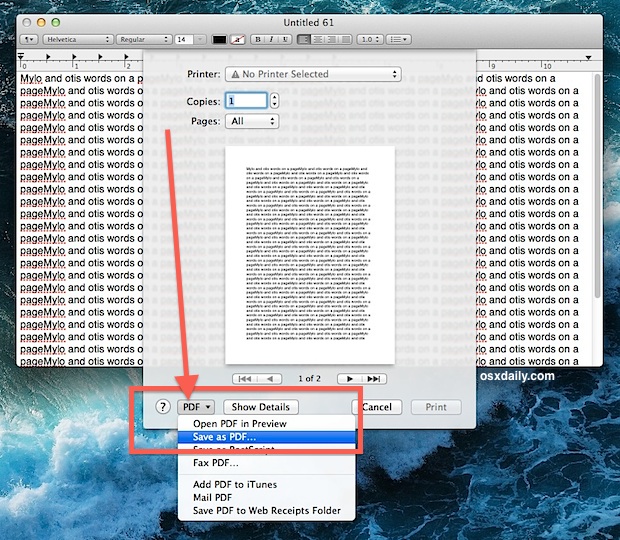
What is known as “Print Screen” in the Windows world is called screen captures or screen shots in Mac OS X. You’ve probably noticed there is no ‘Print Screen’ button on a Mac keyboard, this is to both simplify the keyboard and also because it’s just unnecessary. On the Mac, instead of hitting a “Print … Read More

Switch Mac Function Keys to Work as Standard Function Keys

May 12, 2010 - 13 Comments

I’ve always preferred the way the original MacBook and MacBook Pro’s handled the function keys, in particularly the way F9, F10, and F11 are used to enter into Expose and Mission Control. For a while now the function keys have changed, they default to playing music, adjusting keyboard backlighting, and adjusting volume levels, I like … Read More

How to Make Applications Minimize Into Their Dock Icon in Mac OS X

May 11, 2010 - 5 Comments

You can make save a lot of clutter from showing in the Dock of Mac OS X by making applications minimize into their own Dock icon. What this means is that if you minimize an app, rather than having the little thumbnail stay on the right side of the Mac Dock, it will minimize directly … Read More

NameChanger Will Batch Rename Files for Free in Mac OS

May 11, 2010 - 12 Comments

NameChanger is a free app solution to quickly and easily batch rename files in Mac OS X. It has all the features you’d expect in a batch renaming app, and you can replace occurrences of text in filenames, use wildcards, append text or characters, add dates, make files sequential, and even remove characters, just select … Read More

Create a Hidden Folder in Mac OS X

May 10, 2010 - 18 Comments

You can create a folder that is hidden from the default Finder GUI view by taking advantage of Mac OS X’s unix underpinnings. That probably sounds a lot more complex than it is however, and it turns out it’s actually really easy to make a completely hidden folder on the Mac. This walkthrough details how … Read More

How to Manually Switch Graphics Cards on MacBook Pro

May 8, 2010 - 2 Comments

Would you like to manually choose which graphics card is in use on a MacBook Pro? You can now keep track of which GPU is in use and then manually switch between the two graphics cards included within the MacBook Pro series, thanks to a third party utility called gfxCardStatus. It’s a free app and … Read More

Create an Instant Web Server via Terminal Command Line and Python

May 7, 2010 - 11 Comments
python web server

Want to quickly share a file, test some code, or broadcast something? You can instantly create a web server out of the current directory by using nothing but python, yup, no apache, no nginx, no litespeed, all python, which ships with pretty much every unix variation these days. The command is remarkably simple considering how … Read More

Stop iTunes from Automatically Opening When iPhone, iPad, or iPod is Connected

May 6, 2010 - 39 Comments

Updated 5/31/2015: By default, iTunes will automatically launch when any compatible device is connected, be it an iPhone, iPad, iPod Touch, Nano, whatever. Having iTunes open itself automatically can be helpful but it can also be annoying, it really depends on your user preferences. If you don’t want this to happen, you can easily turn … Read More

Speed Up a Slow Terminal by Clearing Log Files

May 6, 2010 - 54 Comments

The Mac OS X Terminal can become slow to launch over time, but there’s an easy solution to speed it up again. By deleting the Apple System Logs, you can shave the lag in opening and launching new Terminal windows/tabs dramatically, in my case from about a three second delay to instantaneous! Here’s how to … Read More

iTunes loading slowly? Here’s a simple fix to speed iTunes launch

May 5, 2010 - 19 Comments

From time to time iTunes can take a very long time to open, typically because it is looking for the music library. If you find iTunes to be taking a long time to launch, you might try this simple fix seems to resolve the slow application launch issues: * Launch iTunes * Immediately hit and … Read More

Make Mac OS X Run in Grayscale Mode

May 4, 2010 - 2 Comments
Mac running in Grayscale Mode OS X

You can run Mac OS X in Grayscale mode by adjusting the display settings in the Accessibility or Universal Access control panel. Likewise, you can stop a Mac from running in greyscale mode and get full color back by disabling the setting in the same system control panel. This is an easy display settings adjustment … Read More

Securely Format a Mac Hard Drive

May 3, 2010 - 5 Comments

If you want to be absolutely sure your data is wiped clean with virtually no chance of recovery, by anyone, using any possible known recovery tools, look no further than Apple’s Disk Utility tool. The process is simple, and it can apply to any Mac drive, whether that’s an internal hard drive, external hard drive, … Read More

Simple fix for Mac OS X 10.6.3 Samba Write Access problem

May 2, 2010 - 6 Comments

Upgrading to Mac OS X Snow Leopard 10.6.3 was a painless procedure until I tried to access some SMB mounts… suddenly I had no write access to my samba drives! I was presented with this error message: The operation can’t be completed because you don’t have permission to access some of the items. Thankfully there’s … Read More

Make a Screen Saver Out of Your Own Images in Mac OS X

Apr 30, 2010 - 16 Comments

Do you have a collection of images and photos that you’d like to become a screen saver on the Mac? This offers a simple and nice way to customize a screen saver to include only your own images and pictures, and it’s quite easy to accomplish in macOS and Mac OS X.

Subscribe to OSXDaily

Subscribe to RSS Subscribe to Twitter Feed Follow on Facebook Subscribe to eMail Updates

Tips & Tricks

News

iPhone / iPad

Mac

Troubleshooting

Shop on Amazon to help support this site