
Mac OS X Directory Structure explained

If you have ever looked at your Mac root directory and wondered what some of those other directories are for, you’re probably not alone. Mac OS got a whole lot more complex with the advent of Mac OS X, adapting a unix file structure that is largely unfamiliar to Mac OS 9 and Windows users. So just what is /System, /Library, /usr, and all the others for anyway?
Here you will find a brief overview of these directories, as well as an explanation of each system level directory as found in Mac OS X and macOS system software.
Directory Structures of Mac OS X, Examined and Explained
By default, if you glance in the root of your Mac’s hard disk from Finder, you’ll see some unfamiliar sounding directories. The underlying directory structures of Mac OS are best revealed by visiting the root directory of the Mac, which many Mac users may encounter when they visit their own “Macintosh HD”.
Going further from the command line, you will see even more root level directories if you type the following:
ls /
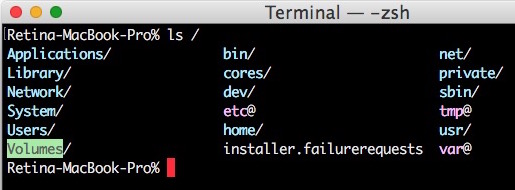
Here you will find directories with names like; cores, dev, etc, System, private, sbin, tmp, usr, var, etc, opt, net, home, Users, Applications, Volumes, bin, network, etc.
Rather than wonder at the mystery of what all these folders, directories, and items mean, let’s examine and detail what these directories are, and what they contain, as they are relevant to the Mac operating system.
In no particular order, here is a table to help with this effort of exploring the base system directory structure of Mac OS:
| Directory | Description |
| /Applications | Self explanatory, this is where your Mac’s applications are kept |
| /Developer | The Developer directory appears only if you have installed Apple’s Developer Tools, and no surprise, contains developer related tools, documentation, and files. |
| /Library | Shared libraries, files necessary for the operating system to function properly, including settings, preferences, and other necessities (note: you also have a Libraries folder in your home directory, which holds files specific to that user). |
| /Network | largely self explanatory, network related devices, servers, libraries, etc |
| /System | System related files, libraries, preferences, critical for the proper function of Mac OS X |
| /Users | All user accounts on the machine and their accompanying unique files, settings, etc. Much like /home in Linux |
| /Volumes | Mounted devices and volumes, either virtual or real, such as hard disks, CD’s, DVD’s, DMG mounts, etc |
| / | Root directory, present on virtually all UNIX based file systems. Parent directory of all other files |
| /bin | Essential common binaries, holds files and programs needed to boot the operating system and run properly |
| /etc | Machine local system configuration, holds administrative, configuration, and other system files |
| /dev | Device files, all files that represent peripheral devices including keyboards, mice, trackpads, etc |
| /usr | Second major hierarchy, includes subdirectories that contain information, configuration files, and other essentials used by the operating system |
| /sbin | Essential system binaries, contains utilities for system administration |
| /tmp | Temporary files, caches, etc |
| /var | Variable data, contains files whose contents change as the operating system runs |
You may very well find other directories as well, depending on the version of Mac OS X you have, and depending on what apps and system adjustments you have made.
Nonetheless you can be sure that if any directory is at the root of Mac OS X, it is important, and shouldn’t be messed with at least without detailed knowledge of what you’re doing. Never delete, modify, or otherwise alter system files and directories on a Mac (at least without knowing exactly what you’re doing and why) because doing so can disrupt the operating system and prevent it from working as expected. Always back up a Mac before exploring and modifying system level directories.
If we forgot anything, or if something isn’t properly described, feel free to chime in with comments.






Thanks
I have done a dozen searches exposing dozens of web pages and none tell me what the “.” and “..” (. and ..) files are. They are the only files in my slash home (/home) directory (which, by the way, was not included in the list.) I am looking for my .leo file to start leoeditor (still haven’t found it) and I ran into these and am curious about system files now that I am starting to use more open source. Thank You
in the context of `ls`, the single period refers to the current directory and the double period refers to the parent directory
How can I see the / contents in finder?
Sir,where directori of essntial system software
Coming from the dos and windows world, I’m not an idiot. Where can I find an Apple utility that gives me the same access and information that Windows Explorer provides? Or has Apple yet to ‘develop’ that capability yet? I have a new Mac (my wife’s idea) that is frustratingly inaccessable.
It’s called FINDER and it is part of Mac OS X, you can find it on your DOCK (blue smiling face icon).
If is not enough for you than you can use Terminal or buy Path Finder (file manager with much more options than Finder).
In what directory should I put SDKs like C++ Boost?
A year ago I moved from a PC to a Mac. Its been a nightmare. After more than a year I still can’t figure out the directory structure of a Mac, and I can never find anything. The directory structure of a PC is a piece of cake in comparison
I’m not a dumb person (a 44 yr oldfinance executive), but man o man! I thought Mac’s were supposed to be more intuitive to work with?
Simon, and they are! what don’t you understand?
Every application is in /Applications, all of your files will be in /Home/Simon/* [Desktop, Documents, Music, etc etc], everything else is basically system related folders and you don’t need to worry about those now. So, that is it! ;-) pretty simple!
If you’re having any doubts drop me a line, maybe i can help you. my contact is on my website under “philip”.
Should be /Users/Simon/* rather than /Home
“… I’m not a dumb person …” yet the very next sentence includes “Mac’s”.
Yeah. OK.
[…] X目录结构的文章中说的那么美好。os […]
I am Using MacPro Machine and having Snow leopard 10.6.6 in my Hard Disk Folder there are same extra folder can i DELATE them? which is showing below in the list here.
• Applications (should be there)
• Library (should be there)
• opt (extra folder can I DELATE this folder)
• Resources (extra folder can I DELATE this folder)
• System (should be there)
• Users (should be there)
• usr (extra folder can I DELATE this folder)
Hi,
I have a huge “. ak” folder in my user home folder. What’s that?
Well i find in my home dir somthnig like this
drwxr-xr-x 1 501 501 3 2009-09-24 22:52 Application Support:Adobe:Acrobat/
Is any one who can explain to me minings of Application Support:Adobe:Acrobat/
Thanks Lew
i have a /home directory, inside that i am not able to create a directory using even “root” user any clue ?.
[…] tak to wklep w terminalu polecenie # man hier. Znalazłem też ciekawy artykuł na ten temat w sieci (polecam przeczytanie komentarzy). Kategorie:Uncategorized Komentarze (0) Trackbacki (0) […]
[…] This would be a good start for understanding the directory structure in OS X. If you want your machine to run optimally, use a tool designed for that. There is no need to risk damage by manually manipulating files in directories that you are completely unfamiliar with. I consider myself fairly proficient with OS X for example but I would never manipulate the files in /System by hand. __________________ Upgrading to Snow Leopard FAQ : Incompatible Software for Snow Leopard : 64-bit and Snow Leopard – What 64-bit means for you Website : Twitter M-F MotM – April 2009. […]
[…] directory or your machine wouldn’t be working (if it was, it wouldn’t be working very well). See here for an explanation for the directories on your Mac. Note the description for /System: "System […]
“ls -lash /” shows me a “/home” folder on my Mac OS X.5. Is this a system created resp. for the system relevant folder or is it a folder I’ve created myself accidentally as I’m (or was :) a long-term Linux user?
Would be nice of you guys to type “ls -lash /” and tell me if you have also a “/home” folder on your system.
Hi,
Does /Users/$User/Desktop exist in any Mac OS 10.x, 9.x, etc.
Thx
> Where can I find /Applications /etc /Network? are these files deletable? If
> they are, how can I delete them? and how will this affect the OS?
In Finder, Go… Go to Folder and type /Applications or whatever folder you want to get to (shift-command-g for keyboard shortcut people).
Deleting any hidden files is never a good idea unless you know what you’re doing. Deleting the /etc directory will probably make your computer unbootable at the very least.
Why would you want to delete that in the first place?
Hi,
Where can I find /Applications /etc /Network? are these files deletable? If they are, how can I delete them? and how will this affect the OS?
Thanks
It’s ridiculous to try to delete theses folders…
Look at Apple.com to see a high level description.
http://developer.apple.com/documentation/Darwin/Reference/ManPages/man7/hier.7.html#//apple_ref/doc/man/7/hier
[quote]> This lib/local stuff has me confused.
/usr is used for files installed through a package manager, such as MacPorts
/usr/local is used for files installed manually, such as something you have compiled. Putting them in /usr/local keeps them separate from the mess of files stored in /usr so it’s easier to manually remove the files (since there isn’t a package manager to do it for you). [/quote]
Yeh we have the same thing here on linux, that is because both OSX and linux are based on unix one way or another (OSX can be considered more “true” unix though as its based on BSD that is mostly derived from unix, linux however is based more off of minix)
the whole usr/local thing makes perfect sense to me, as we have something pretty much like it here in linux land
simple question: does the /usr/local/bin folder exists in mac os?
/usr/local/ does not exist, the /usr/ directory looks like so:
X11/
etc/
libexec/
share/
X11R6/
include/
standalone/
bin/
lib/
sbin/
This is with developer tools installed, so a standard installation may look different.
> This lib/local stuff has me confused.
/usr is used for files installed through a package manager, such as MacPorts
/usr/local is used for files installed manually, such as something you have compiled. Putting them in /usr/local keeps them separate from the mess of files stored in /usr so it’s easier to manually remove the files (since there isn’t a package manager to do it for you).
>Now what I never understood is the real difference between /System/Library and />Library….
As U have it understood, /Library holds preferences, fonts, screen savers and the such that are available to all users and not just /Users/auser/Library.
/System/Library is more like services and extensions (similar to os 9) but very different. Thats is my guess.
My question is.. where would one logically install *nix software on OS X. Lets say I want to install Image Magick. Where should I place it? mysql get put into /usr/local/ and php gets put into /usr/lib/. This lib/local stuff has me confused.
actually, /etc is a symlink to /private/etc, like /tmp and /var are to /private/tmp and /private/var. Furthermore, you should point out that /private/var/log/ contains all the system logs.
Now what I never understood is the real difference between /System/Library and /Library….
/sw is specific to Fink
/opt is common elsewhere, in OS X it probably means you installed DarwinPorts
/private should probably be on the list.
/private, /sw, /opt
are three more I have that aren’t listed, are they install specific?
how about /sw ?
nice thing, though, i think you missed /private out!