
Want Microsoft Paint for Mac OS X? Paintbrush is Equivalent!
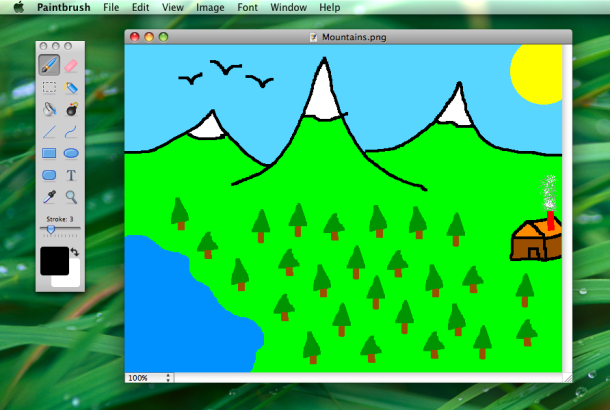
Many of us who converted from a Windows PC to a Mac may long for the amazing artistic capabilities allowed within Microsoft Paint. Ok so maybe that’s a bit dramatic, and we all know that Microsoft Paint is pretty crappy in a weirdly lovable way, but that’s also why it was fun. So, if you came to the Mac you may miss mspaint, right?
I do, I want MS Paint on my Mac, and I found the equivalent with a free app called Paintbrush. And it wasn’t just me, because the good developers in the open source community saw this available niche and went to action, creating Paintbrush, a uniquely Mac OS X clone of a Microsoft Paint-type application. The features are exactly as basic as you’d expect, this is truly the closest thing to MS Paint for Mac that you’ll find.
Check out the screenshots or just download instantly below:
- Visit the developer home at sourcefourge to grab the app, it’s free to download
This is about as close as you’ll get to firing up MSPaint.exe in OS X, so get the free download and have fun with your basic pixel painting and simplistic drawing fun. You can even get super-zoomed in to get perfect pixel level drawings, how awesome is this app? You want MS Paint on your Mac? This is as close to a clone as you’ll get:
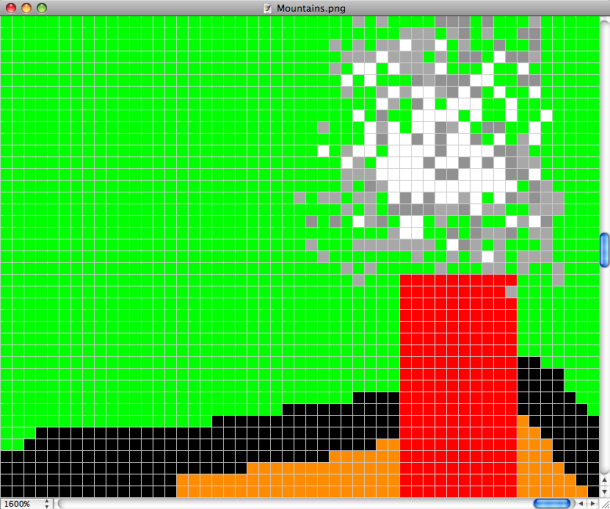
The lovely UI of Paintbrush:
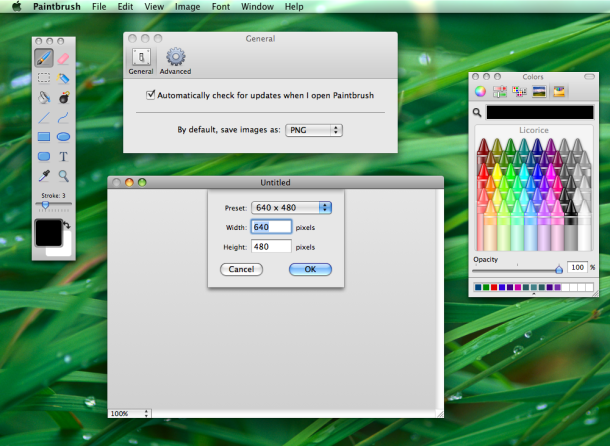
It works in just about all versions of Mac OS X too, enjoy!






MyBrushes is a nice alternate to ms paint for Mac
if i try to copy a text from a scan and then paste it on the same page , the square from the paste is empty, it doesn’t copy paste the text
[…] Once in Gimp you’ll find many of the familiar image editing tools, like layers, brushes, filters, text tools, color adjustments, and much more. Though Pixelmator remains the best Photoshop alternative for Mac users it also costs $15, and Gimp is a perfectly adequate solution for anyone looking to do some quick image editing and adjustments without shelling out any money at all. Try it out yourself, it’s free, cross platform compatible, and it beats the fudge out of something like MS Paint. […]
MAC APPLICATIONS SUCK
first of all this paint doesn’t have a working ERASER
so i got another paint where YOU COULD ONLY EDIT PICTURES 1 PIXEL AT A TIME.
the third paint i got WASN’T COMPATIBLE WITH THE INTERNET
MS PAINT owns all 3 put together, also i am converting to windows again
Okay so all you do for insterting pictures is you open it in paintbrush. And then you select it with the selector. Then you cut/copy. Then you go to where you want to put the image and extend the selector box. Then you paste. Woo!!!
Ok. Look– Here’s the bottom line. Paintbrush is absolutely useless because it doesn’t have the features of MS Paint that people need (i.e. copy/paste images, resizing etc). Therefore, instead of partaking in this endless MAC vs PC bs, can somebody just direct us to alternative Mac software that has these features????
Is there an iPad version comming,looking for free-form select tool like paintbrush in iPad sketch apps.
[…] and for mac users, this program is a delightful improvement of ms paint: paintbrush […]
Seriously, thank you for making this. This is EXACTLY what I need 90% of the time. MAKERS OF THIS PROGRAM, YOU ARE AWESOME.
[…] 587 Register to remove ads Originally Posted by Eh Yo is there a paint program for MacBook???? Paintbrush – a Microsoft Paint clone for Mac OS X […]
In order to paste an image to this application I opened the image in Preview, used the mouse to select the area I wanted, used Edit then Copy, and in paintbrush went to Edit and Paste
I don’t like two boxes for this App. I prefer it all in one.
EXACTLY what I was looking for. Thank you very much. :D
I precisely wished to thank you so much yet again. I’m not certain what I might have accomplished without these smart ideas contributed by you about such a subject matter. This has been a real depressing difficulty for me personally, nevertheless seeing the very specialized form you resolved that took me to jump over happiness. I am just grateful for this guidance and thus pray you find out what a powerful job you have been doing training the mediocre ones thru your website. I know that you haven’t come across all of us.
I’ve been using Paintbrush for over a year now for basic pixel manipulation, each time wishing I was back in MS Paint. Sometimes I would use both Windows and Mac just so I can do my pixel editing in MS Paint, then copy the image back over to Mac.
Thanks to JoeD and P above for finally showing the way to both Pixen and Seashore!!! These are exactly what I’ve been waiting for! Seashore is THE TRUE MS Paint replacement, NOT Paintbrush! Paintbrush gives MS Paint a bad name.
The text feature bugs the heck out of me. Apparently you can’t add more than one line of text? What the heck? Seriously, freaking Lunapic is just as good for text. I mean, I’ll be able to make it work for the one or two things I can’t do in Aviary, which is my MAIN graphics program and SO much better than this, because you can actually resize images :/ but yeah, it’s crap. MS paint forever!
Use the opensource application named “Seashore”. Much better than “Paintbrush” & has the missing features you ms paint crybabies have been whining about.
Here’s the link, now STFU!
http://seashore.sourceforge.net/The_Seashore_Project/About.html
HORRABLE original paint is so much better :p
H8 IT!!!!!!!!!!!!!!!!!!!!!!! nothing 2 do much rather pjotoshop
Paintbrush beats your spelling by far, though
i have paintbrush, but it is nothing like paint. i use paint on my old pc for printing templates of things because you can set up what the print is going to look like. are you sure there is no other program that will do this like paint does?
how do i download it?
If you can’t figure that out then don’t download it.
I have used MS paint for years and drawn all my engineering drawings with it to scale by using the pixel counter bottom RH corner. The Paint download for my new mac is really hopeless and I need a real clone . Any ideas. The clone does not allow saving in monochrome (much smaller file sizes) Most people thought I was using a powerful CAD prog but you will be amazed at what can be done in the original MS paint. I’ve used it for 20 years. Now I am stuck. Might have to go and get a new laptop working in windows 7 as I had Vista which was a disaster . Please any suggestions to stay with MacBook
PaintBrush is a really helpful app for quickly sketching things such as application screens. I am a professional developer and use it quite a lot when I don’t need photoshop and my computer is clogged with like 50 apps
When I switched from a PC to the Mac, Paintbrush was the one quickie app that I missed. That was until I learnt to use the Shift+Command+3 and Shift+Command+4 or the Shift+Control+Command+3 and the Shift+Control+Command+4 and then I realized that I did not miss Paintbrush at all. Yes, Paintbrush was a really crappy app however back in the dark ages I only used it as screen picture taker. I will give this Paintbrush clone a try; it looks cool but I can’t say I really need it though.
um how about you try kolour paint they have it for mac and i had ubuntu before but they also have it for mac and it has the copy and paste capabilities of paint but also has unlimited undos it’s fun to use and easy to use if you know how to use ms paint you’ll hit it off with kolour paint that’s all i have to say i liked it adn i bet you will too X3
Thanks for the application! Didn’t know you could get it on a Mac as well.
This is pretty close to ms paint and it works pretty well. My only gripe is that there is no free form select tool within the app, the main reason why I have been downloading and trying many of the mac paint apps.
This is a free application that delivers on what it says it does, however, you can easily draw stuff on a screen and save it.
well it actually doesn’t @Debra because i have been using paintbrush since feb 1st when i started school and it hasn’t shut down by its self once. :) btw they should have put that one extra zoom level aha!
This is the worst program! Within 55 seconds of opening the program it spontaneously shuts down.
Oh Good God Paintbrush SUCKS. MSPaint is where’s at. I’m so disappointed. Sigh… stupid MAC – FAIL.
Cry me a river, why’d you get a Mac if you’re so in love with 4 bit painting apps from 1992 like MSPaint? I have a 486 running Windows 3.11 that you’d love, let’s trade.
For you Mac owners, I highly suggest Pixen.
It’s available here: http://opensword.org/Pixen/
The latest release is Universal binary, though not completely sure if SnowLeopard has any issues with it. It’s Freeware, and for a pixel-drawing application, I haven’t seen anything yet that comes close to what this app does. Has Layers, a decent set of tools, animations ability, etc. I’ve got it running on both an older PPC G4 eMac (OS 10.4) and a newer Intel-chipped iMac (OS 10.5) with no stability issues.
Worth checking out at any rate.
How do you use this? I’ve downloaded it, but can’t seem to open a program to use for editing…
so no paint for macs?? is there any thing that i can download to make paint work on the mac?
Hey Veronica maybe you should pony up the bucks for some Photoshop. MS Paint doesn’t have layers anyway.
i hate this non paint!! how do you stretch or shrink images from the internet?, or do non-square cuts?, or make the white space transparent when layering images. I WANT PAINT i could cry
mac abuser- you get viruses on a pc! plus you have terribly low quality dispalys, and you are very slow! obviously ther is no comparison!
I have os 10.5.8 but i dont have this. Wtf?
Paintbrush is not even close to as awesome as MSPaint is. Sorry. To be honest, comparing the two programs is an embarrassment to Apple.
Anyone still seen the real thing converted for mac?
Thanks man in the sky that is still have the real MS Pain(t) at work..
oh and you cant put text to picture without that cropping invisible thing.
i miss my windows.
there is no “imaginary” background thing when you select suff.
that was the only reason why i ever used ms paint. you can over lap everything!
stupid paintbrush doesn’t have it.
This is the BEST MS Paint or Microsoft Paint clone for Mac I have seen it is AWESOME thank you for download!
Oh, FOR GODS SAKE PEOPLE, SHUT UP!
This may not have as many features as MS Paint, but just don’t diss it.
By the way, I got the latest version of photoshop at a CAR BOOT SALE! The guy selling it said it was crap and he hated it.
Why?
So, know I got photoshop for a fiver.
cool
This app is super basic. Like, wayyyyy too basic. Unless you want only the most rudimentary photo editing, without much care for accuracy of placement or even being able to cut and paste, look elsewhere.
i want to select a certain section of an image and then copy and paste that into a different image but paintbrush doesn’t let me! is there any other ‘paint’ type programme for mac’s that does let you do this?
I just downloaded this, and when i click on it in my applications it just bounces on my tool bar and disappears. Why wont it open?
mine does this too, WTH?
Mine too! I hope I can figure it out; if I can I’ll post the solution here. It’s just good internet etiquette, right?!?
How about you check if your version of Mac is actually compatible.
“Download now for Mac OS X 10.5 Leopard or higher”
“Download for Mac OS X 10.4 Tiger now”
Download the bottom one if you have 10.4
Download the top one if you have 10.5+
Download none if you have 10.3-
for veteran users of MSPaint, do not use this program. you will be more than disappointed. the lack of a free-hand cutting and grabbing option is my biggest qualm, but mspaint is just far superior. don’t waste your time with paintbrush. for those who haven’t spent the countless hours fucking with mspaint, you may enjoy paintbrush because it is very similar, in some respects.
You CAN put an image on Paintbrush! All you have to do is click ONCE on the image, go up to File and click Open With > and select Paintbrush! Easy as pie!
But you can’t put more than one photo on one page.. which sucks.
is it free?
This is a pretty good attempt at a replica. but its not the same. First of all, deselect for some reason does not exist on this program (especially when the dotted-lines take up the whole canvas). there are no resizing tools. you can only carve out box-shapes, not the hand-drawn carve-outs like MS paint. then there’s all the missing drawing tools, such as the different shapes for the brush, and the diagonal-shaped paint brushes. and of course, the canvas cannot be resized manually.
good things though is the Opacity tool for the color and the adjusting the image SIZE from the clipboard.
if someone could help me out with deselect though that would be great
[…] If there’s something that making art teaches us—it’s patience. With less money to go around these days, we have to be a bit more creative with how we spend. That might mean that you might not be able dish out for expensive digital-manipulation programs like Photoshop, but my art-hero for today, Stanley William Moore II, shows you that patience goes a long way with very little. He made this pic using only MS Paint! Yeah, you know that FREE program that comes with your PC? This is only a portion of the picture, check out the rest here. Scroll down to “Ultimate MS Paint”. Totally bananas, isn’t it? If you love Macs, here’s the Mac equivalent. […]
My friend has a Mac, so when I found out about this, I told him immediately! :)
have a designer of this page made the OSXDaily logo in this paintbrush? :D I think so because shadow of the “ypsilon” in the end of logo is little bit wierd, dont you think so?
Does it have the MS-PAINT easter egg where you can get that one extra zoom level?
I was very disappointed when you highlight and image you cant stretch it buy selecting the corners. You can only move it around. so it makes it hard to make flyers or stretch an image to fill the screen or do photo shop things like stretch the skin so it covers up a pimples. You guys have left out the most creative part of windows paint please fix it.
I agree! This program would be perfect if you were able to stretch image size. Please add this feature in next version. Thx
yes, stretching parts of images was one of one of the features I used most in MS Paint.
Ohhh Paint Brush is sooo close except for this
– Kyle
i would like to know the same thing. if anyone knows how to copy and paste pics to edit in paintbrush (or another similar free program) please share the knowledge. (teddmca@hotmail.com)
how do u copy a pic and paste it onto it can you?
Why are people hating on MS Paint? You can add text into an image instantly with no problems with that … or take 15 minutes booting and cajoling a $1000 piece of software (photoshop) or glitchy free knockoff (gimp) trying to do the same thing. Or add an arrow. Circle something.
Come on, if you’re not professionally doctoring photos MS Paint is more what you need with less hassle. And on topic, this clone is not quite there.
Agreed! Not in the same league as MS Paint yet
there is no fucking lasso tool people! C’MON!!
I agree. I would I say it’s a very important tool that it lacks
Hey,I’ve seen paintbrush a lot of times but it doesn’t have what I want that is in the original MS Paint,that is the copy and paste from and resizing tools.Those tools were the ONLY reason I ever used MS Paint…
And to top it of MS paint is efficient and the panel is much more user-friendly than this clone.
I don’t really like this clone of MS paint at ALL.
Can anyone give me like,a link for an EXACT replica of MS paint for mac?Thanks.
Agreed!!! How do you copy and paste things into paintbrush?? I miss MS Paint!!
There is no eye-dropper
Damn this is the coolest thing ever. Mac paint or Microsoft paint or whatever the hell you want to call it, crappy pixel art is the best.
I use this more than photoshop!
I agree that MS paint is better than photoshop. I use MS paint for all my graphic needs, and I love it!
[…] Originally Posted by Variable Is this just for Leopard?? Because I can’t find it! (congrats on your new Macbook by the way) Do you have development tools installed? It usually doesn’t come installed with the original mac installation (it came with mines though). You could always download this as well. (I havn’t tried it but others i know say it works for basic paint stuff) Paintbrush – a Microsoft Paint clone for Mac OS X – OS X Daily & thanks for the congratz Quote: […]
FYI, MS Paint is a clone of MacPaint which debuted with the original macintosh in 1984. MacPaint, MacWrite, MacDraw, etc.
MacPaint was eventually dropped from the Mac OS bundle as a glut of capable and usually superior clones became available in the marketplace and as a way to promote third party software developers. Can you say Digital Darkroom aka Photoshop 1.0?
How do you copy pics onto Paintbrush though??????
I want to make something with pics I found on the google image search, but it doesn’t work when I try to do it the way you do in Microsoft Paint. I will copy the image, but when I go to ‘Edit’ to paste it, the option is faded out. It won’t let me right click either. I can tell it will let me do it somehow, because there is an option of flipping an image. Am I not copying the image correctly because Firefox(which I am using now)has different features, which are more like Internet Explorer on Microsoft then Safari? Please tell me!!!!!
4yrs later for a reply, better late than never!
In ‘preferences’, select ‘general’ then for [by default save images as:….] SELECT ‘JPEG’. This will allow you to paste any selection from different windows into paintbrush.
4 years after the original question, but I’m sure a lot of folks like me have found your answer useful since you posted it. Thanks for saving me some time!
LOL @ Calvin
this is the best drawing program evaaaaaaaaaaaaar. if only microsoft would just port MS Paint because it is like better than photoshop
I can’t tell, am I looking at a photo or a painting?
[…] Check it out! While looking through the blogosphere we stumbled on an interesting post today.Here’s a quick excerpt Many of us who converted from a Windows PC to a Mac may long for the amazing artistic capabilities allowed within Microsoft Paint. Ok so maybe that’s a bit dramatic, and we all know that Microsoft Paint is pretty crappy, but that’s also why it was fun. Thankfully, developers in the open source community saw this available niche and went to action, creating Paintbrush, a uniquely Mac OS X clone of a Microsoft Paint-type application. The features are exactly as basic as you’d expect. Check out t […]